VPN Not Working in Kuwait? Why It Happens and How to Fix It
When you have a VPN not working in Kuwait, the error screen rarely tells you what went wrong. But don’t worry; it isn’t a blanket…
Protect your online privacy and security
Fast, private, and easy to use, get Hidzo on your device and browse freely with one tap.
Get HidzoVPN When you have a VPN not working in Kuwait, the error screen rarely tells you what went wrong. But don’t worry; it isn’t a blanket ban but a mix of selective ISP filtering, flagged server IPs, and phone settings that quietly kill background tunnels. Instead of toggling random switches and hoping for the best, match your exact symptom in the table below to find the real bottleneck and fix it in minutes.
Table of Contents
Why Your VPN Isn’t Working in Kuwait

Asking “why is my VPN not working in Kuwait” leads you to the problem root, and you have to start with the symptoms because they’re your best clue. So, let’s start with this table.
| Symptom | Likely Cause | First Fix |
|---|---|---|
| Stuck on “Connecting” | Server or protocol flagged | Switch server, then protocol |
| Connected, but pages will not load | DNS or routing problem | Change DNS and reconnect |
| Drops every few minutes | Battery saver or unstable signal | Exempt the app from battery limits |
| Works on Wi-Fi, fails on mobile data | Carrier-level filtering | Try obfuscation or another protocol |
| Works on mobile data, fails on Wi-Fi | Router or network rules | Restart router, change its DNS |
| Slow after connecting | Distant or crowded server | Pick a nearer server |
Before you change anything, run a two-minute test to separate a blocked VPN from a broken setup. Try three different servers on two different networks, such as your home Wi-Fi and a hotspot from another carrier. A VPN that fails on one network but connects on the other points to network filtering, while one that fails everywhere points to the app, your account, or your phone settings.
Does Kuwait Block VPN Use?
Kuwait’s telecom regulator, CITRA, sets the rules, and the main internet service providers (Zain, Ooredoo, and stc) reportedly apply content filters to categories such as adult content and gambling. These Kuwait internet restrictions apply whether or not you use a VPN.
Even so, VPN restrictions in Kuwait appear selective and inconsistent rather than blanket. Some networks use deep packet inspection to recognize VPN traffic patterns. That is why a VPN stopped working in Kuwait overnight may simply mean one server or protocol got flagged while others still connect. ISP VPN blocking tends to hit popular server addresses first.
Unlike some neighboring Gulf countries, Kuwait does not enforce a nationwide ban on WhatsApp or FaceTime calls. If calls fail while your VPN is active, VPN routing overhead is usually the culprit rather than a local VoIP block.
Quick Fixes to Try First
This is how to fix VPN not working in Kuwait when the cause is still a mystery. These four steps clear a surprising share of VPN connection problems in Kuwait.
1. Test Your Internet Without the VPN
Open a website with the VPN off. If it fails, the problem is your Wi-Fi or mobile data, so restart the router or toggle Airplane Mode before touching any VPN setting.
2. Update and Fully Restart the App
Outdated builds struggle when network conditions change. Force close the app, reopen it, and install any pending update.
3. Switch Servers
Skip the most popular location and try a quieter server in a nearby country. From Kuwait, servers in Bahrain or the UAE usually give the lowest latency, while Frankfurt or London are strong backups if regional routes feel congested.
4. Switch Protocols
Each protocol behaves differently under filtering. WireGuard is fast but easier to recognize, while OpenVPN is slower yet more flexible. If one hangs on “Connecting,” try the other.
Fixes When Your VPN Is Blocked
If the basics fail, the network may be actively interfering. A VPN blocked in Kuwait usually comes down to a flagged server address, a recognizable protocol, or DNS trouble, and each has a workaround.
1. Turn On Obfuscation
VPN obfuscation, sometimes labeled stealth mode, disguises VPN traffic so it looks like ordinary encrypted web browsing instead of a VPN handshake.
2. Connect Outside Kuwait
You do not need a Kuwait server to use a VPN in Kuwait. A server in a nearby country often connects just as well, and sometimes more cleanly.
3. Try TCP on Port 443
UDP is quick, but some networks throttle or drop it. TCP over port 443 resembles regular HTTPS traffic, so it passes more often. The speed cost is small compared with not connecting at all.
4. Fix DNS Problems
VPN DNS issues can mimic a block, because the tunnel connects but website names never resolve. Switch your device to a public DNS resolver like 8.8.8.8, then reconnect.
5. Use a Provider Built for Restrictive Networks
Standard protocols are the easiest to spot. Providers that use protocols designed for restrictive networks tend to hold up better when a secure VPN connection keeps getting reset.
VPN Not Working on Mobile Data vs Wi-Fi
Where you connect matters as much as what you connect with, so treat each network as its own test.
When Mobile Data Fails
A VPN not working on mobile data in Kuwait often means the carrier is filtering or shaping that traffic. Zain, Ooredoo, and stc can behave differently, so a VPN that fails on one SIM may work on another. Some carriers also throttle VPN traffic, which feels exactly like a failed connection.
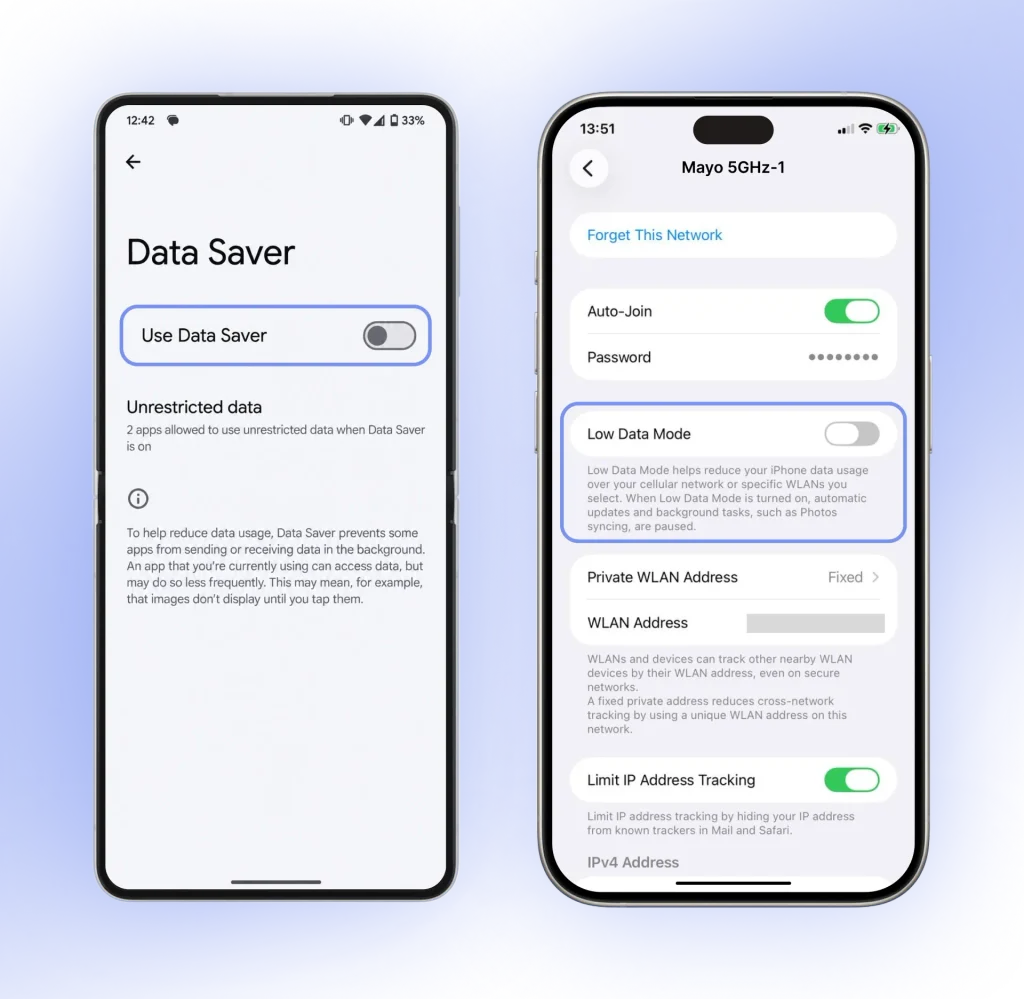
Turn on obfuscation, switch to TCP, and test a hotspot from a different carrier to confirm. Also switch off Data Saver, which can starve the VPN app in the background.
When Wi-Fi Fails
A VPN not working on Wi-Fi in Kuwait usually comes down to the router or whoever runs the network. Restart the router and apply the DNS fix above at the router level, ideally with a resolver that supports DNS over HTTPS. Turn off IPv6 if your VPN stumbles on it.
Guest, hotel, and workplace networks often block VPN ports outright, which explains many cases of VPN not connecting in Kuwait on public Wi-Fi. Switching to mobile data is the quickest test.
Fix VPN Not Working on Any Device
Phones add their own settings on top of network issues, and each platform has its usual suspects.
iPhone Fixes
VPN not working on iPhone in Kuwait often traces back to a stale configuration or a conflicting feature.
- Toggle Airplane Mode on and off to reset the connection.
- Delete old VPN profiles under Settings > General > VPN & Device Management, then reconnect so the app reinstalls its configuration.
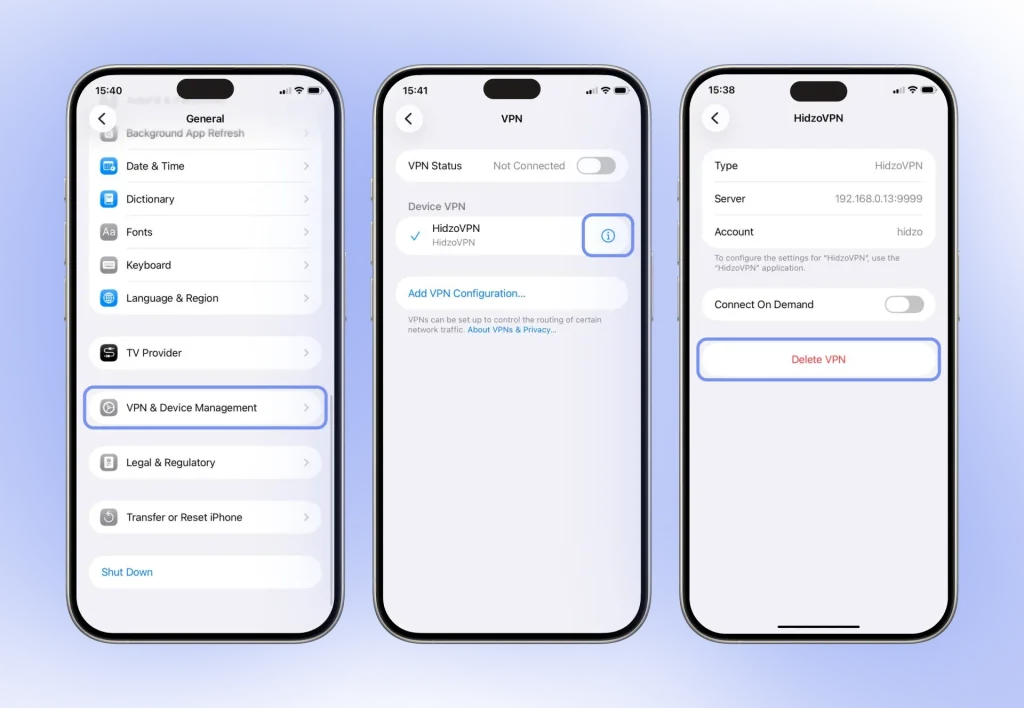
- Turn off Low Data Mode for your current network while testing.
- Switch off iCloud Private Relay, which can clash with a VPN.
- Make sure only one VPN app is active.
Android Fixes
VPN not working on Android in Kuwait is frequently a battery or DNS setting. Menus vary by brand, but these are the usual fixes.
- Set the VPN app’s battery usage to Unrestricted so Android stops closing it in the background.
- Set Private DNS to Automatic or Off while you test.
- Remove old VPN profiles, then reconnect.
- Confirm that Always-on VPN and “Block connections without VPN” point to the app you are using.
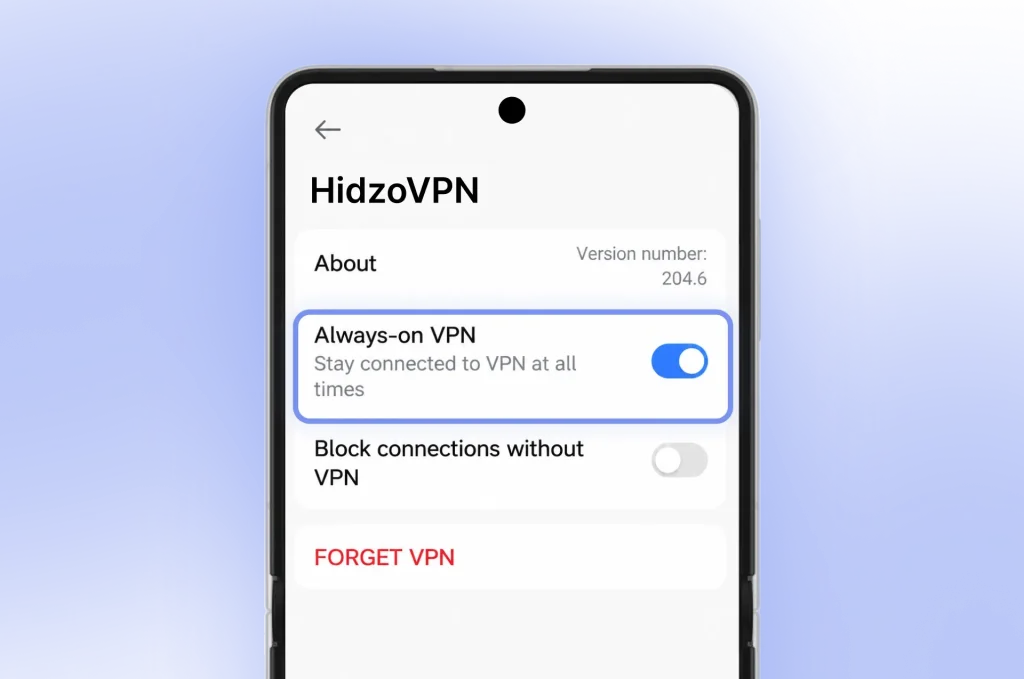
- Turn off Data Saver for the VPN app.
Windows and macOS Fixes
On Windows or macOS, connection failures usually come down to a firewall or antivirus blocking the VPN’s virtual network adapter. Temporarily pause third-party security software while testing, flush your DNS cache, and run the VPN app as an administrator.
Read more:
Troubleshooting VPN Not Working on Windows 11
Connected but No Internet, Disconnecting, or Slow
Three complaints come up again and again, and each has a quick fix plus a deeper guide if you need one.
Connected but No Internet
VPN connected but no internet in Kuwait is usually a DNS or routing problem. Switch servers, change your DNS, turn off IPv6, and reconnect. If the page still will not load, this walkthrough on a VPN connected but no internet error covers more causes.
Also check if your VPN’s Kill Switch triggered after a brief drop. When active, it blocks all internet traffic until you reconnect or turn the feature off.
Keeps Disconnecting
VPN keeps disconnecting in Kuwait most often because of battery optimization, a weak mobile signal, or filtering that resets long connections. Exempt the app from battery limits, turn on auto-reconnect, and try a different protocol. For more fixes across every device, read why your VPN keeps disconnecting.
Slow After Connecting
A distant or crowded server causes most slowdowns. Pick the nearest quiet server and try a lighter protocol before blaming the network. If speeds stay poor, find out why your VPN is slow and what else to adjust.
When It’s Time to Switch Providers
If you have tried everything and one VPN still fails, that provider may not be built for restrictive networks. Before you switch, compare options on these points:
- Obfuscation or non-standard protocol support
- A working kill switch and a strict no-logs policy
- Servers in several nearby countries
- Support that replies with specific troubleshooting steps
HidzoVPN, for example, is powered by Xray protocols built to survive restrictive networks, so it keeps connecting where standard VPN traffic struggles. You can test the HidzoVPN VPN app on the same network where your current one fails and compare.
While you troubleshoot, you may still need a page that will not load. There are ways to access blocked websites without a VPN for those moments, though they offer far less privacy. If you contact any provider’s support, include your carrier, phone model, protocol, and server, because vague tickets get vague answers.
Quick Checklist
Run through this list in order before you give up on a server or a provider:
- Confirm the internet works with the VPN off.
- Update and restart the app.
- Switch servers, then protocols.
- Turn on obfuscation and try TCP on port 443.
- Change DNS and turn off IPv6 if needed.
- Test another network, such as a hotspot from a different carrier.
- Check battery and Data Saver settings on your phone.
- Contact support with your carrier, device, protocol, and server details.
FAQs
There is no widely reported law banning VPN software in Kuwait. Carriers do filter some content, and a VPN does not make restricted activity legal, so follow local rules.
Mobile carriers may filter or throttle VPN traffic differently from your home router. Try obfuscation, switch to TCP, or test a hotspot from another carrier to confirm.
This is usually a DNS or routing issue. Change your DNS, switch servers, turn off IPv6, and reconnect.
No. A server in a nearby country often works just as well and can connect more reliably.
Not necessarily. Test the call with the VPN off. If it fails there too, the VPN is not the cause.
Yes. Updates often include fixes for new network filtering, so install the latest version before deeper troubleshooting.
No single protocol always wins. Obfuscated or Xray-based protocols and TCP on port 443 tend to fare best, while plain WireGuard is easiest to spot.
Article by
-
 Sam Clarke
Sam is a cybersecurity and online privacy writer dedicated to making complex network protection accessible, practical, and engaging.





Share your thoughts
Add a comment