Why Is My VPN Slow? Quick Fixes for Lag, Buffering, and Drops
You are mid-presentation on a critical Zoom call, or about to clutch a high-stakes online match, and you face a connection error. We have all…

Protect your online privacy and security
Fast, private, and easy to use, get Hidzo on your device and browse freely with one tap.
Get HidzoVPNTable of Contents
You are mid-presentation on a critical Zoom call, or about to clutch a high-stakes online match, and you face a connection error. We have all been there, angrily staring at a loading icon while watching a slow vpn connection drain our productivity and patience.
The short answer? A slow vpn usually stems from heavy encryption overhead, overloaded servers, or poor routing choices by your provider. While a slight drop in speed is expected, a crawling connection is not something you have to suffer through. Read on to uncover the root causes and reclaim your fast internet today.
4 Main Reasons Why Your VPN Is Slow
Understanding why your connection drags starts with looking under the hood. When your Internet traffic travels through a secure tunnel, several factors can turn your high-speed fiber into a crawling dial-up connection.
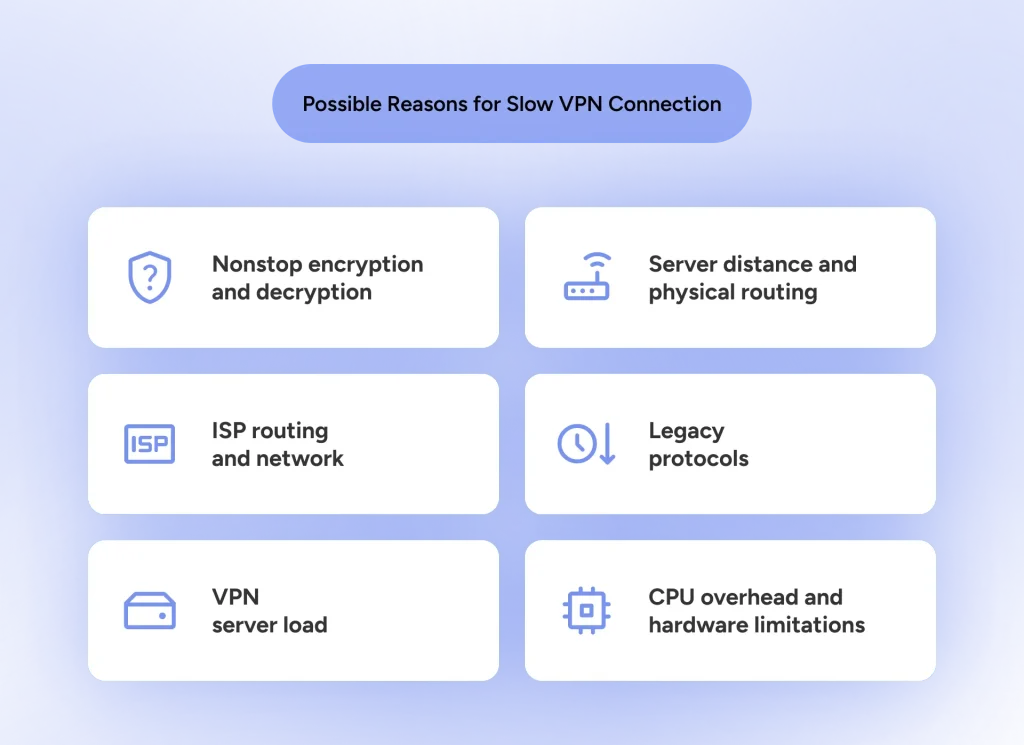
1. Encryption and CPU Overhead
Every piece of data leaving your phone or laptop gets wrapped in complex security layers. This extra math takes time. It is the main reason why vpn encryption slows internet traffic, particularly on older devices where the processor struggles to keep up with heavy data scrambling.
2. Server Distance and Physical Routing
Data cannot travel faster than the speed of light through fiber optic cables. If you choose a distant vpn server location halfway around the world, your data packets must travel thousands of extra miles. These physical hops introduce severe vpn latency issues and delay every click.
3. ISP Throttling and Bad Peering
Sometimes your Internet Service Provider causes the bottleneck. When ISPs detect high volumes of encrypted traffic, they may intentionally deprioritize it. Bad network peering agreements between your ISP and the VPN data center can also create major vpn bandwidth problems.
4. Legacy Protocol Clutter
Not all security protocols handle data efficiently. Legacy protocols like OpenVPN carry bulky packet headers and outdated code bases. Processing this extra weight stalls your traffic and drains your speeds before your data even leaves your home network.
Identifying Your Specific Pain Point
A sluggish connection shows up in different ways depending on what you are doing online. Pinpointing the exact bottleneck helps you fix the issue without wasting time on settings that do not matter.
Everyday Browsing and Daily Tasks
Slow routing delays DNS lookups, causing annoying pauses before a site even begins to load. You might also hit endless security CAPTCHAs or timed-out banking sessions because your lagged connection looks suspicious to servers.
Work, Calls, and File Transfers
Video apps rely on smooth data flow, where even minor packet drops turn your voice into a robotic mess. Meanwhile, hidden outbound limits make it frustratingly hard to increase vpn upload speed when sending heavy project files.
Streaming and Gaming
When you sit down to relax, vpn buffering problems will instantly drop your high-definition movie to pixelated mud while the loading wheel spins. Gamers suffer an even worse fate when a vpn ping high spike strikes, causing severe lag and rubber-banding that ruins fast-paced multiplayer matches.
Systematic VPN Troubleshooting: Step-by-Step
Before changing every setting in sight, taking a methodical approach will save you time. Here is a clear guide on how to make vpn faster without losing your mind.
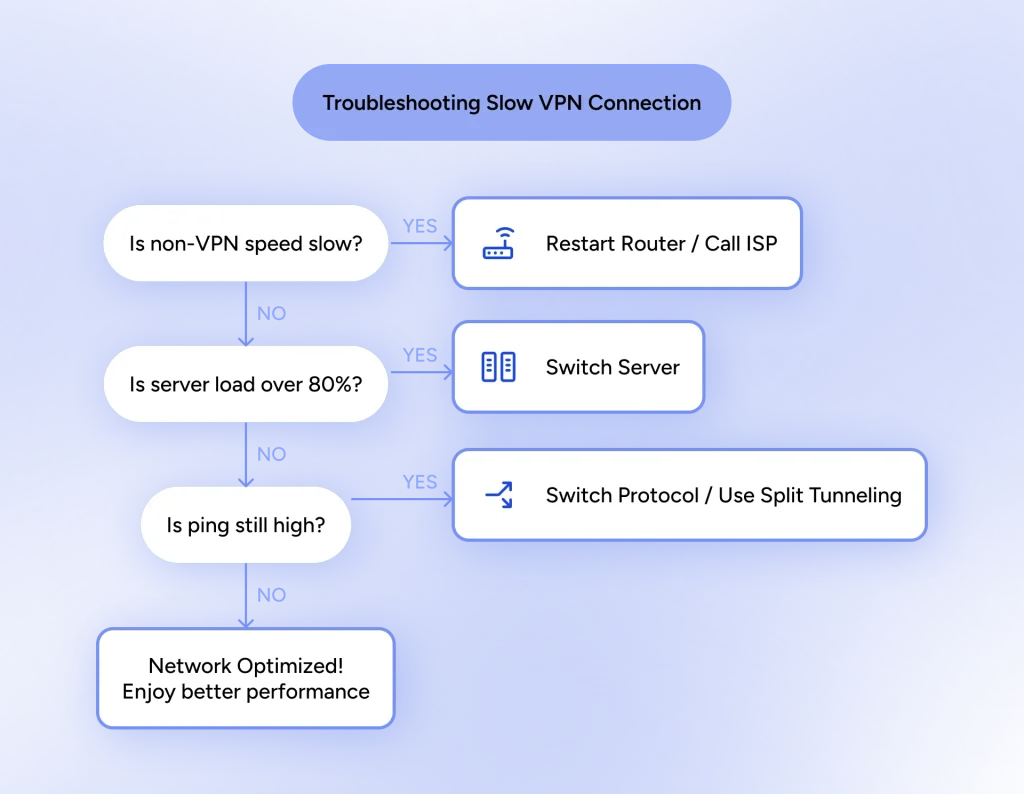
Step 1: Run a Baseline Diagnostics Test
Disconnect your secure tunnel and run a speed test using free tools like Speedtest.net or Fast.com. Write down your raw download speed, upload speed, and ping time.
Next, turn on your connection and run the test again on the same server. Comparing these two results tells you if the problem lies with your base connection or your security app.
Step 2: Rethink Your Server Strategy
Choosing the closest geographical location seems obvious, but physical proximity is only half the battle. A nearby server operating at 95 percent capacity will feel much slower than a slightly distant one at 20 percent capacity.
Always check the server load metrics inside your client before connecting. Swapping to an under-utilized node often delivers instant performance gains.
Step 3: Tackle Hardware and Local Bottlenecks
Sometimes the issue lives right inside your home office setup. Weak Wi-Fi signals, outdated router firmware, or aggressive local firewall rules frequently strangle your connection.
- Switch to Ethernet: Plug directly into your router with an Ethernet cable to eliminate Wi-Fi signal drops.
- Restart Network Gear: Power-cycle your router to clear out clogged memory caches and refresh your IP lease.
- Enable VPN Split Tunneling: Route heavy apps like games directly, keeping only sensitive traffic behind the encryption layer.
Advanced Protocol Optimization: How to Fix a Slow VPN?
Changing your connection protocol is often the single most effective way to recover lost speed. The protocol controls how your device packages and encrypts data, making it a critical factor in overall performance.
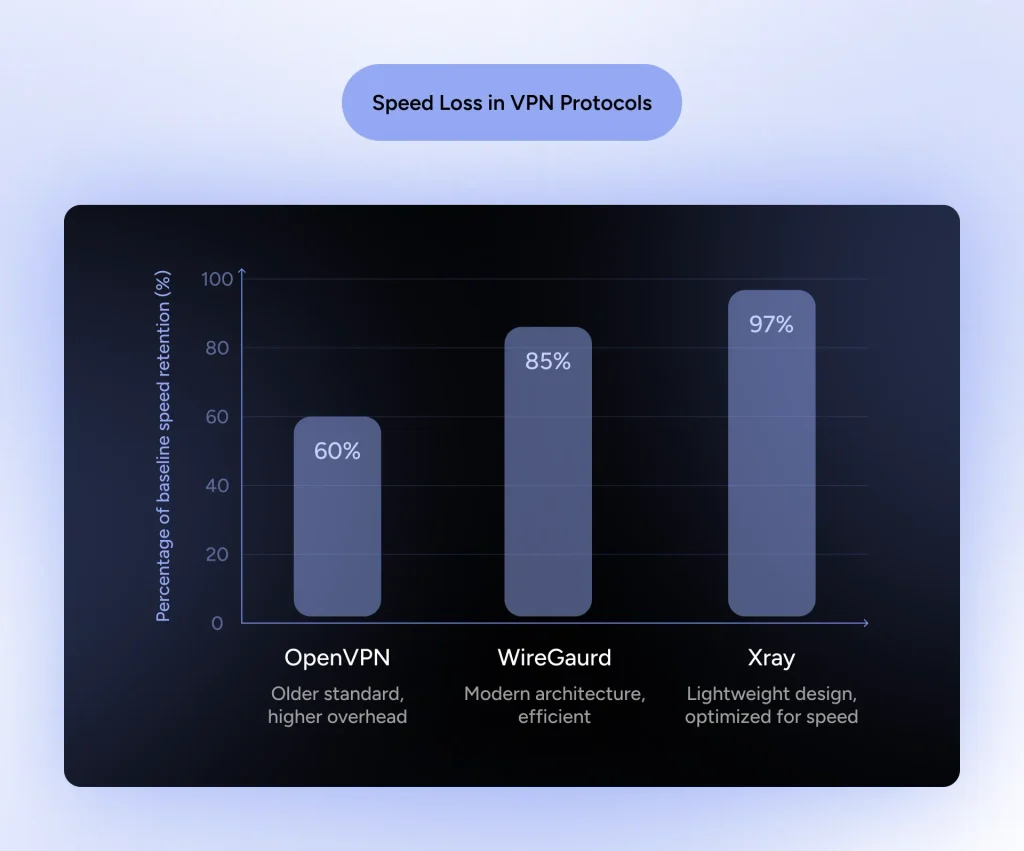
The Protocol Bottleneck
Older protocols like OpenVPN were designed decades ago when online privacy threats looked very different. While incredibly secure, OpenVPN carries heavy processing demands that slow down your traffic, especially on mobile devices or modest laptops.
Faster protocols like IKEv2 or standard WireGuard offer much better vpn protocol speed by using leaner code bases. They encrypt data with far fewer CPU cycles, which instantly reduces latency and speeds up throughput.
Moving Beyond Legacy Protocols
Even modern options like WireGuard can stumble when ISPs actively inspect and throttle encrypted traffic patterns. When traditional protocols hit a wall, you end up stuck with persistent vpn performance issues regardless of how fast your home internet is.
| Protocol | Speed & Overhead | Latency Impact | ISP Throttling Resistance | Primary Use Case |
|---|---|---|---|---|
| OpenVPN | Heavy overhead; noticeably slows down throughput | High latency; high CPU usage | Low; easily identified by network filters | Legacy setups requiring maximum protocol compatibility |
| IKEv2 | Moderate overhead; fast reconnection rates | Moderate latency; efficient on mobile networks | Low; easily flagged by DPI firewalls | Mobile devices frequently switching between Wi-Fi and cellular |
| WireGuard | Low overhead; fast connection speed | Low latency; lightweight codebase | Moderate; modern signatures can still be throttled | General streaming and everyday web browsing |
| Xray (HidzoVPN) | Ultra-lightweight; preserves baseline speed | Very low latency; minimal packet processing | High; disguises encrypted traffic as normal web browsing | Low-ping gaming, 4K video streaming, and stable work calls |
If you want maximum performance without technical hassles, switching to a lightweight VPN app like HidzoVPN is the logical next step. Built around the advanced Xray protocol, it strips away unnecessary network overhead while disguising encrypted packets as regular web traffic.
This smart design prevents ISP throttling, preserves your raw ISP speeds, and delivers a butter-smooth experience for streaming, gaming, and work calls.
Best VPN Settings for Speed and Performance
Adjusting a few key settings inside your provider app can yield immediate speed boosts. Fine-tuning these options gives you the best vpn settings for speed while maintaining strong security.
Practical Optimization Tips
Here are quick vpn optimization tips to clear out remaining network bottlenecks:
- Switch from TCP to UDP: UDP transfers data much faster because it does not wait for packet receipt confirmations. It is ideal for streaming and real-time gaming where speed matters most.
- Tweak MTU Size: Setting your Maximum Transmission Unit slightly lower stops packet fragmentation, which helps reduce vpn lag on unstable Wi-Fi connections.
- Disable Multi-Hop: Double encryption routes your data through two separate locations. Turning this off cuts network travel time in half unless you truly require extreme privacy.
- Use Fast Custom DNS: Provider DNS servers occasionally run slow. Switching to high-speed public DNS options like Cloudflare (1.1.1.1) or Google (8.8.8.8) trims load times.
Summary Checklist to Fix Slow VPN Speeds
- Measure Baseline Speed: Disconnect your tool and run a quick test to ensure your base internet connection is not the actual problem.
- Select Better Servers: Pick a server location closer to you that displays low user load percentages.
- Modernize Protocols: Switch away from legacy protocols to lighter options like Xray or WireGuard to reduce processing overhead.
- Eliminate Local Bottlenecks: Use an Ethernet cable instead of Wi-Fi and adjust your firewall rules to permit smooth traffic flow.
- Optimize Settings: Enable split tunneling for non-sensitive traffic and adjust MTU settings if packet loss persists.
A sluggish security client should never compromise your productivity or gaming sessions. By methodically identifying bottlenecks and adjusting your configuration, you can enjoy complete privacy without sacrificing speed.
FAQs
If your security client takes forever to establish a connection, the server might be overloaded or blocking handshake attempts. Outdated app versions or conflicting local firewall software can also delay initial connection setup.
Yes, any security tool impacts performance to some degree because of data encryption overhead. However, older mobile devices or low-powered routers experience a bigger speed drop because their hardware struggles with processing heavy encryption.
Wi-Fi introduces signal interference, packet loss, and physical obstacles like walls. Adding security overhead to an already unstable wireless connection drops overall throughput significantly compared to a direct wired line.
Frequent drops usually point to unstable network switching or aggressive firewalls interfering with your connection tunnel. Try switching from UDP to TCP protocol in your settings to create a more stable, albeit slightly slower, link.
To boost download rates, connect to an under-utilized server, close background apps, and switch to a lightweight protocol like Xray or WireGuard. Using split tunneling to bypass non-essential traffic also frees up bandwidth.
Running a test while background applications actively consume data skews your numbers. Additionally, certain testing servers struggle to route encrypted packets accurately, yielding artificially low results.
In most cases, yes. Legacy protocols add unnecessary packet weight, whereas modern protocols streamline data delivery. Updating your protocol often delivers an instant speed boost without requiring an upgrade to your home internet plan.
Article by
-
 Sam Clarke
Sam is a cybersecurity and online privacy writer dedicated to making complex network protection accessible, practical, and engaging.





Share your thoughts
Add a comment