VPN vs. Antivirus: Do I Really Need Both?
If you have ever asked yourself, “Do I need antivirus if I have a VPN?”, the answer is yes. A VPN protects your connection, and…

Protect your online privacy and security
Fast, private, and easy to use, get Hidzo on your device and browse freely with one tap.
Get HidzoVPN If you have ever asked yourself, “Do I need antivirus if I have a VPN?”, the answer is yes. A VPN protects your connection, and antivirus protects the device on the other end of it. Neither can do the other’s job, though how much each one matters depends on how and where you go online.
A VPN primarily focuses on protecting your online privacy and data as it travels between your device and a VPN server. Antivirus software focuses on protecting your device from malicious software, including viruses, spyware, ransomware, and other threats that can compromise your system.
Of course, there’s some overlap. Many VPNs now offer extra security features, and some antivirus programs even come with a VPN built in. So where does one tool’s job end and the other’s begin? This guide breaks down what each one can and can’t do, and whether you really need both on your cybersecurity team.
Table of Contents
VPN vs. Antivirus: What’s the Difference?
The difference between a VPN and antivirus software comes down to what each one guards. A VPN protects your connection, while antivirus protects your device. They share the goal of better online security but use very different technology to get there, so let’s look at how each one works.
What Is a VPN and How Does It Work?
A Virtual Private Network (VPN) creates an encrypted connection between your device and a VPN server. Encryption scrambles your information into a code that unauthorized parties can’t easily read. If you want the basics, our guide on what a VPN is covers them.
When you connect, your internet traffic travels through this encrypted tunnel to the VPN server, which forwards it toward its destination. Websites generally see the VPN server’s public IP address instead of your regular one.
You might wonder why a VPN still matters when most sites use HTTPS. HTTPS protects what passes between your browser and a website. A VPN covers all your apps and swaps your real IP address for the server’s. The trade-off is that you trust the VPN provider with that traffic instead.
What Does a VPN Protect You From?
A VPN is built to close privacy and network gaps, so these are the threats it handles.
- Snooping on public or untrusted Wi-Fi. Cafe, airport, and hotel networks give strangers a chance to watch traffic passing through. The encrypted tunnel turns anything they intercept into unreadable noise.
- Your internet provider and network owner watching your browsing. Without a VPN, your internet provider, your employer, or whoever runs the network can see which sites you visit. With one, they see a connection to the VPN server and little else.
- An exposed IP address. Websites, advertisers, and trackers see your real IP address, which hints at your approximate location. A VPN swaps it for the server’s.
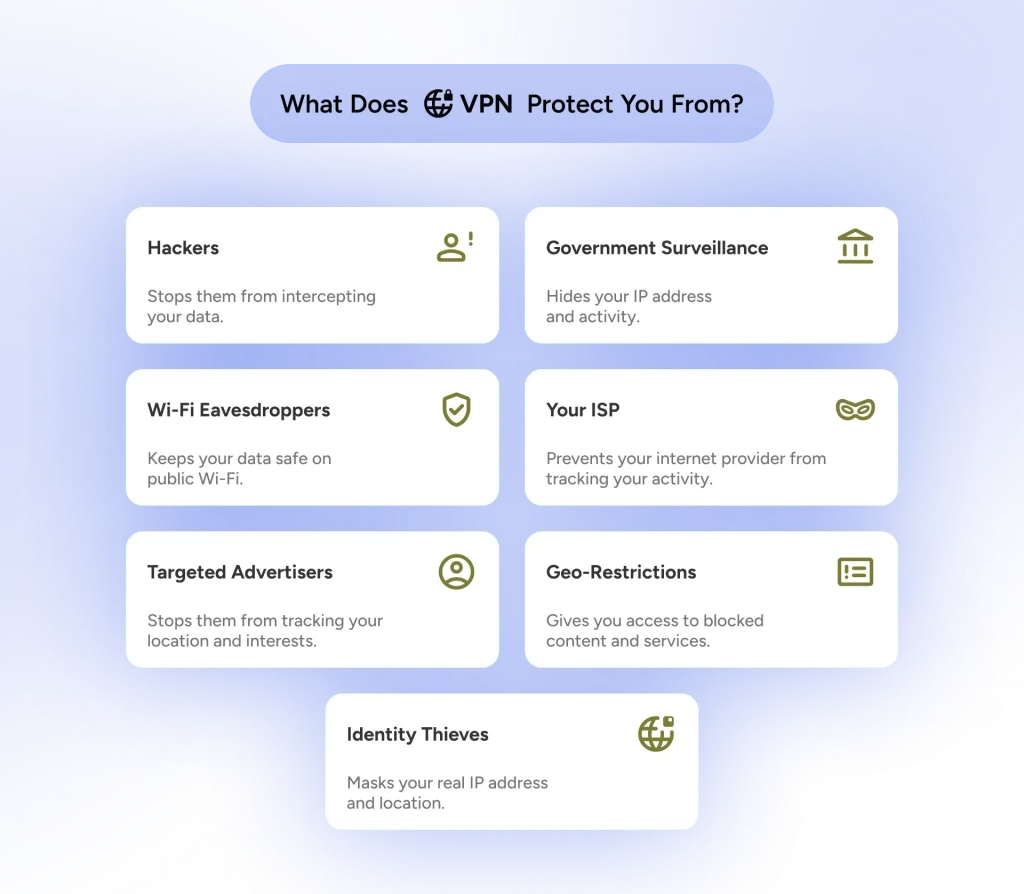
What a VPN doesn’t stop matters just as much. It won’t catch malware, and it can’t help if you type your password into a fake page. Sites can also still recognize you through logins and cookies, so a VPN is one piece of preventing tracking rather than the whole answer.
What Is Antivirus Software and How Does It Work?
Antivirus software detects, blocks, and removes malicious software that could harm your device or compromise your personal information. Despite the name, it covers far more than traditional computer viruses.
Antivirus programs scan files, check for known threats, and monitor suspicious activity on your device. Many offer real-time protection, which means they continuously watch for threats and can block or quarantine suspicious files before they cause damage.
What Does Antivirus Protect You From?
Antivirus is built to stop malicious software and the tricks that deliver it. Here is what it typically covers.
- Viruses and trojans. Viruses attach themselves to files and spread, while trojans pose as legitimate software to sneak in.
- Spyware and keyloggers. These quietly record your activity or keystrokes to steal passwords and card details.
- Ransomware. It locks your files and demands payment, and real-time protection can block it before the damage starts.
- Adware and unwanted programs. They tag along with free software, flood you with pop-ups, and slow your device down.
- Malicious downloads and email attachments. Antivirus scans them before they get a chance to run.
- Phishing and dangerous websites. Many security suites warn you about known bad pages or block them.
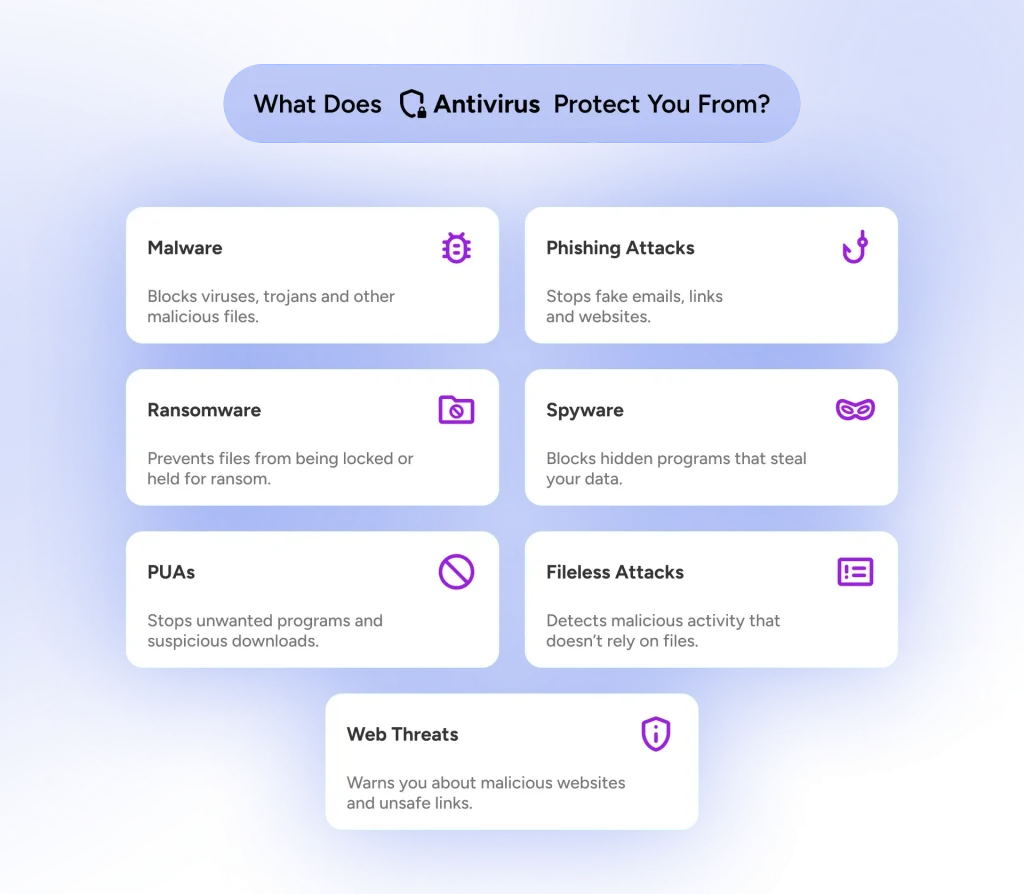
Antivirus has limits too. It doesn’t stop someone on the same Wi-Fi from watching your traffic; it doesn’t hide your IP address, and it can’t undo a password you hand to a scammer.
VPN vs. Antivirus: Side-by-Side Comparison
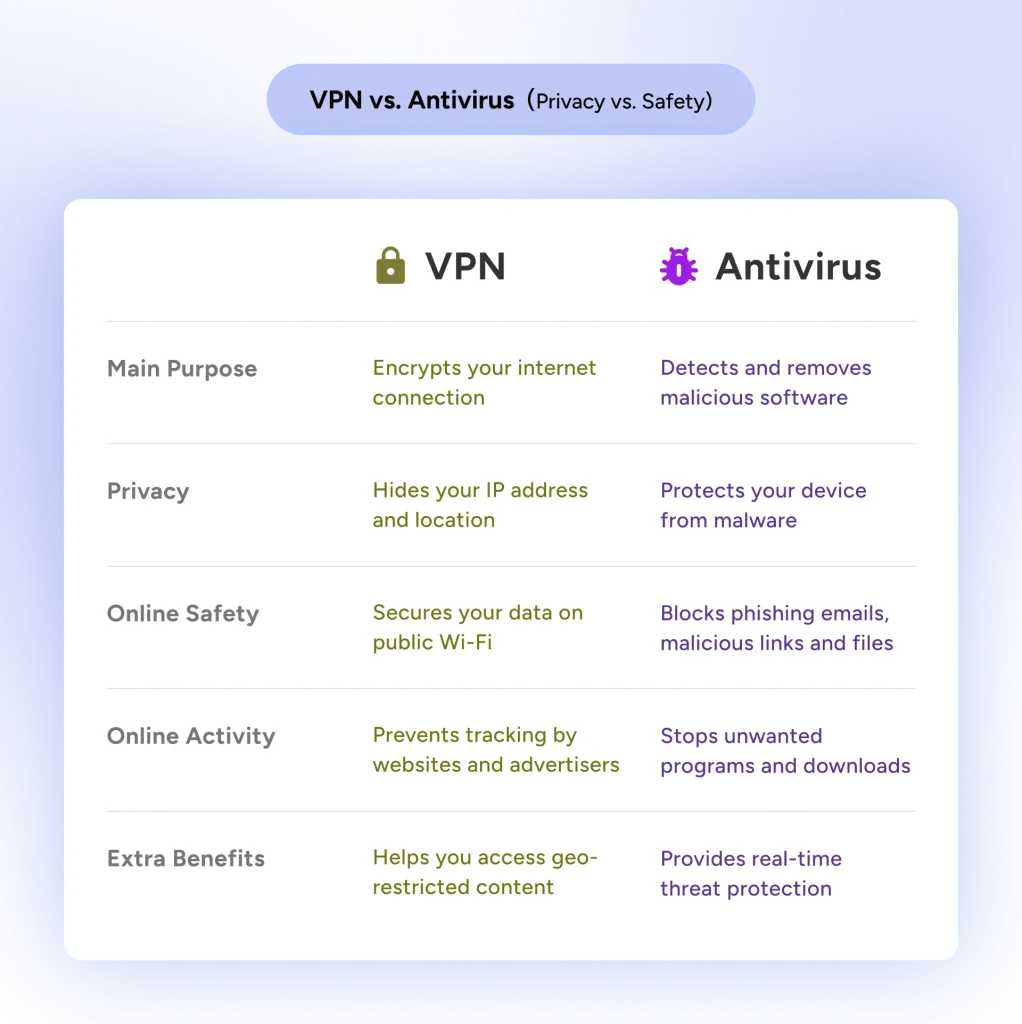
Now that we’ve covered how each tool works and what it protects against, let’s put their capabilities side by side. Some features overlap, but this table shows what each one is primarily designed to do.
| Feature | VPN | Antivirus |
|---|---|---|
| Encrypts internet traffic | Yes, between your device and the VPN server | Not typically, unless a VPN is included |
| Masks your public IP address | Yes | No |
| Hides browsing activity from your ISP and local network | Yes, though the VPN provider can see it instead | No |
| Scans files, downloads, and apps for malware | No | Yes |
| Monitors for and removes malware, including ransomware | No | Yes |
| Helps protect privacy on public Wi-Fi | Yes | Not directly |
| Blocks phishing and malicious websites | Some VPN providers do | Yes |
| Helps prevent data theft | Protects data in transit from snoopers on the network | Blocks info-stealing malware and ransomware on the device |
Note: Some VPNs include additional malware protection, while certain antivirus packages offer VPN features. Always check what’s included, as protection varies by provider.
Do I Need Antivirus If I Use a VPN?
Yes, you still need protection against viruses and malware when you use a VPN. A VPN and antivirus software address different threats, and having one doesn’t remove the need for the other.
A VPN can encrypt your connection, but it doesn’t automatically inspect everything you download or install. Imagine a package riding in a locked delivery truck for part of its journey. It has some protection along the way, but nobody is checking what’s inside the box. You could be receiving a brand-new laptop or a nasty surprise. In the same way, a VPN protects your data between your device and the VPN server, but it generally won’t spot malware hiding in a downloaded file.
That’s where antivirus comes in. It can scan downloaded files, identify suspicious code or behavior, and block or quarantine threats before they do damage. No antivirus catches everything, but that extra layer can make a big difference when something malicious slips onto your device.
Does a VPN Protect Against Viruses?
A VPN alone doesn’t detect or remove viruses from your device. Some providers do add security features that reduce your exposure to malicious websites and suspicious downloads, such as blocking sites known to distribute malware or refusing connections to suspicious domains.
However, blocking a dangerous website isn’t the same as detecting malware already on your computer or phone. These VPN features generally don’t offer the comprehensive file scanning, real-time threat monitoring, or malware removal that dedicated antivirus does.
Expecting a VPN to clean up malware is like expecting a raincoat to fix a leaky roof. It keeps you dry out there, but the problem is already inside. A VPN’s extra features are a welcome layer, yet they aren’t a substitute for antivirus, and leaning on one tool to do everything can leave gaps.
Can a VPN App Itself Carry Malware?
The risk also runs the other way. Scammers love to disguise malware as VPN apps, especially free ones, because people hunting for a quick privacy fix tend to install first and read later. Google warned in its advisory that fake VPN apps and extensions can deliver info-stealers, remote access trojans, and banking trojans.
Install your VPN only from the official App Store, Google Play, or the provider’s own site. Be wary of apps that cover their costs with ads or data, which is how many free VPNs make money. Our guide on whether VPNs are safe explains what to look for. A good antivirus is a handy backstop whenever you download something from outside those sources.
VPN vs. Antivirus: Real-World Protection Scenarios
A VPN and antivirus may sit on the same cybersecurity team, but they don’t play the same position. Here’s how each one handles some common online threats.
Using Public Wi-Fi
You’re enjoying a latte at your favorite coffee shop and catching up on email over public Wi-Fi. A VPN encrypts your traffic, while antivirus flags malicious files or suspicious activity on your device. So the VPN guards the connection and antivirus guards the device.
On a related note:
Do you really need a VPN on Public Wi-Fi?
Downloading Files or Software
You’ve found a free program that promises to make your life easier. That download might arrive with some extra baggage, and it won’t be a complimentary upgrade.
A VPN encrypts the download but can’t tell you whether the software hides malware, while antivirus scans the file and quarantines it before it causes damage.
Visiting a Phishing Website
An email that looks like it’s from your bank lands in your inbox. You click the link, and the site looks convincing enough that you consider entering your login details.
Phishing filters in your VPN or antivirus may flag the page, but neither can save you if you voluntarily type your credentials into a convincing fake.
Dealing With Malware Already on Your Device
Your computer starts acting strangely. Unfamiliar programs appear, performance drops, and something seems to be running in the background.
A VPN won’t typically identify or remove malware that’s already installed. Antivirus can scan the device, detect known threats, and attempt to quarantine or remove them, so it is the tool built for threats that have already made it inside.
Where VPN and Antivirus Features Overlap
VPNs and antivirus software have different primary jobs, but they do cross paths. As cybersecurity tools have evolved, some providers have added features once tied to the other category. Both may offer phishing protection and tools that block suspicious domains. Also, some antivirus packages include a VPN, and certain VPN services add malware protection.
These protections aren’t limited to those two tools. Browsers offer them too, including Chrome with Safe Browsing, Edge with SmartScreen, and Firefox, all of which can warn you about deceptive sites and block some dangerous downloads.
Sharing a few features doesn’t make the tools interchangeable, though. A VPN that blocks malicious sites isn’t built to scan and remove malware, and an antivirus program without a VPN won’t give you an encrypted connection or IP masking.
Do You Need to Buy Both VPN and Antivirus Software?
Not necessarily. Using a VPN alongside antivirus improves your overall security, but that doesn’t mean you need two paid subscriptions.
Many devices already ship with solid protection. Windows includes Microsoft Defender Antivirus through Windows Security, which offers real-time protection against malware. Macs include built-in defenses such as XProtect, which helps detect and remove known malware. Independent labs such as AV-TEST and AV-Comparatives publish current results, so you can see how built-in and third-party options compare before you spend anything.
Free antivirus programs are another option, though protection varies and some lean on upsells or data collection. Paid antivirus suites sometimes bundle a VPN, which can be convenient, but those bundled VPNs are often limited in servers or data, so check the details. The goal isn’t to collect as many security subscriptions as possible. It’s to get the protection you need without paying twice for features you already have.
Want antivirus and VPN in one place?
Best Antivirus Software with VPN
Which One Should You Start With?
If you’re deciding where to begin, this is a fair rule of thumb.
| Your situation | Start with |
|---|---|
| You download a lot of free software or share a computer | Antivirus first, with built-in Defender or XProtect plus careful habits |
| You work from cafes, airports, or hotels | A VPN for the connection and antivirus for the laptop |
| You mostly browse on your phone at home | Updates and official app stores, with a VPN as an optional extra |
| You want your browsing kept away from your ISP | A VPN |
Do You Need Antivirus With a VPN on Your Phone?
Phones play by slightly different rules. iPhones run each app in a tight sandbox, so one app can’t scan or tamper with another, which is why traditional antivirus apps do little on iOS. Android is more open, and Google Play Protect scans apps for harmful behavior by default. On both, the bigger risks are phishing texts, apps from outside the official stores, and unsecured public Wi-Fi.
So do you need antivirus with a VPN on mobile? Play Protect covers most people who stick to Google Play, and a trusted antivirus app is a reasonable extra if you install apps from elsewhere. A VPN app earns its keep on public Wi-Fi and whenever you want your browsing kept from the network owner. Whatever you do, keep your operating system and apps updated, because updates close more holes than any single tool.
Can a VPN and Antivirus Work Together?
Yes, and most people run them side by side without noticing. The VPN encrypts your connection while antivirus watches files and activity on the device, so they rarely collide.
Occasionally, an antivirus firewall or web shield flags the VPN as suspicious and blocks it. If your VPN suddenly won’t connect, check the antivirus settings first. Once you’ve confirmed the VPN app is legitimate and came from an official source, add it to the allowed apps list instead of switching your protection off.
Final Thoughts: Data vs. Device, Why Choose?
The wise Forrest Gump once said some things go together like peas and carrots. VPNs and antivirus make a pretty good pair, too. They have different jobs, but together they keep your online security layered.
When you choose antivirus, don’t let flashy features do all the talking. Look for reliable malware detection, regular updates, and independent testing results.
Add a few habits to the pair as well. Automatic updates, a password manager, and two-factor authentication stop a surprising number of attacks that neither tool can see. If the connection side of the pair is still missing, a VPN download from HidzoVPN adds it while your antivirus keeps handling the device.
It’s not about choosing sides; protect the data, protect the device, and then go enjoy the internet.
FAQs
Neither is universally better because they address different threats. A VPN protects connection privacy, while antivirus detects and helps remove malware. The better choice depends on what you’re trying to protect, and the two complement each other.
Not directly. A VPN can’t detect or remove a virus already on your device, although some VPNs block websites known to spread malware, which may prevent certain infections. Removal is a job for antivirus software.
A VPN can still encrypt traffic between your device and its VPN server, but malware already on your device may reach sensitive information before it’s encrypted. That’s why a VPN can’t guarantee your data is safe on an infected device.
Yes. They guard different things and run side by side on most devices. The rare connection clash usually comes down to a setting you can adjust.
A VPN protects data in transit but does not prevent malware or hacks on endpoints. Use antivirus, updates, and secure configurations in addition to a VPN.
Absolutely. Neither tool can make every online decision for you. If you hand your password to a scammer or fall for a convincing phishing message, even the best security tools may not prevent the consequences. You can have the best security system on the street, but it won’t help if you hand someone the keys.
Article by
-
 Sam Clarke
Sam is a cybersecurity and online privacy writer dedicated to making complex network protection accessible, practical, and engaging.




Share your thoughts
Add a comment