Do You Really Need a VPN on Public Wi‑Fi?
Public Wi‑Fi is almost everywhere these days. You can find a signal at the park, on the bus, and probably even in that tiny café…

Protect your online privacy and security
Fast, private, and easy to use, get Hidzo on your device and browse freely with one tap.
Get HidzoVPNTable of Contents
Public Wi‑Fi is almost everywhere these days. You can find a signal at the park, on the bus, and probably even in that tiny café whose Wi‑Fi password is “password.” It’s not exactly the kind of security that puts your mind at ease about the safety of the data you send over it.
So, do you need a VPN on public Wi‑Fi? Yes. You need another layer of security, and a solid VPN provides that. It’s like wearing a helmet while riding a bike. You probably won’t fall today, but if you do, you’ll be very glad you had it on!
What a VPN Actually Provides on Public Wi‑Fi
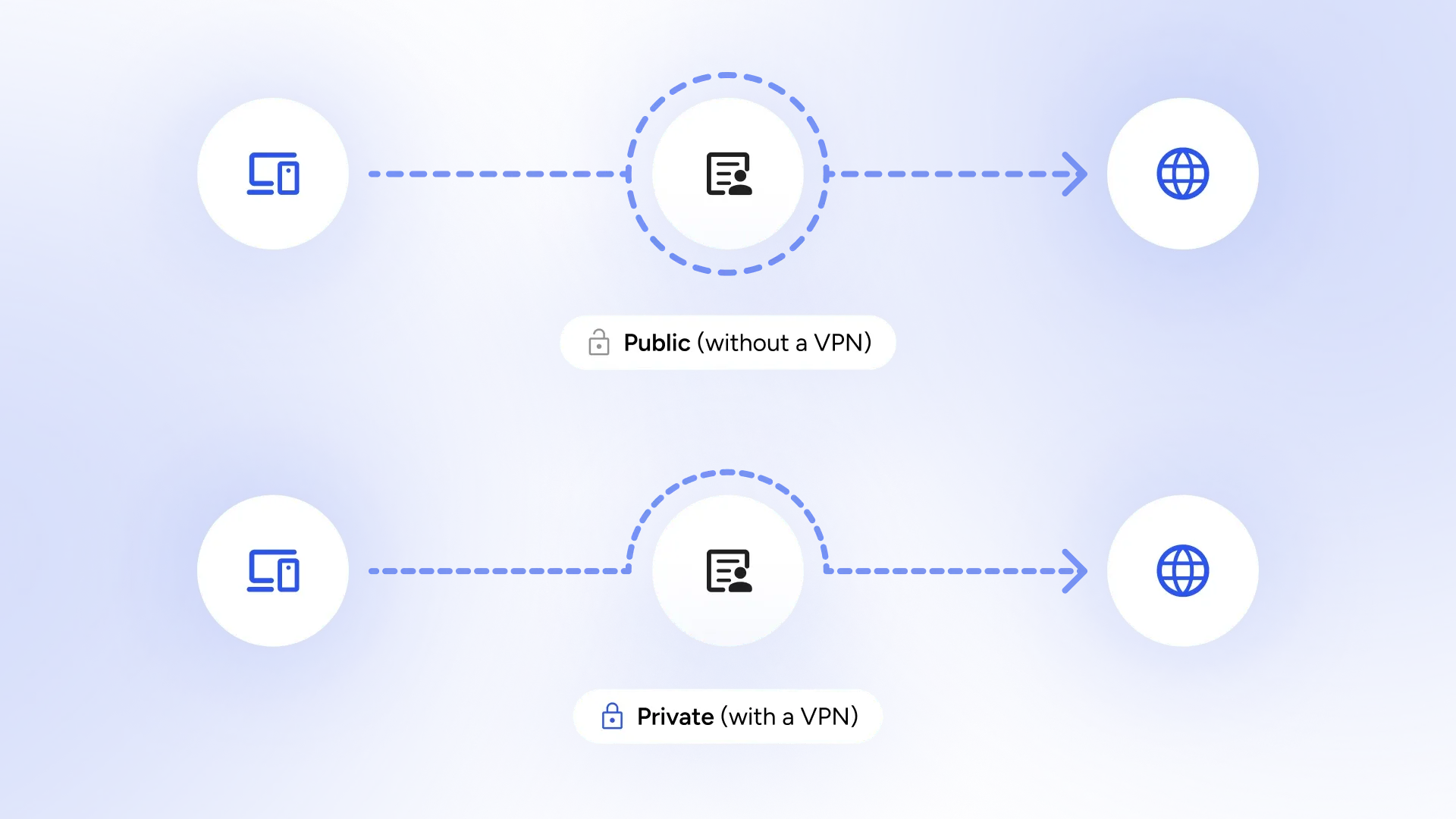
So, what does a VPN (Virtual Private Network) actually do? Imagine you are walking through a crowded, muddy street. A VPN is like a private, clean, underground tunnel built just for you. You get where you’re going, and no one on the street even knows you were there.
Learn more about how a VPN works:
How Does a VPN Protect Privacy? (Without Getting Technical)
Core Benefits of Using a VPN
The main job of a VPN is to create a secure tunnel. Before your data even leaves your phone, the VPN wraps it in a thick layer of encryption. To anyone watching the Wi‑Fi network, your activity looks like total gibberish. It also hides your IP address (your digital home address), making it much harder for websites or hackers to track where you actually are.
Additional Advantages Beyond Basic Security
A VPN also stops the Wi‑Fi provider from “spying” on you. Many free Wi‑Fi spots are only free because they watch what you browse and sell that info to advertisers. (Ever wonder why you see ads for suitcases right after using airport Wi‑Fi? Yeah, that’s why!)
A VPN can also help protect you even on networks with “captive portals,” and it can let you watch your favorite shows from home while you’re traveling. It’s pure peace of mind.
Limitations of VPNs and When They May Not Be Strictly Necessary
Let’s be honest: you don’t always need to be in an armored tunnel. Sometimes a regular sidewalk is fine.
Scenarios Where Risks Are Lower
If you are just checking the soccer scores or looking up a recipe for banana bread, the risk is very low. Also, if you have a great 5G or 6G cellular connection, you’re already much safer than on public Wi‑Fi. Using your phone’s data is like driving your own car instead of taking a mysterious “free” bus.
What a VPN Cannot Protect Against
A VPN is strong, but it can’t stop you from making a mistake! If you click on a link in a weird email that says you won a billion dollars, a VPN can’t save you. It also won’t help if your password is “123456” or “password123.” (Please, change that if it is!) Also, stay away from “Free VPNs” because often, they are the ones doing the spying.
Choosing the Right VPN
Since you are trusting the VPN provider with your data, you want to make sure they are actually the “good guys.” Here’s exactly what to look for:
A “No-Logs” Policy (That has been Audited)
Many VPNs say they don’t keep records of what you do, but the best ones actually prove it. Look for a provider that hires independent experts (like Deloitte or KPMG) to check their systems and confirm they aren’t saving your history. It’s like a restaurant having a health inspector’s “Grade A” in the window; it gives you a lot more confidence in what’s happening in the kitchen!
The Kill Switch
This is a must-have. Think of it as an emergency brake. If the VPN connection accidentally drops for even a split second while you are on public Wi‑Fi, the Kill Switch instantly cuts your internet. This prevents your real IP address or private data from “leaking” out onto the unsecured network.
Security and Encryption
Security is the heart of any VPN app. VPN apps encrypt your data, and that’s how they keep hackers or snoopers out of your business. Look for a provider that supports the most secure protocols, namely OpenVPN, WireGuard, Lightway, and IKEv2/IPSec (often optimal for phones). VPN titans like NordVPN have also developed proprietary protocols with excellent security.
Ease of Use & Support
If the app looks like the cockpit of an airplane, you probably won’t use it. Look for a “one-tap” design. Also, check if they have 24/7 live chat support. If you’re at an airport at 3:00 AM and can’t get connected, you’ll want a friendly person (not just a robot!) to help you out.
HidzoVPN: Your Lightweight Digital Bodyguard
If you’re looking for a way to stay safe without needing a degree in rocket science, HidzoVPN is here to help. While some VPNs are as complicated as a 1,000-piece puzzle, HidzoVPN is designed for the “one-tap” lifestyle. Also, HidzoVPN is nice to your phone battery. It’s incredibly light, meaning it won’t gobble up your battery life or turn your smartphone into a pocket-sized heater.
What makes HidzoVPN stand out in the VPN market is its pricing. HidzoVPN Premium is just $2.99 per month, and it gives you full access to global servers, smart protocols, and unlimited and unrestricted internet access. You can try it for free to see how easy it is to get fast, private internet access.

Understanding Public Wi‑Fi Risks in 2026
Even with all the fancy technology we have today, public Wi‑Fi is still… well, public. It’s like a conversation in a crowded elevator; even if you’re whispering, someone with big ears might be listening.
Common Security Threats on Public Networks
The “bad guys” have some classic tricks that still work. One is the “Evil Twin.” This is when a hacker sets up a network named “Free_Airport_WiFi” right next to the real one. If you join the fake one, the hacker becomes the “Man in the Middle” who sees everything you send.
It’s the digital version of someone putting a “Free Pizza” sign on a cardboard box and waiting for you to walk inside. In busy places like hotels or train stations, these traps are more common than a delayed flight!
Evolving Threats in the Current Landscape
Hackers are also using AI (Artificial Intelligence) to be extra sneaky. They don’t just wait for you to type a password; they use smart programs to watch your “digital behavior” and infer what you’re doing. There is also the “Harvest Now, Decrypt Later” problem, where hackers steal your encrypted data today, hoping that future supercomputers will be fast enough to crack it open in a few years. It’s like a thief stealing a locked safe. They can’t open it yet, but they’re happy to keep it in their garage until they find the key.
How Modern Web Technologies Have Changed the Risk Profile
The good news is that the internet isn’t the “Wild West” anymore. Our browsers and phones have grown some pretty strong muscles to help keep us safe.
The Role of HTTPS and Built-in Encryption
You’ve probably noticed the little padlock icon in your browser address bar. That’s HTTPS, and almost every website uses it. It’s great because it encrypts your data. However, HTTPS is like a locked envelope. It protects the letter inside, but a hacker on the same Wi‑Fi can still see who you are writing to. They might not see your bank password, but they know you’re visiting your bank’s website, which is already more information than a stranger should have!
Other Protective Features in Devices and Browsers
Our phones are now smart enough to give us “Security Alerts” when a network looks fishy, and they update themselves automatically to fix holes in their armor. These help a lot, but they aren’t perfect. Relying only on your browser for security is a bit like locking your front door but leaving all your windows wide open.
Best Practices for Safe Public Wi‑Fi Use in 2026
Security is all about layering. Think of it like dressing for winter: one big coat is good, but a shirt, a sweater, and a coat together are much better.
Combining Tools for Layered Security
- Double-check the name: Ask the barista, “Is the Wi‑Fi really named ‘Coffee_Fun_Time’?”
- Use Multi-Factor Authentication (MFA): This is when your phone asks, “Is this really you?” before you log in. It’s the best backup plan!
- Keep it updated: When your phone asks to update at 2:00 AM, let it. Those updates usually fix new security holes.
Final Words…
Public Wi‑Fi is one of the best conveniences of modern life, but it’s not exactly a “safe zone.” While our devices have become much better at defending themselves, hackers have also spent the last few years going to “Hacker School” to learn new tricks.
For most people, using a high-quality VPN on public Wi‑Fi is just good digital hygiene, like checking both ways before crossing the street. It’s a small step that provides a huge amount of protection. So, the next time you’re at the airport, turn on your VPN, grab a snack, and browse with a smile!
FAQs
No. Public Wi‑Fi remains inherently risky due to potential man-in-the-middle attacks, rogue hotspots, and packet sniffing, even with widespread HTTPS adoption. It may suffice for low-stakes browsing, but it is not recommended for any sensitive activities such as banking.
Without a VPN, hackers on the same network can observe metadata, including visited domain names, connection timestamps, DNS queries, and data volume patterns. On unencrypted (HTTP) traffic or vulnerable apps, they may intercept actual content such as login credentials, form data, emails, or session cookies.
HTTPS offers significant protection by encrypting data between your device and the destination website, shielding passwords and content from direct interception. However, it does not secure the local network connection itself.
Yes. Although iPhones incorporate strong built-in security features and automatic updates, they remain vulnerable to the same public Wi‑Fi threats as other devices, including data interception and fake hotspots.
Article by
-
 Sam Clarke
Sam is a cybersecurity and online privacy writer dedicated to making complex network protection accessible, practical, and engaging.





Share your thoughts
Add a comment