Are VPNs Safe? A Complete Guide to VPN Security
Online privacy is basically a high-stakes game of digital hide-and-seek where the “seekers” have supercomputers. VPNs are still our strong shelters, but the big question…

Protect your online privacy and security
Fast, private, and easy to use, get Hidzo on your device and browse freely with one tap.
Get HidzoVPNTable of Contents
Online privacy is basically a high-stakes game of digital hide-and-seek where the “seekers” have supercomputers. VPNs are still our strong shelters, but the big question is whether that shelter is made of concrete or glass.
We’re diving into VPN safety to see if these tools are still the superheroes of the internet or if they’ve retired to a beach house with your data. The thing is, while a solid provider can still keep you off the radar, it all depends on whether they’re actually trustworthy or just really good at marketing flashy (but empty) promises.
The Great Trust Swap: Trading Your ISP for a VPN
Before we talk about encryption keys and protocols, let’s address the elephant in the server room: using a VPN doesn’t magically delete your internet traffic; it simply reroutes it.
When you browse without a VPN, your Internet Service Provider (ISP) sees every website you visit, every file you download, and every late-night snack recipe you search for. Turning on a VPN wraps that data in a secure, encrypted tunnel so your ISP only sees unreadable gibberish.
The catch? The VPN provider now sits where your ISP used to sit. They can see where your encrypted connection is heading.
In short, using a VPN is a deliberate choice to shift your trust from your ISP, a company legally bound (and often incentivized) to monitor and log your activity, to a third-party VPN service.
You are essentially handing your digital front-door keys from a landlord who watches your coming and going to a private concierge. You had better make sure that concierge isn’t quietly taking photos of your keys and selling them on the side.
Busting the Myths: What a VPN Can and Can’t Protect You From
Marketing departments love to make VPNs sound like impenetrable forcefields that instantly turn you into an untraceable digital ninja. Let’s dial back the hype and set realistic expectations for what a VPN app actually does—and where its powers end.
| The Myth | The Reality |
|---|---|
| “A VPN makes me completely invisible online.” | False. A VPN masks your IP address and encrypts your transit data. However, if you log into Facebook, Google, or your bank account, those services still know who you are. Modern tracking also uses browser fingerprinting (identifying you by screen resolution, installed fonts, and device specs) regardless of your IP. |
| “A VPN makes me 100% immune to viruses and hackers.” | False. Encrypted malware is still malware. If you click a suspicious link in a phishing email and download a shady .exe file, a VPN will gladly encrypt that download all the way to your hard drive. You still need anti-malware tools and good sense. |
| “All VPNs automatically keep zero logs.” | False. “No-logs” is an easy claim to write on a website homepage, but a hard one to maintain in infrastructure. Unless backed by third-party audits and RAM-only servers, “no-logs” claims are often just polite suggestions. |
Potential Risks and Limitations of VPNs
Even superheroes have weaknesses, and VPNs are no different. Assuming a VPN makes you bulletproof is a recipe for trouble. Here are the fine-print risks you need to keep on your radar:
1. Data Logging and Harvesting
The ultimate betrayal in the privacy world is a provider that keeps logs while pinky-swearing they don’t. Some services, especially predatory “free” apps—operate as data-vacuuming operations in disguise. They record your browsing history, IP addresses, and session timestamps, selling that goldmine to advertisers or handing it over to data brokers.
On a related note:
How Do Free VPNs Make Money? The Hidden Price You Pay!
2. Legal Pitfalls and State Bans
The global map of VPN legality is complex. Countries like North Korea, Belarus, Iran, and Iraq enforce total bans, while Russia and China only allow “state-approved” VPNs (which completely defeats the purpose of privacy).
Using an unauthorized VPN in these regions can result in heavy fines or an unwelcome invitation to the local police station. Always verify local regulations before traveling.
3. Loss of Access to Certain Websites
Sometimes, turning on a VPN helps you see less, not more. High-security sites like online banking portals, government platforms, and major streaming services use Deep Packet Inspection (DPI) to detect VPN signatures and block access instantly. You may find yourself constantly toggling your VPN off just to pay a bill or check your account balance.
Tired of toggling? Read our guide:
What Is Split Tunneling VPN? Discover Why It’s Essential for Privacy and Performance
4. Disconnections Leading to Data Leaks
Technology glitches happen. If your Wi-Fi flickers or a VPN server hiccups, your connection might drop for a fraction of a second. Without a reliable, built-in Kill Switch, your device will instantly revert to your “naked” home connection without warning, exposing your real IP address mid-session.
5. User Error
Even nuclear-grade encryption can’t protect you if you use Password123, fall for basic phishing scams, or ignore application warning prompts. Relying on an unverified, sketchy provider discovered in a pop-up ad is asking for a digital headache.
6. Next-Gen Threats: AI & Quantum Computing
Threat actors are upgrading their playbooks. We are seeing AI-driven traffic analysis capable of inferring what you’re doing simply by analyzing the patterns and timing of encrypted data packets. Furthermore, adversaries engage in “harvest now, decrypt later” strategies, stealing encrypted data today to crack it once quantum computing matures.
Safety Breakdown: How Much VPN Security Do YOU Actually Need?
Not everyone needs a digital bunker. Your ideal VPN setup depends entirely on your online lifestyle and threat model.
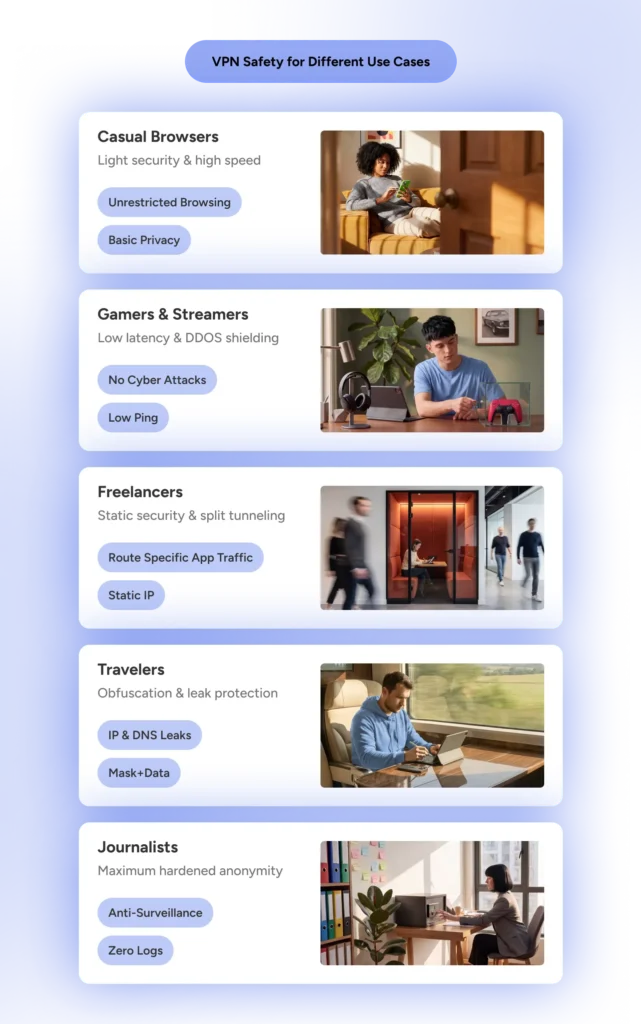
1. The Casual User
- Threat Level: Low.
- Primary Needs: Basic privacy on open Wi-Fi (coffee shops, airports), blocking ads, and dodging basic ISP throttling.
- Required Safety: Standard AES-256 or ChaCha20 encryption, a clean no-logs policy, and a simple, stable app interface.
2. The Gamer
- Threat Level: Low to Medium.
- Primary Needs: Defense against DDoS attacks, bypassing regional game-server blocks, and preventing ISP bandwidth throttling without tanking ping rates.
- Required Safety: Fast protocols (like WireGuard), reliable DDoS-protected servers, and minimal encryption overhead to keep latency low.
3. The Freelancer & Remote Worker
- Threat Level: Medium.
- Primary Needs: Securing sensitive client data, safely accessing corporate networks from public places, and maintaining stable IP addresses.
- Required Safety: Robust leak protection (DNS/IPv6), Kill Switch, reliable split-tunneling, and static/dedicated IP options.
4. The Traveler & Digital Nomad
- Threat Level: Medium to High.
- Primary Needs: Accessing home services (like online banking) abroad, dodging hotel Wi-Fi tracking, and bypassing restrictive local firewalls.
- Required Safety: Obfuscated servers (stealth mode to mask VPN traffic as regular HTTPS) and strict Kill Switch functionality.
5. The Journalist & Activist
- Threat Level: Critical / High-Risk.
- Primary Needs: Protecting source identity, evading heavy state surveillance, and communicating safely under authoritarian regimes.
- Required Safety: Independent security audits, RAM-only server infrastructure, operating outside 5/9/14-Eyes alliances, Multi-Hop (double VPN), and anonymous payment options (crypto/cash).
The “Is Your VPN Safe?” Self-Assessment Checklist
Before trusting any VPN app with your personal connection, run it through this quick evaluation checklist:
- 1. Independent No-Logs Audit? Has a reputable third-party firm (like PwC, Cure53, or Deloitte) verified that the provider truly keeps zero logs?
- 2. Privacy-Friendly Jurisdiction? Is the provider headquartered outside 5/9/14-Eyes surveillance alliances (e.g., Panama, Switzerland, BVI)?
- 3. RAM-Only Infrastructure? Do servers run entirely on volatile RAM (wiping all data upon every reboot) rather than standard hard drives?
- 4. Automatic Kill Switch & Leak Protection? Does the app reliably block internet access if the connection drops, and protect against DNS/WebRTC leaks?
- 5. Modern, Open-Source Protocols? Does it support battle-tested, modern protocols like WireGuard or OpenVPN rather than obsolete options like PPTP?
- 6. Transparent Ownership & Business Model? Is the parent company transparent about who owns it, and is there a sustainable paid model rather than suspicious “100% free forever” claims?
If your current VPN checks all six boxes, you’re in safe hands.
How to Choose a Safe VPN
Choosing a VPN is like dating: everyone looks great in their profile picture, but you need to check references before moving in together. You want a provider that treats your data like a state secret, not a trade commodity.
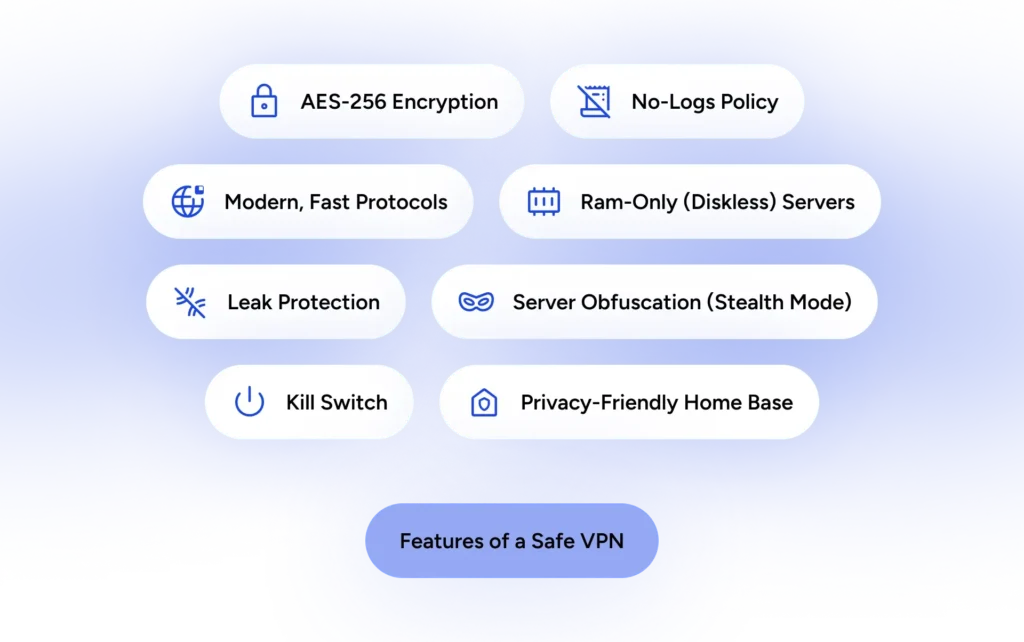
The Must-Haves for Your Digital Shield
- Independent Audits: Don’t take their word for it. Look for verified audit reports.
- Privacy-Friendly Jurisdiction: Ensure the service isn’t based in a country with legal mandates forcing companies to log user data.
- Amnesia Servers (RAM-only): Ensures no residual user data can physically survive a server power cycle.
- The Kill Switch: Your safety net that cuts internet traffic instantly when a drop occurs.
The Technical Nerdy Stuff (That Actually Matters)
- Future-Proofing: Look for providers actively adopting post-quantum cryptography standards.
- Leak Defenses: Built-in defenses blocking DNS, IPv6, and WebRTC leaks.
- Avoid “Free” Traps: Paid services are funded by subscriptions. Free services are funded by you.
Meet Your Digital Bodyguard: HidzoVPN
If all this talk of quantum decryption and data harvesting has you wanting to pull the router plug, take a breath. HidzoVPN is built specifically for the modern web; lightweight on battery, heavy on real protection, featuring advanced privacy protection features.
Whether you’re a gamer dodging latency, a freelancer working from a crowded coffee shop, or a traveler accessing home news on sketchy hotel Wi-Fi, HidzoVPN keeps things simple with a single-tap connection. No jargon, no hidden traps; just a clean, reliable tunnel.
The VPN Vibe Check: Where Are We Now?
The VPN space is a high-tech game of cat and mouse. The industry lightweights have faded, while verified heavyweights have transitioned to RAM-only hardware and Post-Quantum Encryption designed to outlast future supercomputers.
However, the wider web environment continues to shift:
- Regulatory Oversight: Over 47 countries maintain data retention mandates targeting digital services. State-approved VPNs in strict regions act more like glass houses than shelters.
- The AI Arms Race: VPN providers deploy AI threat detection to block malicious IPs in real-time, while threat actors deploy AI-driven bots to probe for connection vulnerabilities.
- The Zero-Trust Shift: Enterprises increasingly supplement traditional VPNs with Zero-Trust Network Access (ZTNA), enforcing “never trust, always verify” policies for remote workers.
Final Notes
A VPN is a vital element of your online security toolkit, but it isn’t the entire toolkit. It works best when combined with smart digital hygiene:
- Update Consistently: Software updates patch security flaws that malicious actors actively exploit. Keep your VPN app and operating system up to date.
- Stay Informed: Keep an eye on your provider’s policy updates or ownership changes.
- Layer Security: Combine your VPN with strong unique passwords, an encrypted password manager, and Two-Factor Authentication (2FA).
FAQs
Yes, a reputable VPN is generally safe to use when it features a verified no-logs policy, independent security audits, strong encryption, and a reliable kill switch.
Yes, a poorly chosen VPN can be harmful. Free or untrustworthy services may log and sell your data, inject malware, or expose you through leaks.
Yes, VPN usage is legal in most countries for individuals. However, some nations impose restrictions on VPN providers or ban certain uses, such as bypassing government censorship. Check local regulations before use.
A legitimate, audited VPN should not steal your data. However, dishonest providers may log and monetize your activity or even inject tracking. Always review independent audit reports and avoid unverified services.
Free VPNs can be risky; they may log data, inject ads, or have weak security. Paid, reputable VPNs are usually safer.
Yes, because traffic is routed through a VPN server and encrypted. However, the speed reduction isn’t noticeable if your baseline connection is fast.
Only partially. A VPN hides your location and IP address from AI scraping bots. However, it cannot stop AI companies from tracking you if you log into their specific platforms (like ChatGPT) or leave unique browser fingerprints.
Not live. Because your traffic is encrypted, the police cannot intercept your real-time data. However, they can court-order a VPN provider to hand over data logs—which is why choosing a verified “no-logs” VPN is critical.
A premium, trustworthy VPN cannot see or steal your passwords because your banking traffic is already heavily encrypted by the website itself (via HTTPS). However, a malicious or fraudulent free VPN could theoretically log your unencrypted actions.
Yes, and it’s highly recommended, especially if you are banking on public Wi-Fi. A trustworthy VPN keeps your passwords safe from local network hackers. Just remember to connect to a server in your home country; otherwise, your bank’s fraud detection might mistake you for an international hacker and temporarily lock your account.
Article by
-
 Sam Clarke
Sam is a cybersecurity and online privacy writer dedicated to making complex network protection accessible, practical, and engaging.




Share your thoughts
Add a comment