How Does a VPN Work? A Simple Guide to Online Privacy
The internet is a giant web of computers and servers, and there are agencies that are crawling up and down this web like horrifying, venomous…

Protect your online privacy and security
Fast, private, and easy to use, get Hidzo on your device and browse freely with one tap.
Get HidzoVPNTable of Contents
The internet is a giant web of computers and servers, and there are agencies that are crawling up and down this web like horrifying, venomous spiders with long twisted legs and giant, round eyes, looking for prey.
That’s a scary picture, isn’t it? Well, maybe, but it is the true face of the internet, and you might get stuck in this sticky web. Luckily, it’s never too late to free yourself from this innocent-looking trap. What you need is a VPN that makes you invisible to the spiders. Here, we’ll walk you through how a VPN works using simple language.
What “Privacy” Means Today
In our time, privacy equals the amount of control we have over what we want to share with others. This privacy is realized for average internet users; you can’t see your neighbor’s internet traffic, and they can’t see yours, unless they’re cybersecurity experts. But online privacy has a different meaning for your ISP, data brokers, and hackers.
For instance, your ISP doesn’t feel guilty when it monitors your traffic to see how much bandwidth you use for, for example, streaming. It simply justifies it by claiming that it needs this monitoring to maintain a smooth network. So, what online privacy means really depends on who’s answering the question.
The Online Privacy Threats
On a small scale, we can point to privacy settings on your social media apps. Imagine not listing your mom in the “hide from” list on Instagram. Fortunately, this is easily controllable but needs tact.
However, things aren’t so straightforward on a larger scale: the internet. Here, you can’t define the rules of the internet (i.e., internet protocols) and tweak them in your favor. No, here you have to play by the rules, and you’re not going to like it because big corporations have designed the anatomy of the internet in a way that benefits them.
How? with your data. You can’t imagine how internet users’ data turns the wheels of the market. It’s simple math; controlling the data means controlling the market.
How Does a VPN Protect Your Privacy?
In a word, a veil covers your traffic when you tap connect on your VPN app. Without a VPN, your request (for instance, when you type chatgpt.com in your browser) goes to your ISP and then to the host, ChatGPT’s website.
What Happens When You Connect to a VPN?
When you turn the VPN on, your request has to make another stop on the way. The app encrypts your data, sends it to the VPN server, which is normally in another country, and then sends it to the host. Finally, your request goes back the way it came from, and as a result, you see the ChatGPT website on your screen, without your ISP knowing.
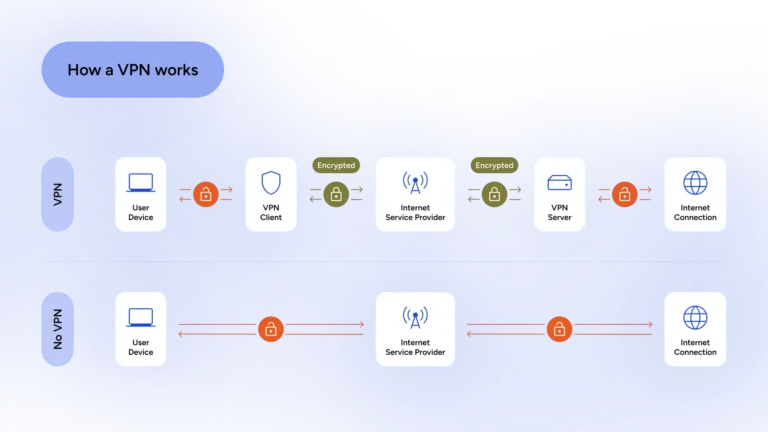
The above diagram paints the big picture. VPN makes other smaller changes to protect your online privacy.
VPN Encryption: How Your Data Stays Protected
Imagine a tunnel with thick concrete walls, and data is transferred in bulletproof cars with smoked glasses. VPN app sends your traffic in a secure tunnel, and even if someone can penetrate into this tunnel, they can’t see your data.
How a VPN Hides Your IP Address
Your original IP is the one that your ISP gives you. Your VPN app changes this IP to the one obtained from the VPN server. So, when you open, for example, the Netflix app on your mobile, Netflix will see you with the VPN IP, not your original IP. That’s how VPNs get around geo-blocked content.
ISP Surveillance Block
Your ISP can see that you’re using a VPN, but they can’t see what you’re doing because your data now travels through a secure tunnel. Phew, what a relief.
VPN Servers: What Role Do They Play?
We’ve already mentioned that your VPN app makes another stop on the way to your favorite website. That stop is the VPN server. But what exactly goes on inside these mysterious digital hubs?
Think of a VPN server as a high-tech, digital middleman—or better yet, a reliable courier who wears a disguise. When you type a website address into your browser, instead of knocking on that website’s door yourself, your VPN app sends this courier on your behalf.
First, the server strips away your original IP address (your digital identity) and slaps on its own. Then, it forwards your request to the website. To the website, it looks like the courier is the one making the request from wherever that server is physically located. Once the website replies, the courier brings the data right back to you through that secure, concrete tunnel.
In short, VPN servers do the heavy lifting. They hide your true location and process the heavy-duty encryption that keeps you safe. Plus, having servers scattered all over the globe means you can virtually “teleport” your device to another country, letting you bypass annoying geo-blocks with ease.
Common VPN Protocols
All we discussed above happens through the magic of VPN protocols. A VPN protocol is like an agreement between your device and the VPN server. It dictates the encryption model, data transfer rate, and some technicalities we won’t bore you with.
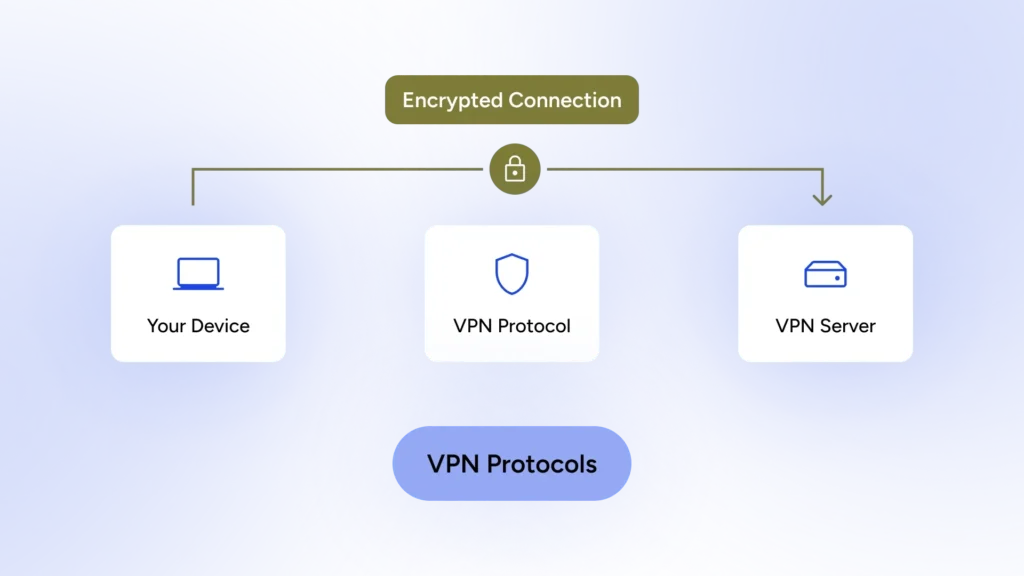
Common and modern protocols are OpenVPN, WireGuard, and IKEv2/IPsec, but what you need to know is that the VPN protocol affects your connection speed and the level of security. Click to learn about the best VPN protocols and their use cases.
VPN Limitations You Should Know
Your VPN is like Batman because it keeps the ones that want to snoop on you in the dark. But it’s definitely not Superman! These are some of the things your VPN can’t do:
Malware protection: your curiosity is stronger than your VPN. The VPN’s job is to secure your connection, but it can’t prevent you from opening a suspicious email with a tempting subject. So, if you do open that and something messes with your files, it’s on you.
- Solution: To prevent that, you need to install an anti-virus on your device.
Complete anonymity: VPN’s don’t deliver this. Your VPN needs to know your original IP to work, and your IP in the virtual world is just like your ID card in the real world.
- Solution: Use a no-log VPN that doesn’t keep your connection details.
Max speed: Earlier, we said that your VPN app encrypts your data and makes another stop on the way. So, naturally, your speed won’t be as fast as it is when you’re not using a VPN.
- Solution: You should use VPNs that have global servers, especially in nearby countries. VPN protocols also play a role here, so use VPNs that include modern protocols like WireGuard.
Personal habits: VPNs can’t protect you against things like using easy passwords for sensitive services, like email or banking, or using public Wi-Fi without a VPN.
- Solution: Use password managers, enable 2FA, and disable Wi-Fi auto-connect to prevent connection to open and unsecure Wi-Fis.
On a related note:
Online Privacy Guide for Managing Your Digital Footprint: 5 Tools + 20 Tips
What Matters the Most in a VPN
We tend to opt out of difficult tasks. Imagine having to change settings every time you want to connect to the internet. You’ll just drop it and forget about it. But when it’s as easy as a press of a button, you’ll do it.
HidzoVPN prioritizes simplicity because it’s designed for everyone; whether it’s a geeky youngster or a grandpa with thick glasses, they can benefit from this app. Everything from server selection, protocol selection, and other advanced settings is optimized by default.
Regarding accessibility, HidzoVPN has also considered your budget. HidzoVPN Premium is extremely competitive; you don’t get this pricing in short-term plans anywhere else. Enjoy the discounts without having to make a long-term purchase.
How to Choose a Reliable VPN Service
With hundreds of VPN choices out there, all claiming to be the fastest and most secure, picking one can feel like trying to choose a cereal down a massive grocery aisle. To save you from choice paralysis, here is a quick cheat sheet on what actually matters when looking for a reliable VPN:
- A strict no-logs policy: This is the golden rule. A reliable VPN must clearly state that they do not track, collect, or store your browsing history. If they don’t keep logs, they have nothing to show anyone—even if authorities come knocking.
- Modern, fast protocols: Look for a service that offers cutting-edge protocols like WireGuard. Older protocols can drag your internet speed down to a crawl, turning your movie night into a frustrating buffering nightmare.
- A global server network: You want plenty of servers worldwide. More servers mean less network crowding, better speeds, and more choices to unblock content.
- Ultimate simplicity: If an app looks like the cockpit of a fighter jet and requires a manual just to turn on, you’ll probably get annoyed and stop using it. Look for a clean, “one-tap and done” interface.
- Fair, wallet-friendly pricing: Watch out for “100% free” VPNs. Running a global server network costs a lot of money; if they aren’t charging you a dime, they are likely paying the bills by selling your browsing habits to advertisers. Look for a high-quality, premium option that fits your budget without forcing you into an expensive, multi-year trap.
Is Using a VPN Safe?
This is a totally fair question. You’re encrypting your traffic to hide it from your ISP, but now you’re passing all that data through a VPN provider. Aren’t you just trading one watcher for another?
So, are VPNs safe? The short answer is: Yes, using a VPN is safe, but it depends entirely on the provider you choose. A high-quality no-log VPN uses top-tier encryption protocols that even government supercomputers can’t crack. It shields you from hackers on public Wi-Fi and blocks creepy trackers. However, a VPN is only as safe as its privacy policy.
If a provider keeps logs of your activities, they can sell your data to the highest bidder. That’s why a trusted, transparent service is absolutely non-negotiable.
Who Can See You Without a VPN
Let’s rephrase this question. Who can shoot you when you’re not wearing a bulletproof vest? Now, the answer is easy: anyone with a weapon. The same goes for the original question. When you’re not using a VPN, anyone with the right tools and technical knowledge can snoop on your internet traffic. If you’re looking for a classification, here it is:
- Your ISP: They see every website you visit, how long you stay, and how much data you use. Some even sell anonymized browsing data to advertisers. Imagine your ISP knowing you binge-watched every rom-com on a Tuesday night. That’s awkward.
- Public Wi-Fi networks (cafes, airports, hotels): These are hacker playgrounds. Nearly 40% of Americans have reported a security incident after using public Wi-Fi. It’s like leaving your front door wide open while you’re on vacation.
- Websites and advertisers: They see your real IP address (which reveals your rough location and internet provider) and use it to build scarily accurate profiles. That’s why the ads feel like they’re reading your mind.
- Your employer, school, or even governments: On company or school networks, everything you do can be monitored. And in certain countries, ISPs are required to keep logs for law enforcement.
FAQs
A VPN hides your real IP address and encrypts your internet traffic, so websites, hackers, and your local network can’t easily see what you’re doing online. It masks your location and browsing activity from outsiders on the same network.
Your ISP can see that you’re connected to a VPN service, but it cannot see the websites you visit, searches you make, or data you transmit through the encrypted tunnel.
No. A VPN improves privacy, but it doesn’t make you fully anonymous. Websites can still track you through cookies, accounts, browser fingerprinting, and other tracking methods.
Yes, but it depends on the provider. A reputable VPN with a strict no-logs policy can significantly improve your privacy. However, you’re still trusting the VPN company to handle your data responsibly.
If you are logged into your personal accounts, these platforms can still track your activity through your profile. A VPN hides your IP address, but it cannot stop companies from recognizing you the moment you sign in.
No, because modern financial and sensitive websites use their own HTTPS encryption before your data even reaches the VPN. Your passwords and bank details remain completely scrambled and unreadable to the VPN provider.
Generally, no; a VPN secures your connection path, but it can’t stop you from downloading a bad file or clicking a sketchy email link. You still need an antivirus tool and a healthy dose of caution for full protection.
Yes, keeping your VPN active 24/7 is highly recommended to ensure your digital footprint is constantly shielded. It acts as a permanent security vest, especially when your device automatically switches between different Wi-Fi networks.
No, a VPN masks your IP address and encrypts your traffic, but it doesn’t clear or block cookies stored inside your browser. To stop cookie tracking, you will need to pair your VPN with a privacy-focused browser or extension.
No, a VPN wraps your internet traffic in military-grade encryption, rendering it completely unreadable to hackers on the same network. Even if a cybercriminal manages to intercept your data, all they will see is useless gibberish.
Usually not, because running a global server network is incredibly expensive, meaning “free” services often log and sell your browsing habits to advertisers to cover costs. In the free VPN world, you aren’t the customer—your data is the product.
Not through your internet connection, as websites will only see the location of the VPN server you selected. However, if your device’s built-in GPS is enabled, apps can still pinpoint your exact coordinates regardless of your VPN.
A VPN only encrypts data that travels over the internet, like WhatsApp messages, FaceTime calls, and web browsing. Regular cellular phone calls and standard SMS text messages do not pass through the VPN tunnel.
While they can see that you are connected to a VPN service, they cannot look inside the encrypted tunnel to see what you are doing. If you use a trustworthy, strict no-logs VPN, there is simply no historical data trail for anyone to request.
Article by
-
 Sam Clarke
Sam is a cybersecurity and online privacy writer dedicated to making complex network protection accessible, practical, and engaging.




Share your thoughts
Add a comment