Best VPNs for eFootball: Lower Ping, Stable Connection & Better Gameplay
POV: You send a perfect through-ball to your star striker, who is completely clear on goal. You tap the shoot button, but a sudden spike…
Protect your online privacy and security
Fast, private, and easy to use, get Hidzo on your device and browse freely with one tap.
Get HidzoVPN POV: You send a perfect through-ball to your star striker, who is completely clear on goal. You tap the shoot button, but a sudden spike of packet loss hits. Instead of striking the ball, your player freezes and lets a recovering defender casually slide in to steal it away.
That’s just a slap in the face, and a poorly routed network (your ISP) is the usual suspect. Using a high-quality VPN can actually stabilize your routing path and fix these connection nightmares. If you are in a rush, ExpressVPN and NordVPN are your quickest tickets to smooth, stutter-free matches today.
However, a VPN isn’t a magic wand, and picking the wrong one might actually make your lag worse. Stick around as we break down how to bypass ISP throttling, avoid regional matchmaking traps, and set up your network like a pro for the ultimate gaming experience.
Table of Contents
What Makes the Best VPN for eFootball?
Not all VPNs are built for the fast-paced, split-second decision-making required in football simulators. While a basic privacy tool is fine for hiding your browsing history, a true gaming VPN needs to prioritize stability, server placement, and cutting-edge data transfer protocols to keep your matches flowing smoothly.
Ultra-Low Latency and Fast Speeds
In a game where a millisecond determines whether you successfully time a stunning shot or miss the ball entirely, speed is everything. Traditional VPN protocols can slow your connection down because they take too long to encrypt data, but modern VPN protocols like WireGuard or NordVPN’s proprietary NordLynx are built for sheer performance.
These protocols process data instantly, meaning your button inputs travel to the game server and back without any noticeable delay.
Jitter Reduction and Stable Connections
While a low ping number looks nice on paper, your connection stability actually matters much more during an intense online match. Jitter refers to the constant fluctuation in your ping, which causes your players to warp across the pitch or freeze momentarily.
A top-tier VPN focuses on consistent packet delivery, ensuring that your data flows in a perfectly steady stream to prevent sudden, mid-match disconnections when you are leading in the 80th minute.
Wide Server Network Near Konami Data Centers
A VPN cannot make data travel faster than the speed of light, so physical distance always matters. The best VPNs offer a massive web of servers located right next to Konami’s primary matchmaking hubs, including Tokyo, Frankfurt, São Paulo, and London.
Connecting to a VPN server in the same city as the game server creates a highly optimized shortcut, which saves you from matching with players halfway across the globe.
Anti-DDoS Security and Privacy
Let’s face it, the gaming community can get a little salty sometimes. It is not uncommon to run into toxic opponents who use lag switches or attempt to flood your home IP address with traffic to force a disconnect and steal a win. A premium VPN completely masks your true IP address behind its own secure servers, absorbing any malicious traffic and keeping your home network safe from sore losers.
Cross-Platform Compatibility
Whether you are a mobile grinding community events on the bus or a hardcore PC and console player, your VPN needs to work everywhere.
The best providers offer lightweight, battery-friendly apps for iOS and Android that won’t make your phone overheat mid-match.
Additionally, they feature easy split-tunneling options for PC and clear instructions to share the connection with your PlayStation or Xbox via a router setup.
Best VPNs for eFootball
Choosing the wrong VPN for a football simulator can completely ruin your match formatting, transforming a smooth defensive line into a chaotic mess of player teleportation. Here is the curated list of the absolute best VPNs that directly tackle the distinct routing challenges, server networks, and mobile-specific issues plaguing the eFootball community.
1. ExpressVPN
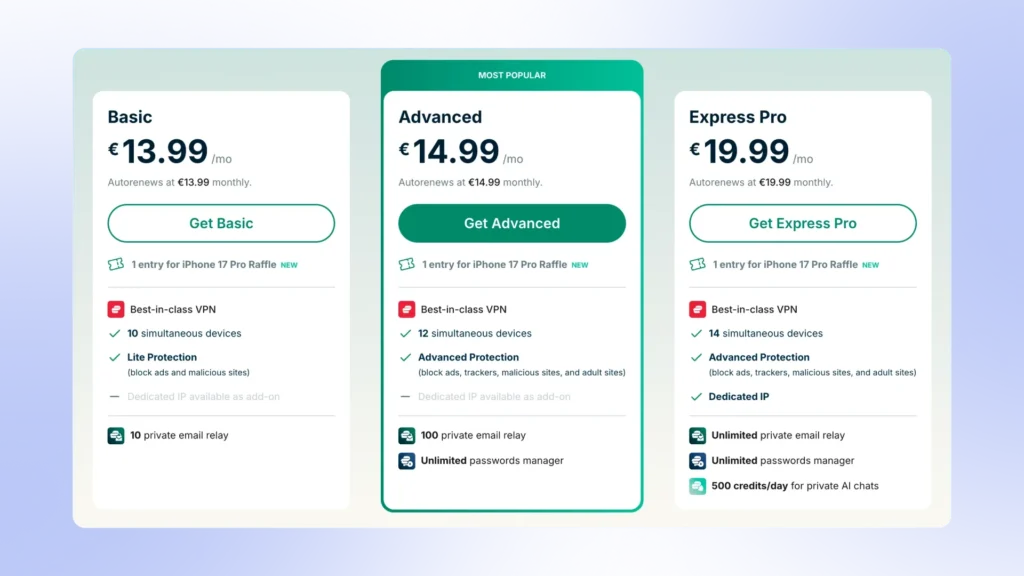
The absolute biggest pain point for eFootball players is the notorious “heavy gameplay” feel, where your highly-rated defenders move like they are stuck in quicksand.
ExpressVPN solves this through its high-capacity 10 and 40 Gbps server network and its proprietary Lightway protocol, which is intentionally engineered to trim data overhead. It provides incredibly reliable routing directly to Konami hubs, making it the premier choice if you are tired of input delays during tight dribbling sequences.
Additionally, if you play on console, their dedicated router solutions make it incredibly easy to link your PlayStation or Xbox without needing a complex PC hotspot setup.
2. NordVPN
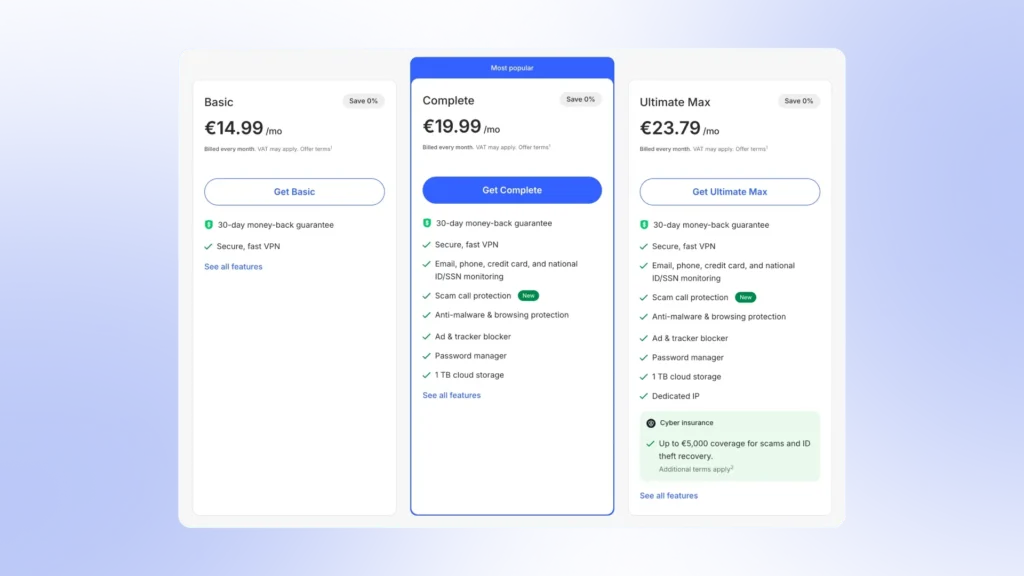
If you primarily play eFootball mobile on data or fluctuating home Wi-Fi networks, you are likely intimately familiar with packet loss, which is the culprit behind sudden, unexpected match disconnections.
NordVPN directly addresses network jitter with its ultra-fast NordLynx protocol, keeping your data packets flowing in a perfectly rigid, predictable line. A standout feature for the community is Meshnet, which allows you to establish a secure, private network link with friends.
This completely bypasses Konami’s crowded public peer-to-peer matchmaking pools, letting you host local tournaments with zero latency or outside interference.
3. CyberGhost
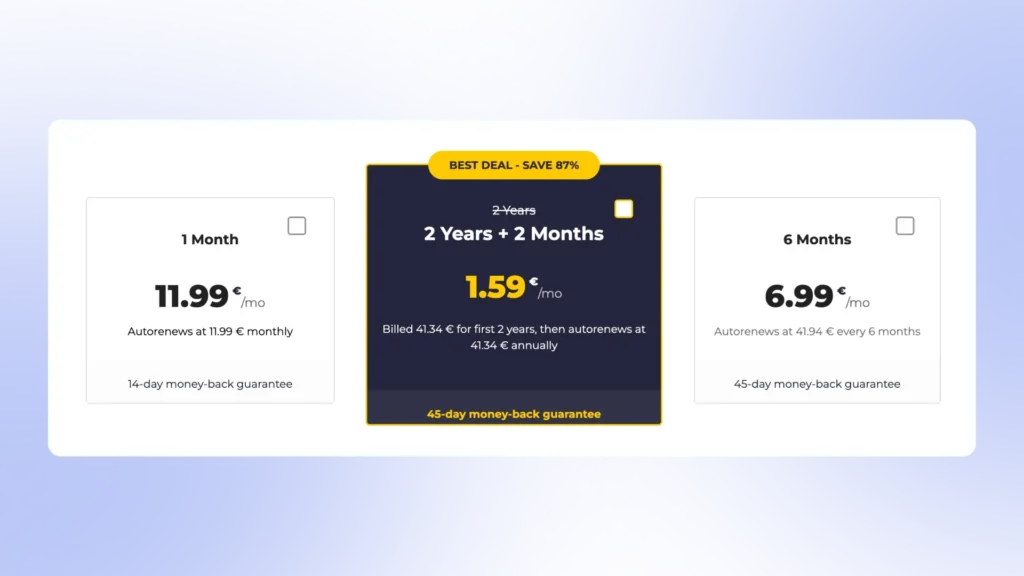
For casual or competitive players who do not want to spend hours testing different server locations to find the lowest latency, CyberGhost is a lifesaver. It features dedicated gaming profiles built directly into the app interface.
These specialized nodes are constantly managed to ensure low ping and minimal congestion. For eFootball, this means you can simply filter for gaming-optimized hubs near London, Frankfurt, or Tokyo and instantly secure a stable, interference-free pipeline straight to the nearest matchmaking center.
4. HidzoVPN
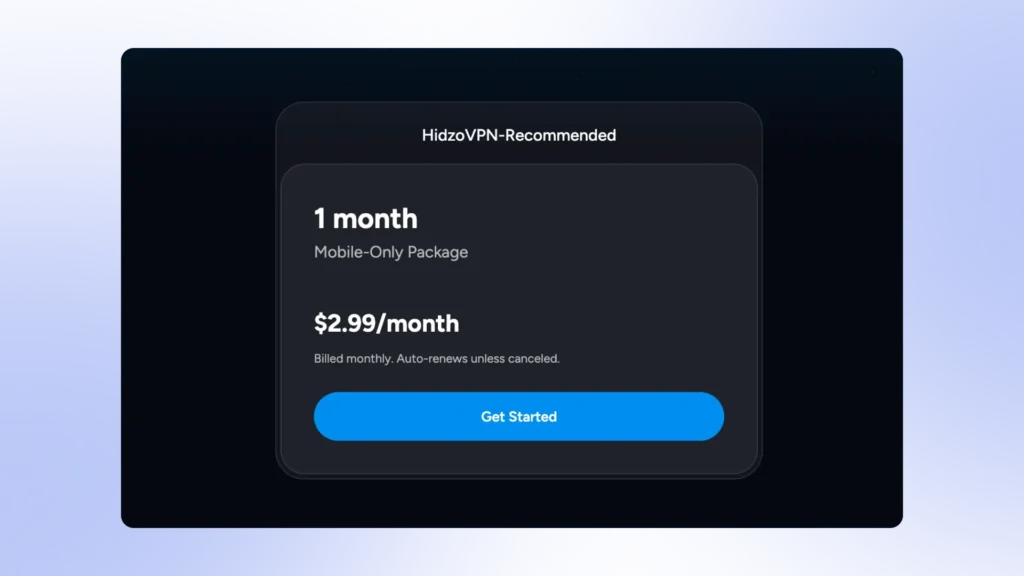
Mobile-first gamers often get left behind by bloated desktop-centric VPNs, but HidzoVPN is a mobile power-user favorite that excels on iOS and Android platforms.
It addresses two very specific eFootball pain points: high device battery drain and region-exclusive event access. Its smart architecture handles data encryption so cleanly that it keeps your phone from overheating or aggressively throttling its processor during long tournament sessions.
Furthermore, its network features highly optimized server locations that make it incredibly efficient for unlocking regional campaigns, such as England- or Germany-exclusive Epic packs, without triggering suspicious account-teleportation flags.
5. Proton VPN
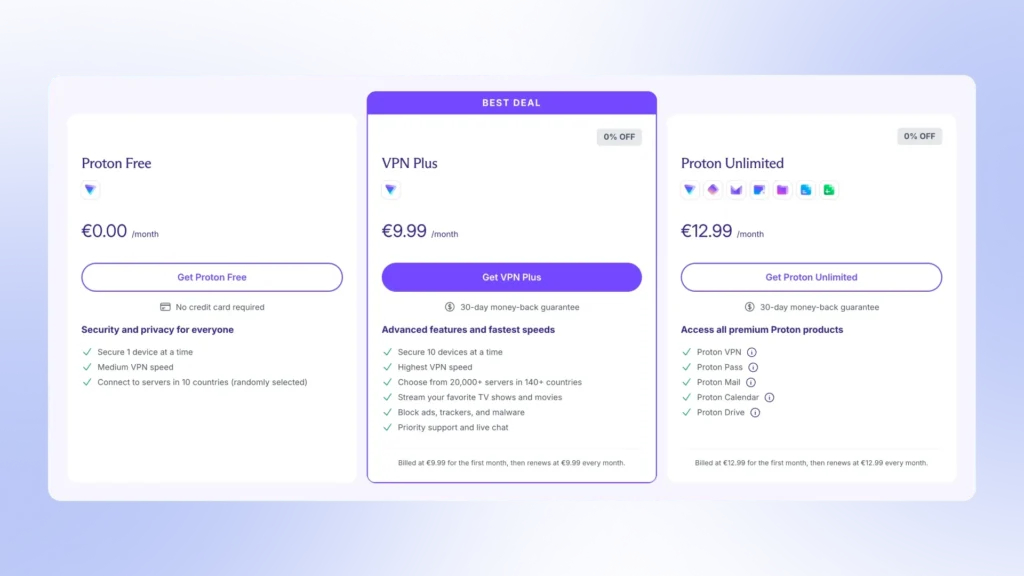
ProtonVPN includes its unique VPN Accelerator technology across its applications. This feature rewrites the way the VPN software processes data by splitting the connection into multiple parallel streams, overcoming the processing bottlenecks that naturally occur over long distances.
For eFootball players, this means that the accelerated packet processing drastically cuts down on input lag and unexpected packet drops. It keeps your match data moving smoothly without forcing you to open your wallet just to get a responsive, competitive connection.
Best eFootball VPNs at a Glance
| VPN Provider | Core Protocol | Feature for eFootball | Best Platform Match |
|---|---|---|---|
| ExpressVPN | Lightway | Drastically trims data overhead to fix heavy, unresponsive player movement. | Console & PC |
| NordVPN | NordLynx | Meshnet allows secure, private matches with friends entirely outside public matchmaking pools. | Mobile & PC |
| CyberGhost | WireGuard | Specialized, pre-configured gaming filters for rapid server selection. | PC & Mobile |
| HidzoVPN | Xray | Smart architecture prevents mobile device battery drain and overheating during long matches. | Mobile (iOS/Android) |
| ProtonVPN | WireGuard / Custom | VPN Accelerator technology parallel-streams data to maximize long-distance routing speeds. | Budget Mobile |
Pro Tip: If your primary focus is strictly competitive PC matchmaking and you do not require full-device data encryption, skip the traditional VPN options and look at a dedicated service like ExitLag to optimize your packet routing pathways instead.
ExitLag: A Game-Centered Latency Solution
If you are playing eFootball on PC and want the absolute pinnacle of network optimization, you might want to look beyond traditional VPNs and consider a dedicated service like ExitLag.
While a standard VPN is designed to encrypt your entire internet connection for privacy, ExitLag is a GPN (Gamers Private Network). It completely ignores your web browsers or background downloads, dedicating 100% of its resources solely to optimizing your eFootball game data.
The true magic behind ExitLag lies in its Multi-Path Routing technology. Instead of sending your match data down a single path, it maps out multiple different server routes to Konami’s data centers simultaneously.
If one internet node suddenly spikes with lag or drops a packet, ExitLag seamlessly switches to the alternative route in real time. For an eFootball player, this means you will almost never experience those abrupt, infuriating micro-stutters right as you are trying to time a crucial defensive tackle.
Can a VPN Reduce Ping in eFootball?
The short, honest answer is: usually no, but under the right circumstances, it absolutely can. To understand why, we have to look at how data actually travels from your gaming device to Konami’s servers.
A VPN cannot physically upgrade your home fiber line or make data travel faster than the speed of light, so if you already have a flawless, direct connection to the game server, turning on a VPN will usually add a tiny bit of routing overhead and increase your ping by a few milliseconds.
However, the real world of internet routing is rarely flawless. Internet service providers are notorious for taking inefficient shortcuts to save on operational costs. Instead of sending your eFootball data packets in a straight line to the matchmaking server, your provider might route your connection through a series of cheap, crowded regional detours.
This is exactly where a premium VPN saves the day. By connecting to a high-speed gaming server located right next to an eFootball data hub, you effectively force your internet provider to stop taking those slow detours. The VPN creates an optimized shortcut, bypassing the crowded infrastructure and instantly dropping your ping.
Furthermore, it is vital to remember that ping is only half the battle in a football simulator. Packet loss and jitter, the sudden jumping of your ping from 30ms to 120ms and back, are what actually cause your players to feel heavy or unresponsive.
Even if a VPN keeps your ping exactly the same, its ability to stabilize the flow of data packets means you get a predictable, fluid match experience with zero sudden teleportation spikes.
Is It Safe to Use a VPN with eFootball? (Will You Get Banned?)
The fear of getting your hard-earned team permanently banned is enough to make any eFootball player hesitate before clicking that big connect button on a VPN. If you scroll through Reddit or gaming forums, you will see a lot of conflicting information, with some players claiming they got banned for using a VPN, while others swear they have been using one daily for years without a single issue.
To settle the score once and for all: Konami does not ban you simply for using a VPN to stabilize your connection.
When you boot up a premium VPN to smooth out your network routing or protect yourself from malicious DDoS attacks, you are completely safe. Konami’s automated security systems are looking for real cheats, such as third-party script tools or networks that purposely manipulate data packets to drop matches when a player is losing. A standard VPN merely changes your digital address, keeping you well within the safe zone.
However, there is one major catch that trips up a lot of players, and it usually involves regional stores.
The Red Line: While using a VPN for gameplay is totally fine, attempting to use a VPN to spoof your location to access cheaper eFootball coins in foreign regional storefronts is a direct violation of Konami’s Terms of Service.
If Konami’s billing system catches your account suddenly hopping from London to Argentina within five minutes just to buy cheap currency, your profile will immediately trigger fraud detection flags.
Stick to using your VPN for low-latency gameplay, keep your store purchases to your home region, and your account will remain perfectly secure.
How to Choose the Right VPN for eFootball
Finding the perfect VPN for your weekend league matches requires looking at a few specific technical features rather than just picking the biggest brand name on the market. If you want to avoid that dreadful input delay, keep these key factors in mind before making your choice.
Match Your Platform First
Your choice should heavily depend on how you actually play the game. If you are an eFootball Mobile user on iOS or Android, you need a lightweight app like HidzoVPN that will not turn your phone into a hot brick or drain your battery before halftime.
For PC players on Steam, look for a service with robust split-tunneling features so your browser downloads do not interfere with your match data.
Console players on PlayStation or Xbox should prioritize brands that offer easy router setups or dedicated smart DNS features, since consoles do not support native VPN apps.
Look for Modern Protocol Selection
When you open a VPN’s settings menu, you will see a list of connection protocols. You want to completely ignore older, slower options like OpenVPN or L2TP, as they add too much encryption overhead and will make your players feel incredibly heavy. Instead, ensure the service offers one of the following:
- WireGuard: The industry gold standard for gaming; incredibly lightweight and fast.
- NordLynx: NordVPN’s custom protocol built directly on top of WireGuard for maximum speed.
- Lightway: ExpressVPN’s custom-built protocol designed to connect instantly and reduce ping.
Check Server Density in Major Hubs
A VPN is only as good as its physical server locations. Before signing up, verify that the provider has high-speed, non-congested servers sitting right in Konami’s primary matchmaking regions.
For instance, if you live in Europe, you want plenty of server choices in Frankfurt or London. If you are in South America, Sao Paulo is essential, while Tokyo is the holy grail for Asian matchmaking nodes. The closer the VPN server is to the actual game server, the lower your ping will be.
Best Server Locations for eFootball Players in GCC Countries
For eFootball players in the GCC region, the absolute best server locations to connect to are Saudi Arabia (Dammam) and Qatar (Doha).
Because Konami hosts its Middle Eastern eFootball matchmaking infrastructure directly on Google Cloud nodes, these local nodes are the prime choice. Connecting to a VPN server in Dammam or Doha keeps data packets entirely within the Gulf network infrastructure, completely avoiding the sluggish 130ms detour to Europe that local internet service providers often force your traffic onto.
If your VPN doesn’t have a specific server path open in Saudi Arabia or Qatar, the absolute best alternative locations are:
- Mumbai (India): A massive matchmaking hub for the Asian pools that offers incredibly fast undersea routing straight across the Arabian Sea, keeping your ping reliably under 50ms.
- Frankfurt (Germany) or Milan (Italy): The primary choices if your game profile is fundamentally hard-locked into the European matchmaking region.
Connecting to these specific nodes optimizes the direct continental jump so your inputs still register crisply during heavy weekend peak hours.
Common eFootball VPN Issues and How to Fix Them
Even when using the most premium gaming network, playing an online football simulator behind an encrypted tunnel can sometimes throw a few unexpected errors your way. Before you rage-quit and delete the game, use these quick troubleshooting fixes to get back on the pitch.
Issue: “Unable to find an opponent” / Long matchmaking times
This is the single most common frustration for players running a VPN. If you notice the search wheel spinning indefinitely or getting an “Unable to establish connection” pop-up, your VPN server is likely sitting too far away from your account’s locked home profile region.
- The Fix: Go to your eFootball matchmaking settings and switch your search filter from “Search nearby area only” to “Gradually expand search area.” If that fails, disconnect your VPN, check the exact country your eFootball profile was registered in, and reconnect to a VPN server inside that specific nation before searching for a PvP match.
Issue: Game crashes or suffers a major loading delay upon startup
If your title screen gets completely stuck or takes five minutes just to load into your main team dashboard, your chosen VPN protocol is likely crumbling under heavy data packet overhead. Older encryption setups can delay the game’s authentication checks with Konami’s servers.
- The Fix: Completely close the eFootball app, open your VPN settings, and make sure you have explicitly chosen WireGuard (or NordLynx/Lightway). Avoid OpenVPN at all costs for gaming. Once changed, clear your game app cache from the mobile settings or the PC Steam menu and launch the game again.
Issue: Random disconnections right before the kickoff whistle
There is nothing worse than setting your squad depth, choosing your tactics, and instantly getting a “Match Ending” error message before you even touch the ball. This usually happens when your VPN drops its connection for a split second, causing Konami’s security systems to flag you for a potential network exploit.
- The Fix: Turn off your VPN’s aggressive Kill Switch feature while playing eFootball. While kill switches are great for private browsing, a tiny millisecond drop will force the feature to completely freeze your internet, which guarantees an instant match forfeit in online divisions. Also, if you are on mobile, ensure that your device’s background battery-saver settings are not putting your VPN app to sleep mid-game.
Tips to Improve Your eFootball Connection
Even if you are using the most elite, high-speed gaming VPN on the planet, it cannot work miracles if your underlying, local setup is fundamentally flawed. If you want to maximize your network performance and guarantee a smooth, fluid match experience, combine your VPN with these essential connection rules.
Ditch the Wi-Fi for an Ethernet Cable
No matter how close your PC or console is to your home router, wireless internet is highly prone to brief spikes of signal interference. Every time your phone, microwave, or smart TV transmits a heavy blast of background data, your wireless signal drops vital match packets, which results in that dreaded, heavy input delay. Switching to a physical Ethernet cable creates a completely insulated, unyielding highway for your connection.
If you play primarily on mobile, try upgrading to a dedicated 5GHz Wi-Fi band instead of the older, crowded 2.4GHz channel to sidestep local wireless congestion.
Manually Inspect the Connection Bars
Konami provides a very helpful connection antenna rating on the pre-match matching screen. It can be incredibly tempting to just mash the confirm button to skip the loading screens, but accepting a low-bar match is a recipe for disaster.
Make it a strict habit to only accept matches that display a solid, steady 4- or 5-bar rating. If the screen flashes a 3-bar opponent or lower, simply hit cancel, let the game refresh its matchmaking parameters, and search for a closer, more stable network route.
Regularly Clear the In-Game Cache
Every single time Konami drops a minor patch, weekly live update, or major seasonal campaign, eFootball downloads chunks of data that build up inside your device’s storage. Over time, these old files can get slightly corrupted or tangled up, leading to bizarre in-game micro-stutters and extended loading screen times.
To keep everything running clean, head to the eFootball title screen before launching into your match routine, tap the circular menu icon in the bottom corner, and hit the Clear Cache option. It takes less than ten seconds, keeps your local server routing maps pristine, and will not delete your actual squad, coins, or account data.
Wrapping It Up
At the end of the day, dealing with unresponsive players or sudden match drops in eFootball is a quick way to ruin your gaming session. While you cannot control Konami’s server capacity, you can absolutely take charge of how your data travels there. Pairing a premium, low-latency provider like ExpressVPN, NordVPN, or HidzoVPN with a solid, wired setup is the most reliable shortcut to bypassing messy ISP routing and keeping your inputs crisp.
Just remember to stick to modern protocols, leave your home store region alone to avoid any automated account flags, and skip the low-bar opponents on the matching screen. Get your network setup dialed in, clear your cache, and we will see you at the top of the divisions.
FAQs
HidzoVPN is incredibly lightweight and battery-friendly, and it’s excellent for mobile eFootball players with average smartphones.
Yes, but only if your internet provider is routing your match data through slow, inefficient regional detours.
Yes, Konami does not ban or penalize accounts simply for using a VPN to improve network stability. However, using a VPN to manipulate your location to purchase cheaper eCoins from foreign regional stores is a major violation of the Terms of Service and will result in a ban.
Always select a high-speed VPN node that sits as physically close to you as possible, or one located directly within your account’s locked registration region.
Generally no, because most free VPNs enforce strict data caps, throttle your connection speeds, and utilize highly congested servers that drastically increase your ping.
A low ping number only tells half the story. If your network is dropping data packets or suffering from heavy jitter (unstable ping spikes), your buttons will take a second to register, making your players turn like slow cargo ships.
Article by
-
 Sam Clarke
Sam is a cybersecurity and online privacy writer dedicated to making complex network protection accessible, practical, and engaging.





Share your thoughts
Add a comment