Best VPNs for PUBG for a Smooth, Lag-Free Gaming Experience
The delay between a clean headshot and an embarrassing rubber-band death is measured in milliseconds, often dictated by the physical distance between your phone and…
Protect your online privacy and security
Fast, private, and easy to use, get Hidzo on your device and browse freely with one tap.
Get HidzoVPN The delay between a clean headshot and an embarrassing rubber-band death is measured in milliseconds, often dictated by the physical distance between your phone and PUBG’s servers. The real culprit, however, is frequently bad ISP network routing, which a fast VPN can optimize to drastically improve your ping. We have tested and broken down the top 6 VPN apps you can install to stabilize your connection:
- NordVPN
- ExpressVPN
- HidzoVPN
- Surfshark
- Proton VPN
- PIA
Stick around to see how these apps lower latency, prevent bans, and unlock exclusive regional events!
Table of Contents
Do You Need a VPN for PUBG?
Before downloading any third-party tool, it helps to understand whether a VPN will actually fix your specific issue. A VPN is not a magic wand that transforms a weak cellular connection into fiber-optic internet, but it solves specific network roadblocks that standard connections run into.
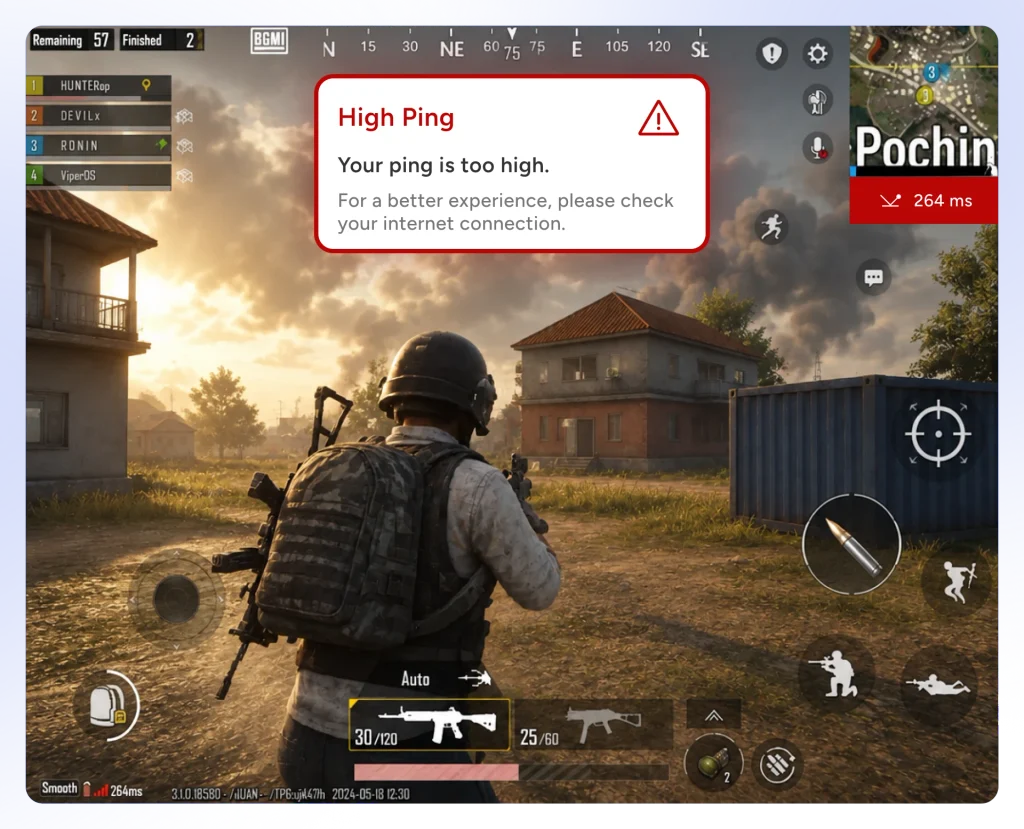
When You DO Need a VPN:
- Your ISP Reroutes Game Traffic Poorly: Internet service providers often route your packets through congested public nodes instead of taking the shortest geographic path to PUBG servers. A gaming VPN redirects your data through optimized routing lines.
- Your ISP Throttles Gaming Bandwidth: Some ISPs automatically detect high UDP packet volume during peak gaming hours and intentionally slow down your connection. VPN encryption hides your traffic type, bypassing artificial throttling.
- You Suffer from Geo-Blocking or IP Bans: If you are playing on restricted Wi-Fi networks (like campus or workplace firewalls) or live in a country where PUBG ports are blocked, a VPN restores access.
- You Want Localized Events & Cheap UC: VPNs let you switch virtual locations to access regional event centers, localized discounts, and skin giveaways in countries like Turkey or Taiwan.
When You DO NOT Need a VPN:
- Your Base Home Internet is Extremely Slow: If your broadband speed is below 5 Mbps or your home Wi-Fi signal is weak, adding a VPN encryption layer will not fix the underlying bandwidth bottleneck.
- You Already Have a Local 15ms Ping: If you live close to PUBG’s regional servers and experience no packet loss, a VPN will generally add a tiny distance overhead (1–5ms) rather than lowering it further.
The Best VPNs for PUBG & PUBG Mobile (Tested & Ranked)
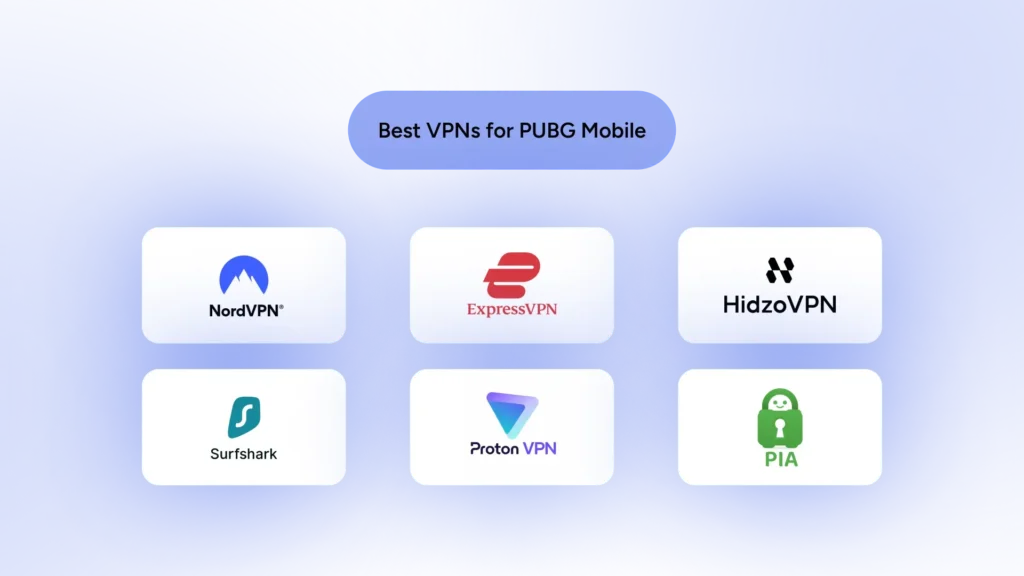
Not every VPN can handle the fast-paced demands of PUBG Mobile. We tested dozens of providers focusing on low ping overhead, packet loss prevention, server density across major PUBG hub regions, and anti-cheat stability. Let’s take a quick peek at the best VPNs for PUBG before we get into details for each provider.
| VPN Provider | Core Strength | Key Gaming Feature | Primary Protocol | Best For… |
|---|---|---|---|---|
| NordVPN | Overall Winner | Meshnet LAN lobbies & massive high-speed server network | NordLynx (WireGuard) | Serious gamers wanting ultra-low ping and smooth server hopping. |
| ExpressVPN | Mobile Stability | Flawless cellular network handoffs (4G/5G to Wi-Fi) | Lightway Turbo | Gamers on the go who frequently experience connection drops. |
| HidzoVPN | Stealth & Lightweight | Stealth anti-censorship with low CPU/RAM consumption | XTLS Reality / VLESS | Players facing strict ISP throttling, firewalls, or running on budget phones. |
| Surfshark | Best for Squads | Unlimited simultaneous device connections per account | WireGuard | 4-man squads looking to split a single cheap subscription. |
| Proton VPN | Best Free Tier | Unlimited bandwidth without speed-throttling paywalls | WireGuard / Stealth | Gamers who want a reliable, safe VPN without paying a subscription. |
| PIA | Customization | Granular network, port, and encryption setting controls | WireGuard / OpenVPN | Technical users who like tweaking settings to extract maximum speed. |
1. NordVPN: Overall Best PUBG Mobile VPN
- Protocol: NordLynx (WireGuard-based)
- Key Strengths: Ultra-low latency, vast server network, built-in Meshnet
- Best For: Ping stability and accessing regional events safely
NordVPN remains the reigning heavy hitter for mobile gamers. Its proprietary NordLynx protocol is built on top of WireGuard, meaning it connects almost instantly and adds virtually no routing delay to your game packets.
With thousands of high-speed servers in key PUBG hubs like East Asia, Turkey, and Western Europe, you can hop between regional events without worrying about jittery frames.
Their Meshnet feature is also a neat bonus if you play custom rooms with friends. It lets you create a secure private network as if you were all sitting on the same local Wi-Fi, perfect for organizing low-latency private tournaments.
2. ExpressVPN: Best for Mobile Stability & Fast Server Hopping
- Protocol: Lightway Turbo
- Key Strengths: Flawless mobile optimization, extremely reliable connections
- Best For: iOS and Android players on cellular data networks (4G/5G)
If you play PUBG Mobile while commuting or switching between Wi-Fi and mobile data, ExpressVPN is almost impossible to disrupt. Its Lightway protocol was designed specifically for smartphones, handling sudden network handoffs without dropping your game connection or sending you back to the loading screen.
ExpressVPN operates servers across 105 countries, making it the premier choice for grabbing exclusive regional skins in harder-to-reach locations like Taiwan or Egypt. While it costs a bit more than its competitors, the buttery smooth connection quality justifies the price tag for serious competitive players.
3. HidzoVPN: Best Lightweight Contender with Advanced XTLS Reality
- Protocol: XTLS Reality / VLESS
- Key Strengths: Extremely lightweight app, advanced anti-detection, super affordable
- Best For: Budget-conscious gamers facing strict local ISP blocks or DPI throttling
HidzoVPN is a rising star in the VPN industry that punches well above its weight class. Unlike bloated VPN apps that drain your smartphone battery and hog RAM while you run max graphics settings, HidzoVPN is engineered to be featherlight on mobile system resources.
Its secret weapon is the XTLS Reality protocol, which mimics genuine TLS web traffic. This makes your VPN app practically invisible to strict network censors and aggressive ISP throttling, offering unrestricted access without triggering anti-cheat red flags.
4. Surfshark: Best Budget VPN for Squads
- Protocol: WireGuard
- Key Strengths: Unlimited device connections, fast 10Gbps+ servers
- Best For: Sharing one subscription with your whole PUBG team
Surfshark lets you log in on as many devices as you want under a single account. That means you can share your login details with your entire four-man squad, splitting the bill down to loose change.
Despite the wallet-friendly cost, Surfshark does not skimp on performance. Its WireGuard implementation delivers impressive speeds, and its built-in Bypasser (split tunneling) allows you to route only PUBG Mobile through the encrypted tunnel while leaving Discord or Spotify on your local network.
5. Proton VPN: Best Free & Freemium VPN
- Protocol: WireGuard / Stealth
- Key Strengths: Truly unlimited free bandwidth, strong privacy focus
- Best For: Players who want a legitimate, safe VPN without paying
Most free VPNs are malware-ridden trap doors that harvest your personal data and inject dirty IPs into your network connection. Proton VPN is the rare exception. Its free version has no data caps, meaning you can game all month long without suddenly getting cut off mid-clutch.
While the free plan restricts you to a few server locations (US, Netherlands, Japan), it gives you access to Proton’s VPN Accelerator feature, which helps stabilize connections on weak Wi-Fi networks.
6. Private Internet Access (PIA): Best for Deep Network Customization
- Protocol: WireGuard / OpenVPN
- Key Strengths: Huge server fleet in North America and Asia, customizable encryption levels
- Best For: Tweakers who want complete control over port settings and protocols
PIA gives you granular control over your network parameters. If you love tinkering with port forwarding or dropping encryption strength down to 128-bit AES to squeeze every millisecond of speed out of your connection, PIA is your sandbox. It boasts a massive network of thousands of servers, ensuring you rarely encounter overloaded connection nodes.
Is Your PUBG Lag Caused by the Internet or Your Phone?
When your character stutters mid-firefight, it is easy to blame the internet. However, Network Lag and Hardware Lag are fundamentally different issues that require totally different fixes.
| Issue Type | Typical Symptoms | Main Causes | Solved by a VPN? |
|---|---|---|---|
| Network Lag (High Ping / Desync) | Rubberbanding, hit detection delay, “Server Did Not Respond” messages, actions delayed by 100ms+. | Bad ISP routing, high packet loss, Wi-Fi jitter, congested server nodes. | YES. Reroutes traffic through faster, direct server paths. |
| Hardware Lag (Low FPS / Frame Drops) | Screen freezing, choppiness during intense gunfights, phone getting hot to the touch, low framerate. | Overheating GPU/CPU, thermal throttling, insufficient RAM, aggressive background apps. | NO. Requires adjusting game graphics or freeing device memory. |
PUBG Network Problems Explained: Ping, Jitter, & Packet Loss
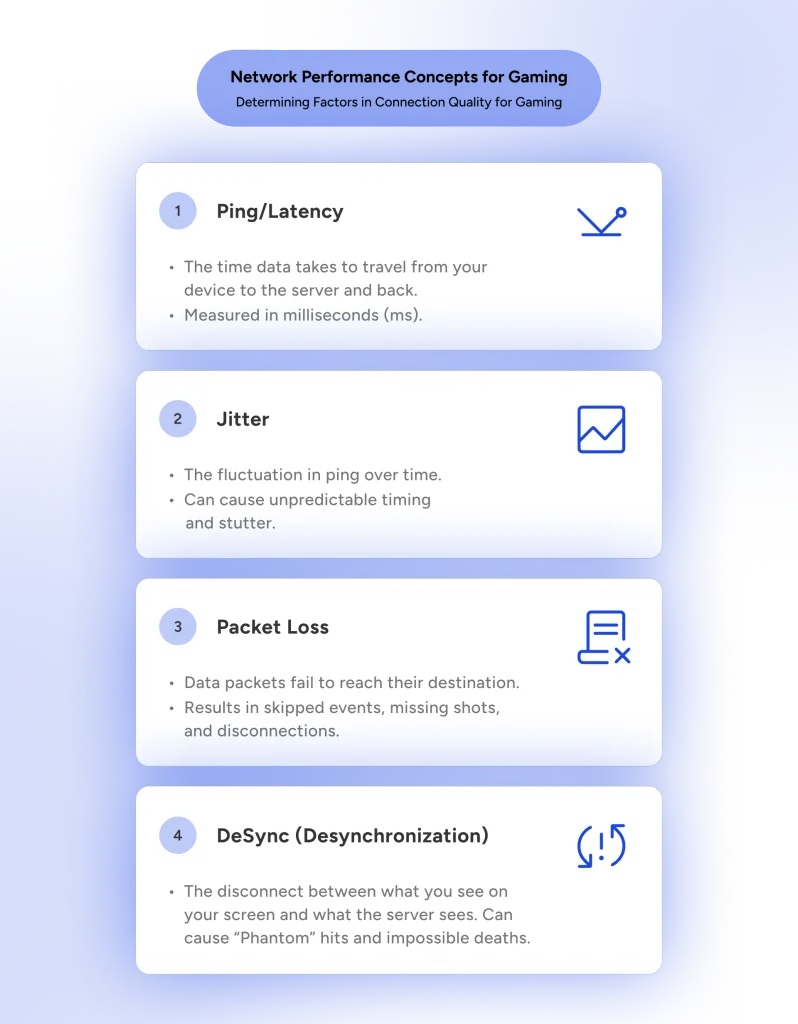
Understanding network terminology makes diagnosing lag much easier when adjusting your settings:
- Ping (Latency): Measured in milliseconds (ms), this is the time it takes for data to travel from your device to the PUBG server and back. A ping under 50ms is optimal for competitive play; anything above 120ms creates noticeable delays.
- Jitter: Jitter measures the variance in your ping over time. If your ping jumps rapidly from 30ms to 180ms and back, you will experience sudden screen teleports and inconsistent hitboxes, even if your average ping looks fine.
- Packet Loss: The most frustrating network problem. This occurs when data packets sent between your phone and the game server are dropped along the route. High packet loss results in bullets dealing zero damage, door-opening delays, and vehicle glitches.
- ISP Throttling: When your network provider detects high gaming or streaming traffic, it limits your connection speed to preserve bandwidth for other users.
Continue reading:
How to Fix High Ping in PUBG: 12 Proven Ways to Reduce Lag and Improve Gameplay
PUBG & PUBG Mobile Server Regions: Which One Should You Use?
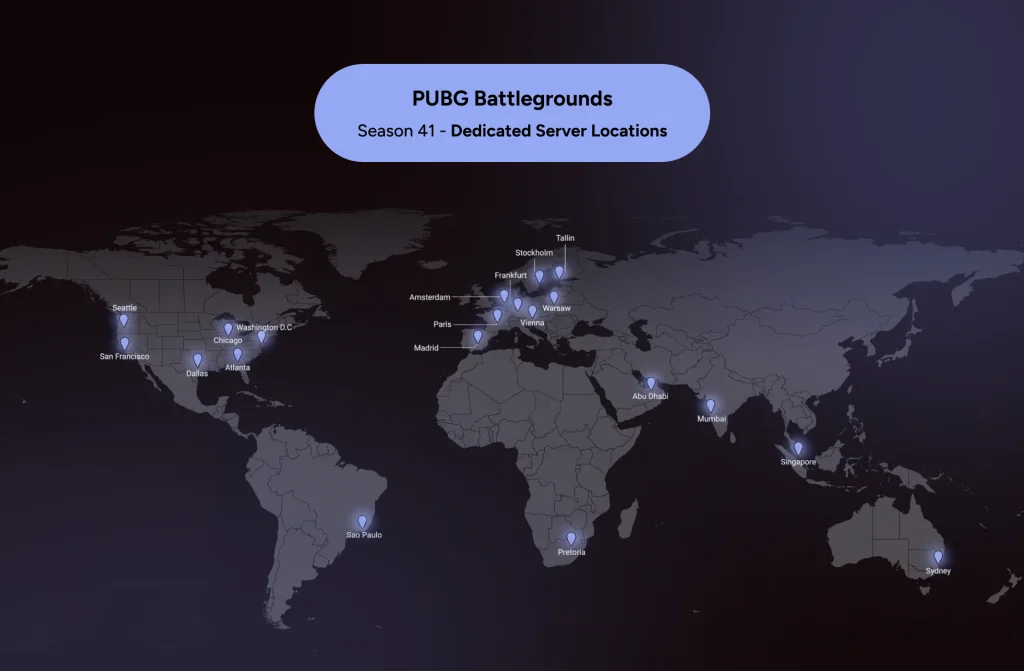
PUBG operates dedicated server clusters worldwide to keep gameplay responsive. Choosing the best VPN server location balances low ping against matchmaking speed.
Official Server Hubs:
- Asia (Tokyo / Seoul / Singapore): The largest player base with fast matchmaking across all game modes. Best for aggressive competitive lobbies.
- Europe (Frankfurt / London): Highly stable routing with strong server density across EU countries.
- North America (Virginia / Oregon): Excellent infrastructure with low latency across NA and northern LATAM regions.
- Middle East (Dubai): Dedicated regional hub minimizing delay for Gulf and North African players.
- South America (São Paulo): Serving Southern Latin America with local server nodes.
Rule of Thumb: Always connect to the server region closest to your physical location for ranked play. Switch to distant regions (like Asia or NA) only if you are looking for specific regional event stores or queuing during off-peak hours when local lobbies are empty.
How PUBG Mobile Anti-Cheat Works: Will a VPN Get You Banned?
Let’s clear up the biggest rumor floating around game lobbies right now. Simply turning on a VPN will not automatically trigger a 10-year ban from Tencent or Krafton.
Millions of players safely route their traffic through VPNs every single day to stabilize their connection or grab regional rewards. However, the automated anti-cheat systems behind PUBG Mobile are notoriously sensitive, and bad VPN habits can easily put your main account in the hot seat.
Anti-cheat bots primarily look for sudden, impossible shifts in your account data. If you log in from Tokyo at 2:00 PM and magically drop into a lobby from Frankfurt two minutes later, security flags go off. Additionally, many free VPN apps reuse cheap, flagged IP addresses that actual hackers have already tainted, meaning you might end up sharing a “dirty” digital signature with a known cheater.
The Golden Rule: Always connect to your desired VPN server before booting up PUBG Mobile, and never switch server locations while the game app is running in the background.
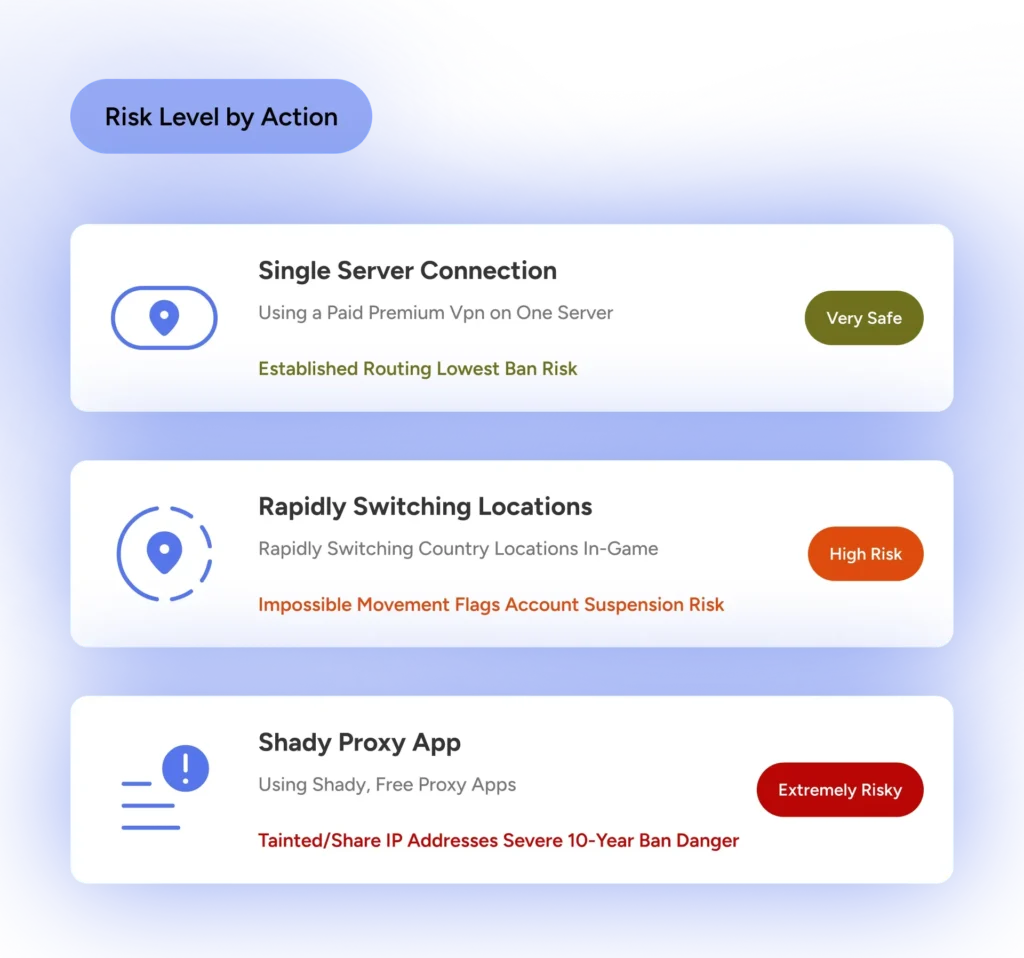
There is also the infamous region lock timer to keep in mind. PUBG Mobile limits how often you can manually change your primary gameplay region in the settings menu, often locking you in for 60 to 90 days. If you use a VPN to jump into a foreign event center, make sure you don’t accidentally confirm a permanent region migration unless you actually want to play on those servers for the next three months.
Full VPN vs. Gaming Booster: Which Do You Need?
Before dropping money on a subscription, you need to understand that a full VPN and a specialized game booster like ExitLag or GearUP do two completely different jobs. Picking the wrong one means wasting cash on features you won’t use or missing out on the exact tool required for your situation.
A traditional VPN acts as a secure, encrypted tunnel for your entire phone or tablet. It hides your real location, encrypts every byte of data, and makes PUBG Mobile think you are sitting in Turkey, Japan, or the US. This makes a full VPN essential if you want to bypass regional blocks, grab localized events, or shield your connection from annoying ISP bandwidth throttling.
On the flip side, game boosters operate as Gamers Private Networks (GPNs). They do not hide your identity or encrypt your browsing data. Instead, apps like GearUP Booster and ExitLag actively monitor internet pathways in real time, constantly swapping your game packets onto dedicated, low-congestion routes directly to Tencent’s servers.
| Feature / Capability | Full VPN (e.g., HidzoVPN) | Gaming Route Optimizer (e.g., GearUP) |
|---|---|---|
| Primary Focus | Total online privacy, encryption, & location spoofing | Pure ping stabilization, multi-path routing, & zero packet loss |
| Traffic Encrypted | All device traffic (System-wide) | None (Only optimizes game data packets) |
| IP Address Masking | Yes (Hides real IP behind a remote server) | No (Your public IP remains unchanged) |
| Unlock Regional Events & Skins | Yes (Bypasses geo-blocks to enter foreign shops/events) | No (Cannot change your store or event location) |
| Buy Regional UC Cheaply | Yes (Accesses localized currency stores like Turkey/Egypt) | No (Locked to your local currency/region) |
| Fix ISP Bandwidth Throttling | Yes (Encryption prevents ISP from detecting game traffic) | Partial (Optimizes routes, but ISP can still throttle unencrypted data) |
| Multi-Path UDP Game Routing | Standard (Routes through single chosen VPN server node) | Advanced (Simultaneously sends packets across multiple paths to avoid drops) |
Bottom Line: If your primary objective is entering regional event centers or changing your PUBG Mobile store region, grab a Full VPN. If you already play on your home server and simply want to stop lag spikes, jitter, and rubberbanding, a Game Booster is built purely for that mission.
Best VPN Protocol for PUBG: WireGuard, XTLS Reality, Lightway, & OpenVPN
Your choice of VPN protocol dictates both your connection speed and encryption overhead. Selecting the wrong protocol can add up to 50ms of unnecessary delay.
- WireGuard: The gold standard for mobile gaming. Uses ultra-lean cryptography to deliver low ping and instant reconnection times when switching between Wi-Fi and 5G.
- XTLS Reality / VLESS (HidzoVPN): The best protocol for bypassing heavy firewalls and aggressive ISP throttling. It disguises encrypted VPN packets as ordinary HTTPS web browsing, preventing network firewalls from detecting or slowing down your game traffic.
- Lightway (ExpressVPN): ExpressVPN’s custom protocol optimized specifically for smartphones. Handles cellular network drops seamlessly without disconnecting your PUBG lobby.
- OpenVPN (UDP/TCP): Legacy protocol with heavy encryption overhead. Avoid OpenVPN for PUBG whenever possible—its processing demands increase ping and drain your smartphone battery rapidly.
Which VPN Server Should You Choose for PUBG?
Picking the right server destination depends entirely on your objective for that gaming session.
| Goal | Target Server Location | Key Benefit |
|---|---|---|
| Lowest Ping (Ranked) | City Closest to You | Shortest Packet Path |
| Cheap UC / Discounts | Turkey / Egypt | Regional Store Prices |
| Anime Skins & Events | Taiwan / Thailand | Crossover Giveaways |
| Bypass Network Blocks | Nearby Neighbor Country | Avoids Firewall Locks |
- For Lowest Latency in Ranked Play: Choose a VPN server located in the same city or nearest region as your actual physical location. This ensures the VPN acts purely as a routing optimizer without adding geographic physical distance.
- To Access Exclusive Events & Skins: Choose a server in Turkey, Taiwan, Thailand, or Egypt. Connect before launching PUBG Mobile to access localized event windows.
- To Bypass ISP Throttling or Local Firewalls: Choose the closest server node outside your ISP’s restrictive firewall zone.
How to Set Up a VPN for PUBG Mobile (Android & iOS)
Setting up your VPN properly ensures that anti-cheat systems do not flag your connection.
1. Download and Install Your Preferred VPN
Stick to trusted official app stores.
Download your chosen VPN app (e.g., HidzoVPN, NordVPN) directly from the Google Play Store or Apple App Store. Avoid downloading third-party APKs from untrusted web sources.
2. Configure Fast Protocols and Split Tunneling
Optimize app settings before connecting.
Open the VPN settings menu. Select WireGuard, Lightway, or XTLS Reality as your active protocol. If available, enable Split Tunneling so only PUBG Mobile traffic is routed through the VPN.
3. Connect to Your Target Server Node
Activate your VPN before launching the game.
Select the appropriate server location based on your goal (nearest server for low ping, foreign server for cosmetics) and tap Connect.
4. Launch PUBG Mobile and Verify Connection
Check the lobby ping indicator.
Open PUBG Mobile. Verify that your ping indicator in the bottom-left corner of the lobby remains stable before joining a ranked match.
Battery & Background Restrictions: Keep Your Mobile VPN Alive
Mobile operating systems like Android (Samsung, Xiaomi, Pixel) and iOS aggressively kill background apps to conserve battery. If your OS suspends your VPN process mid-game, your connection will drop instantly, sending you back to the loading screen or causing severe desync.
Fixing Battery Restrictions on Android:
- Open Settings > Apps > select your VPN App.
- Tap Battery or Power Management.
- Change the setting from Optimized or Restricted to Unrestricted.
- Open your recent apps menu, long-press the VPN app icon, and select Lock App to prevent auto-clearing.
Fixing Battery Restrictions on iOS (iPhone/iPad):
- Go to Settings > General > Background App Refresh.
- Ensure Background App Refresh is toggled ON for your VPN app.
- Disable Low Power Mode while gaming, as it throttles network refresh rates in the background.
How to Use a VPN for Regional PUBG Events, Cheap UC & Exclusive Skins
One of the biggest perks of running a VPN on PUBG Mobile is hopping virtual borders to grab regional loot. Tencent frequently runs exclusive crossover events, localized discount shops, and free skin giveaways that are locked to specific countries. If you are sitting in North America or Europe, you might be missing out on massive sales happening halfway across the globe.
Top Regions for PUBG Mobile Cosmetics & Discounts:
- Turkey: Renowned among skin collectors for having some of the cheapest localized UC pricing and frequent bonus recharge events.
- Taiwan & Southeast Asia (Thailand, Indonesia): The go-to hubs for exclusive anime collaborations, special mini-game events, and unique weapon finishes.
- Egypt & Middle East: Famous for regional holiday events that hand out free crate coupons, silver fragments, and limited-time outfits.
How to Claim Regional Rewards Safely:
- Close PUBG Mobile completely and wipe it from your recent apps screen.
- Connect your VPN to the target country (e.g., Turkey or Taiwan).
- Open PUBG Mobile and navigate to the Events or Local Shop tab.
- Claim your localized event rewards, spin the regional wheels, or check shop prices.
- Disconnect the VPN before entering a live ranked match to avoid high ping.
A Crucial Warning on UC and Region Changes: Viewing regional event tabs with a VPN is totally fine, but changing your permanent account location in the settings menu triggers a 60-day cooldown lock. Additionally, UC purchased in one specific regional storefront may not transfer if your primary account is linked to a restricted server version like Japan or Korea. Always test with a tiny UC pack before making major purchases!
PUBG VPN Not Working? Troubleshooting Decision Tree
Running into technical roadblocks right as you queue up for a match is frustrating. Use this step-by-step diagnostic workflow to isolate and fix connection problems fast:
Step-by-Step Troubleshooting Guide:
- High Ping, Desync, andRubberbanding
- The Cause: Heavy OpenVPN encryption or a server node located thousands of miles away.
- The Fix: Switch your VPN protocol to WireGuard or XTLS Reality. Choose a server node geographically closer to your actual game server.
- Stuck on “Server Did Not Respond” or Loading Screen
- The Cause: The game client detected a mid-game IP address change, or your connection dropped during matchmaking handoff.
- The Fix: Force-close PUBG Mobile, disconnect your VPN, toggle Airplane Mode ON for 5 seconds to reset your network interfaces, reconnect the VPN, and then restart the game.
- Matchmaking Takes Forever or Times Out
- The Cause: Your chosen server region has a strict ping limit (over 200ms), or matchmaking split tunneling is misconfigured.
- The Fix: Check your current ping indicator in the game lobby. If it exceeds 180ms, switch to a closer VPN server node or disable split tunneling to route all game traffic through a clean IP path.
- Random Mid-Match Disconnections
- The Cause: OS battery optimization killing the VPN process in the background.
- The Fix: Set your VPN battery permissions to Unrestricted in Android settings, or verify Background App Refresh is enabled on iOS.
Conclusion: Mastering Your Connection in PUBG Mobile
A fast, properly configured VPN is an invaluable tool for PUBG Mobile players. Whether your goal is fixing bad ISP routing, bypassing aggressive bandwidth throttling, or unlocking regional skin events in Turkey and Taiwan, selecting a lightweight, high-speed VPN provider ensures you stay ahead of the competition.
Keep your protocols modern (WireGuard or XTLS Reality), select server nodes strategically, and make sure background battery restrictions don’t interrupt your path to a Winner Winner Chicken Dinner!
FAQs
NordVPN ranks as the top overall choice due to its ultra-fast NordLynx protocol, minimal latency impact, and high server density across key PUBG match regions. For budget-conscious players facing aggressive ISP blocks, HidzoVPN is an ideal alternative thanks to its lightweight app and anti-detection XTLS Reality protocol.
Yes, but only under specific network conditions. A VPN cannot break physics to shorten physical distance, but it reduces ping if your default ISP routes game packets inefficiently or deliberately throttles mobile gaming bandwidth. Connecting to a VPN server optimized for direct routing straight to Tencent’s data centers circumvents these bottlenecks.
Using a premium VPN for connection stability will not get you banned. However, account suspensions occur if you use cheap, blacklisted free VPNs that share IP addresses with cheaters, or if you rapidly hop between foreign servers while the game app is actively running. Always switch on your VPN before launching PUBG Mobile.
Your VPN app displays the ping between your mobile device and the local VPN server. The ping shown inside PUBG Mobile measures the total round-trip latency from your phone, through the VPN tunnel, to Tencent’s physical game host server, and back.
Yes. Connecting to regional servers in countries like Turkey, Taiwan, or Egypt unlocks localized event centers, exclusive crossover cosmetics, and discounted UC packs. Remember that viewing event tabs is safe, but permanently changing your primary match region in the settings menu triggers an irreversible 60-to-90-day cooldown timer.
Most free VPNs throttle speeds, impose data caps, and sell user logs. The rare safe option is Proton VPN, which offers truly unlimited free data without bandwidth caps. Alternatively, lightweight freemium services like HidzoVPN offer clean free access without compromising security.
Article by
-
 Sam Clarke
Sam is a cybersecurity and online privacy writer dedicated to making complex network protection accessible, practical, and engaging.




Share your thoughts
Add a comment