What Is the Best Region for eFootball and Can a VPN Improve Your Connection?
You can build the perfect squad, master your formations, and have your game plan ready to go. But if your connection is lagging behind, even…
Protect your online privacy and security
Fast, private, and easy to use, get Hidzo on your device and browse freely with one tap.
Get HidzoVPN You can build the perfect squad, master your formations, and have your game plan ready to go. But if your connection is lagging behind, even your best players may look like they forgot how to play football.
Before you pack your virtual bags and move your team halfway around the world, there’s something you should know: the closest region isn’t automatically the best one. Let’s look at how eFootball regions and servers actually work, what can affect matchmaking and ping, and where a VPN may fit into the game plan.
Table of Contents
What Is the Best Region for eFootball?
If you’ve been reading our VPN articles, you know that any question with the word “best” rarely comes with a one-word answer, and more often than not the answer is “it depends.”
There isn’t one best region for every eFootball player. Generally, you want a region that gives you a fast, stable connection to an available game server. A nearby server can often provide better connection quality, but distance isn’t the only thing that matters.
Your location and network infrastructure can also play a role. In fact, KONAMI notes that in some cases, a game server farther away can provide a higher-quality connection than one that’s closer. That means the best connection for someone playing in Europe may be very different from the best option for a player located in the Middle East, Asia, or North America.
So, instead of looking for one winning region on the map, think closer to home first. Then consider how well the connection performs.
Quick-Start Connection Checklist
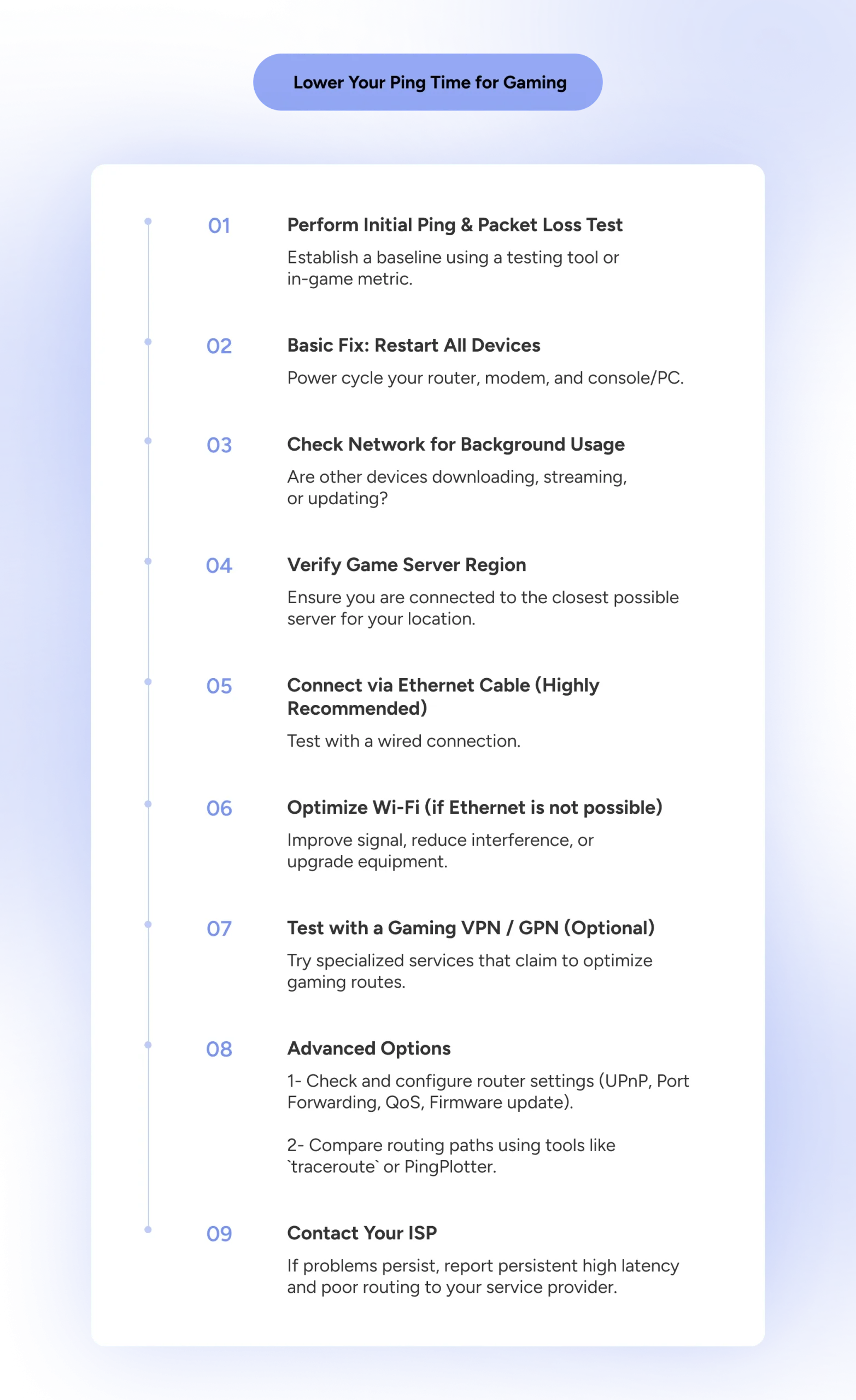
If you’re looking for a fast lineup change to cut down input delay before diving into the deep technical stuff, here is your quick-start checklist:
- Plug in an Ethernet cable: Wi-Fi interference is the single biggest cause of sudden frame drops and packet loss.
- Switch to a modern VPN protocol: If you run a VPN, choose lightweight protocols like WireGuard or Xray. Older protocols add encryption bloat that spikes your ping.
- Tweak your in-game search filter: If you’re stuck waiting in queue, broaden your matchmaking settings from “Search nearby area only” to “Gradually expand search area.”
- Test for ISP throttling: If your connection slumps during evening peak hours, test a VPN server close to your location to bypass provider traffic shaping.
How eFootball Regions and Servers Work
Before looking for the best eFootball server, it helps to understand how the game gets you there. eFootball uses different connection methods depending on the type of online match you’re playing.
Some modes, including Quick Match and 1v1 Friend Match, can use a peer-to-peer (P2P) connection, where players connect directly to each other. Competitive modes, such as eFootball League and most Challenge Events, use a client-server connection. In those matches, eFootball selects a game server based on factors such as the players’ locations and network infrastructure.
Region and Server Aren’t the Same Thing
Here’s where things can get a little confusing. Your Country/Region setting isn’t necessarily the location of the game server handling your match. Your account region and the physical server used for a match are two different things.
Think of it as three separate pieces:
- Where you’re physically located
- The Country/Region associated with your account
- The game server handling your match
You could be physically located in one country, have a particular Country/Region listed on your account, and still have your match handled by a game server somewhere else.
| Location | What It Means | Can You Choose It? | Example |
|---|---|---|---|
| Your Physical Location | Where you’re playing eFootball from | Not unless you physically move | You’re playing from Buenos Aires, Argentina |
| Country/Region of Residence | The country or region associated with your eFootball account | Yes, but restrictions apply | Your account is set to Argentina |
| eFootball Game Server | The server/data center handling an applicable online match | Not directly | eFootball uses a game server in São Paulo, Brazil |
You also don’t simply pick an eFootball game server from a list the way you might choose a server in a VPN app. For applicable online matches, eFootball determines the game server it considers optimal for the connection.
So, while we’re going to talk about the “best region” and “best server” throughout this guide, keep that distinction in mind. Changing one doesn’t necessarily mean you’re changing the others.
On a related note:
How to Choose the Best VPN Server Location for Any Task
eFootball Server Locations
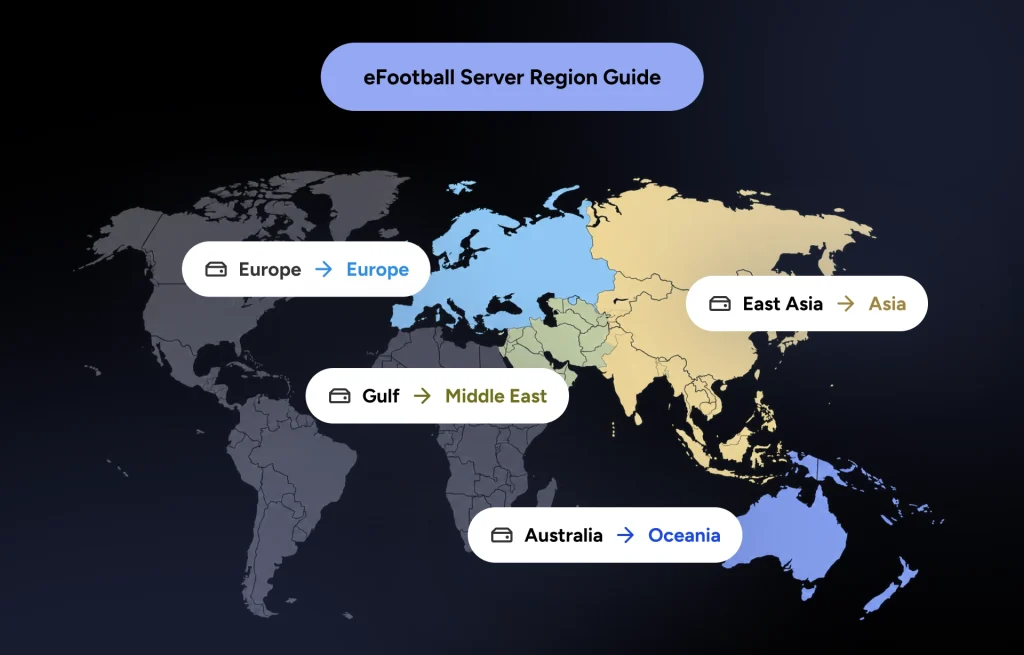
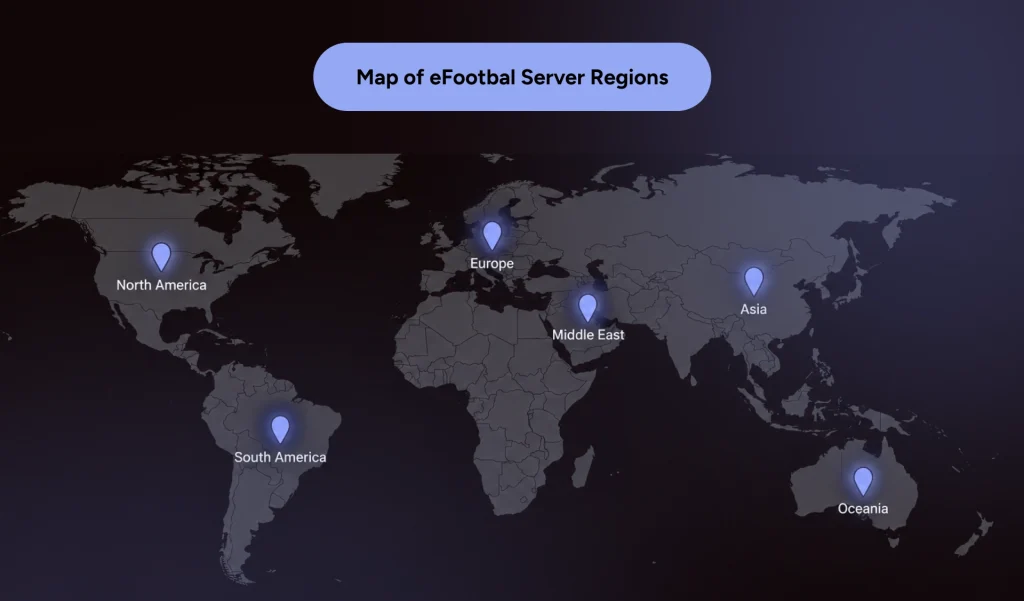
KONAMI installs eFootball game servers in data centers located in cities around the world. Its current server locations are grouped into three broad categories: Europe/Africa, The Americas, and Asia/Oceania. As stated earlier, these server groupings are separate from the Country/Region of Residence associated with your account.
| KONAMI Region | eFootball Server Locations |
|---|---|
| Europe/Africa | Saint-Ghislain, Hamina, Paris, Frankfurt, Tel Aviv, Turin, Milan, Eemshaven, Warsaw, Madrid, Zurich, London, Johannesburg |
| The Americas | São Paulo, Santiago, Querétaro, Montreal, Toronto, Ashburn (Virginia), Moncks Corner (South Carolina), Council Bluffs (Iowa), Los Angeles (California), Oregon, Salt Lake City (Utah), Las Vegas (Nevada) |
| Asia/Oceania | Melbourne, Sydney, Mumbai, Delhi, Jakarta, Jurong West, Dammam, Doha, Tokyo, Osaka, Hong Kong, Seoul, Changhua County, Thailand, Malaysia |
When milliseconds can make a difference on the field, finding the connection that keeps ping low becomes part of the game plan. You can’t draft an eFootball game server into your starting 11, but knowing who’s on the roster is the secret to a lag-free match.
How to Find the Best eFootball Server for You
Finding the best eFootball server for your connection may take a little trial and error. Instead of assuming the nearest server will always give you the best experience, pay attention to how your matches perform.
Start with your regular internet connection and use it as a baseline. Look for signs of a good connection, such as responsive gameplay, fewer delays, and a stable match from kickoff to the final whistle.
You can also improve your chances of a better connection by:
- Using Ethernet when possible: A wired connection can be more stable than Wi-Fi.
- Checking your home network: Downloads, streaming, and other bandwidth-heavy activity can affect your connection while you’re playing.
- Playing at different times: Network congestion can change throughout the day, so a connection that struggles during peak hours may perform better later.
- Testing a VPN connection: If poor routing appears to be part of the problem, you can compare your regular connection with a VPN server relatively close to you or the game’s server infrastructure. A VPN may provide a different route, but don’t assume it will automatically lower your ping.
- Comparing performance: Don’t judge a connection based on one match. Test it more than once and stick with the setup that consistently gives you the most stable experience.
- Adjusting in-game matchmaking settings: If finding opponents feels like waiting for extra time to end, check your in-game search filters. Switching from “Search nearby area only” to “Gradually expand search area” allows KONAMI’s system to expand its search radius, helping you find suitable matches faster without severely sacrificing your ping.
Test a few options and see which one performs best when it’s game time. The rest can stay on the bench.
Best eFootball Region for Lowest Ping
Think of ping as your connection’s reaction time. It’s measured in milliseconds (ms) and represents how long it takes data to travel between your device and the game connection and back again. Generally, the lower the ping, the more responsive an online match can feel.
KONAMI notes that network infrastructure can sometimes make a farther server the better-performing option. Your ISP’s routing, network congestion, Wi-Fi connection, and the infrastructure between you and the game server can also influence latency. Instead of relying on distance alone, pay attention to the connection you’re getting.
Sometimes the map can point you in the right direction, but your ping time gets the final say.
Best eFootball Region for Matchmaking
Finding the lowest ping is only half the match. You still need someone on the other side of the field.
When it comes to matchmaking, the number of available players matters, but eFootball also considers other matchmaking conditions. For example, KONAMI says eFootball League has been adjusted so players around the same ability level are matched more frequently.
Server availability also plays a role. Interestingly, more servers aren’t always better for matchmaking. KONAMI explains that adding too many servers can spread players out, making it take longer to find a suitable opponent and set up a match.
That means good matchmaking is a balancing act. You want enough nearby server infrastructure to support a quality connection, but you also need a sufficient pool of suitable opponents to keep matchmaking moving.
Does Changing Region Reduce Ping in eFootball?
If only lowering your ping were as easy as changing a setting and calling it a day. Unfortunately, changing your eFootball Country/Region setting doesn’t automatically give you a faster connection.
For online matches that use eFootball’s client-server connection, the game selects a server based on factors such as player location and network infrastructure. Connection quality still depends on the server selected for the match and the network conditions between you and that server.
Can You Change Regions in eFootball?
Yes, but there are some restrictions. On eFootball mobile, KONAMI allows you to check or change your Country/Region by going to:
Extras → User Information → User Personal Information → Country/Region
Your eFootball mobile region is like a committed short-term relationship. Once you make your choice, you’re sticking with it for 180 days. Even 90 Day Fiancé gives you an earlier decision point. Just when you’re starting to get comfortable, you’re free to consider another region.
KONAMI warns against accessing the game from countries or regions where eFootball isn’t officially available, so check the game’s availability and rules before making a change.
Can a VPN Change Your eFootball Region?
A VPN can change your virtual location, but don’t expect it to hand you the keys to eFootball’s server room.
When you connect to a VPN server, websites and online services generally see the VPN server’s IP address instead of your real public IP address. For example, if you’re in the United States and connect to a VPN server in Germany, your connection can appear to be coming from Germany.
However, that doesn’t automatically change the Country/Region saved to your eFootball account, nor does it give you direct control over which eFootball game server handles your match.
A VPN can also change the route your internet traffic takes on its way to the game. In some circumstances, that different route may perform better, while in others it can add latency. That’s why changing your VPN location shouldn’t be treated as a guaranteed shortcut to a different eFootball server or lower ping.
ISP Throttling and DDoS Protection
Internet Service Providers (ISPs) often monitor network traffic and intentionally throttle bandwidth-heavy data or certain UDP game packets during peak hours.
If your eFootball matches feel buttery smooth at 10 AM but laggy at 8 PM, your ISP might be throttling your connection. Encrypting your traffic through a VPN hides your gaming activity, preventing your provider from throttling your game traffic.
Choosing the Right VPN Protocol for eFootball
Look for modern, lightweight VPN protocols such as WireGuard or Xray. These protocols carry minimal encryption overhead, ensuring data travels back and forth with as little delay as possible. On mobile devices, lightweight protocols also keep your phone from turning into a hot brick or draining your battery mid-match.
Optimize Your Connection on Mobile
HidzoVPN is a VPN app that offers diverse server locations and modern protocols that minimize VPN overhead, and thanks to its lightweight build, it won’t take up much of your device’s resources. Also, the pricing is affordable for a mobile gamer’s budget.
How to Set Up a VPN for eFootball on Consoles (PlayStation & Xbox)
While mobile and PC players can simply download a VPN app, play, and disconnect, console players on PlayStation or Xbox have to take a slightly different route since consoles don’t support native VPN apps.
If you play eFootball on a console, you have two simple ways to route your connection:
- The Router Method: Install or configure the VPN directly on your home Wi-Fi router. Every device connected to that network, including your PlayStation or Xbox, automatically routes through the VPN tunnel.
- The Hotspot / Bridge Method: Connect your PC, Mac, or laptop to the VPN, then share that secure connection to your console using an Ethernet cable or a local Wi-Fi hotspot.
While it takes a couple of extra minutes to set up, bridging your console connection gives you the exact same routing and anti-throttling benefits enjoyed by PC and mobile players.
FAQs
There isn’t one best region for every player. Start with nearby server infrastructure, but let your actual connection quality and gameplay performance guide you.
Usually, nearby servers are a good place to start, but distance isn’t the only factor. ISP routing, congestion, and network infrastructure can also affect ping.
KONAMI currently lists game servers in Dammam and Doha, with Tel Aviv listed in its Europe/Africa group. Which performs best depends on your location and connection.
KONAMI lists European servers in cities including Paris, Frankfurt, London, Madrid, Milan, Warsaw, and Zurich. The best-performing option depends on your location and network connection.
Yes, but choose carefully. As of September 30, 2026, KONAMI says your Country/Region of Residence and where you’re accessing the game from may affect eligibility for certain eSports tournament events.
A VPN can change your virtual location, but it doesn’t automatically change the Country/Region registered to your account or let you choose a particular eFootball game server.
A VPN may improve routing in some situations, but it can also add latency, so compare your regular and VPN connections to see which performs better.
Since consoles don’t support direct VPN apps, you can either install the VPN on your Wi-Fi router or connect your console to a PC/laptop that is running a shared VPN connection via Ethernet or Wi-Fi hotspot.
WireGuard and Xray are the best protocols for online gaming. They feature lightweight encryption, minimal latency overhead, and quick reconnection times if your connection stutters.
Article by
-
 Sam Clarke
Sam is a cybersecurity and online privacy writer dedicated to making complex network protection accessible, practical, and engaging.



Share your thoughts
Add a comment