VPN for Home WiFi: Stop ISP Snooping, Secure IoT Devices, and Protect Your Entire Household
There is a comfortable fiction most people tell themselves when sitting on their couch, connected to their personal wireless network. They look at the little…
Protect your online privacy and security
Fast, private, and easy to use, get Hidzo on your device and browse freely with one tap.
Get HidzoVPNTable of Contents
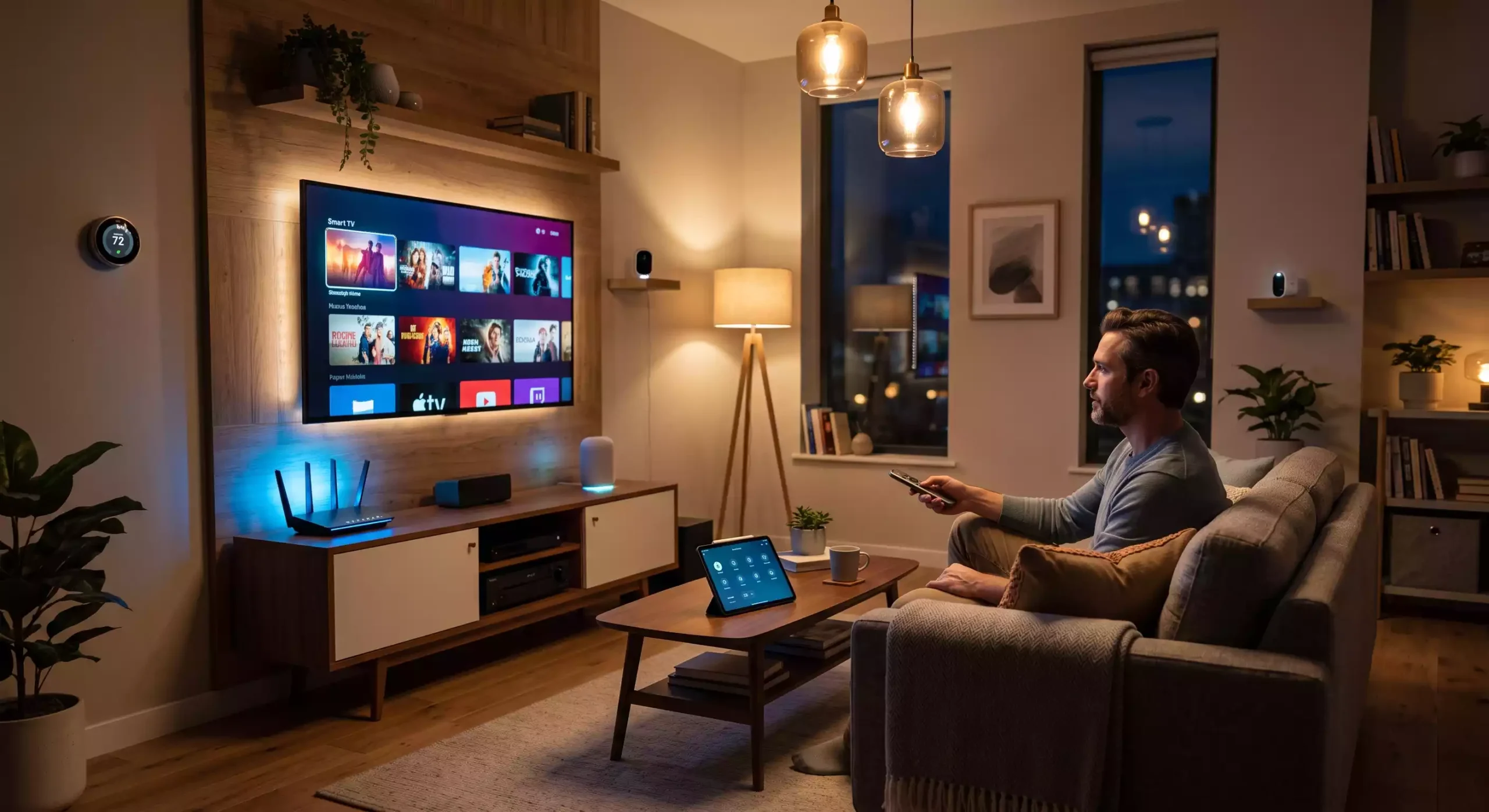
There is a comfortable fiction most people tell themselves when sitting on their couch, connected to their personal wireless network. They look at the little padlock icon next to their Wi-Fi settings and assume their private life stays inside their four walls.
The truth is slightly less comforting. Your home router encrypts data traveling between your device and the router itself, keeping your neighbor from stealing your bandwidth. Beyond that router point, your entire digital footprint flows openly into your Internet Service Provider’s network, fully visible and constantly logged.
Understanding how to use a vpn for home wifi isn’t about paranoia; it is about digital hygiene. If you would not leave your physical mail sitting on the front curb for passersby to read, you probably shouldn’t hand your complete browsing history over to companies that profit from monitoring it.
The Best VPNs for Home WiFi: Top Privacy Picks
Choosing the best vpn for home wifi means looking past glossy advertising and assessing real network performance. A proper home VPN must process high bandwidth without overheating your router or slowing down family streaming, offer rock-solid device compatibility, and uphold strict zero-logs policies.
Below is an in-depth breakdown of seven top-tier options, ranging from consumer-friendly powerhouses to specialized privacy tools.
1. HidzoVPN (Best Overall Balance of Speed, Simplicity & Home Value)
If your main goal is to protect a busy household without dealing with complex network configurations or steep subscription fees, HidzoVPN is a standout choice. It is built specifically around lightweight, smart VPN protocols that reduce CPU overhead, keeping latency low even on high-traffic Wi-Fi networks.
- Best For: Families, non-technical users, and households prioritizing smooth 4K streaming and low-ping gaming over deep manual configuration.
- Performance & Protocols: Employs smart, speed-optimized protocols designed to preserve your baseline internet connection speed with virtually no noticeable lag.
- Router & Compatibility: Offers lightweight background apps for mobile, desktop, and smart TVs, along with simple profile exports for home routers.
- Standout Feature: Extremely stable connection recovery featuring a built-in Kill Switch that automatically re-establishes your encrypted tunnel if your home Wi-Fi drops out temporarily.
- Pricing & Value: Remarkably budget-friendly VPN plans (includes a 7-day free trial), covering up to 5 simultaneous devices.
- Buy This If: You want a straightforward, affordable, high-speed wifi vpn that secures your household devices without requiring an advanced IT degree to set up.
2. Mullvad VPN (Best for Absolute Anonymity & Technical Simplicity)
Mullvad is widely regarded as the gold standard for privacy purists who want zero personal data attached to their VPN account.
- Best For: Privacy advocates who want a simple, flat-rate pricing model without being locked into multi-year contracts.
- Performance & Protocols: Built from the ground up to support WireGuard natively, providing blazing-fast speeds on home fiber connections.
- Router & Compatibility: Exceptional router support. Mullvad provides an easy WireGuard configuration generator that lets you flash individual configuration files directly to AsusWRT, OpenWRT, or GL.iNet routers.
- Standout Feature: You sign up without an email address, password, or name. Mullvad generates a random 16-digit account number, and you can even pay via cash or crypto for complete anonymity.
- Pricing & Value: A flat €5 (approx. $5.40) per month, whether you stay for 30 days or 3 years, covering up to 5 devices.
- Buy This If: You refuse to hand over your personal email, hate subscription traps, and want clean, high-speed WireGuard performance across your entire network.
3. Proton VPN (Best for Built-in Network Security & Swiss Jurisdiction)
Headquartered in Switzerland, Proton VPN combines strict Swiss privacy laws with heavy-duty infrastructure, making it a powerful defensive choice for home networks.
- Best For: Households looking to block ads, phishing links, and malware at the router level before they reach kids’ devices.
- Performance & Protocols: High-speed server network supporting WireGuard and OpenVPN, featuring a proprietary “VPN Accelerator” technology that optimizes routing paths over long distances.
- Router & Compatibility: Excellent support for home routers, complete with detailed step-by-step installation guides for DD-WRT, AsusWRT, and Tomato firmware.
- Standout Feature: NetShield Ad-Blocker. When Proton is installed on your Wi-Fi router, NetShield acts as a network DNS filter, blocking harmful scripts and intrusive ads across every TV, phone, and tablet connected to your network.
- Pricing & Value: Standard paid plans start at roughly $4.49 to $4.99 per month on multi-year commitments, covering up to 10 simultaneous devices.
- Buy This If: You want enterprise-grade DNS ad-blocking for all your smart devices and place a premium on audited, open-source software.
4. IVPN (Best for Extreme Transparency & Ethical Operations)
IVPN is an independent, heavily audited provider that avoids aggressive affiliate marketing and focuses entirely on radical user privacy.
- Best For: Tech-savvy users who demand regular independent security audits, open-source apps, and strict operational transparency.
- Performance & Protocols: Pure, lightweight WireGuard implementation delivering fast speeds and low CPU load, ideal for low-power home routers.
- Router & Compatibility: Full support for custom router firmware, complete with straightforward key generation tools for OpenWRT and pfSense setups.
- Standout Feature: Multi-hop routing (chaining traffic through two separate server locations) and automatic WireGuard key rotation to prevent long-term tracking.
- Pricing & Value: Flexible tiers starting at $6.00 per month for IVPN Standard (2 devices) up to $10.00 per month for IVPN Pro (7 devices, includes multi-hop and port forwarding).
- Buy This If: You are willing to pay a slight premium for an ethical, highly transparent provider that handles internal network security like an enterprise firewall.
5. AirVPN (Best for Power Users & Network Customization)
Founded and maintained by hacktivists and networking experts, AirVPN is designed for users who want total control over their network routing.
- Best For: Advanced home users, homelab enthusiasts, and people running home file servers or torrent clients.
- Performance & Protocols: Supports OpenVPN and WireGuard with real-time server statistics (load, bandwidth, latency) so you can pick the exact server node you need.
- Router & Compatibility: Highly compatible with custom router software like DD-WRT, Tomato, pfSense, and OPNsense, offering granular configuration files.
- Standout Feature: Free persistent port forwarding. AirVPN allows you to open ports easily, which is crucial if you need incoming connections for a local NAS, game server, or P2P client behind your router.
- Pricing & Value: One of the most wallet-friendly options available when bought long-term, dropping as low as €1.79 (approx. $1.95) per month on 3-year plans.
- Buy This If: You run home servers or torrent clients and need advanced port forwarding alongside absolute control over your network parameters.
6. Windscribe (Best for Custom Control & Household DNS Filtering)
Windscribe is a versatile provider that mixes powerful customization with a user-friendly approach, making it fantastic for practical everyday home management.
- Best For: Households looking to balance streaming capabilities with granular content filtering for different family members.
- Performance & Protocols: Excellent speeds across WireGuard and OpenVPN protocols, with solid capabilities for unblocking regional streaming libraries on smart TVs.
- Router & Compatibility: Supports custom router configuration downloads for all major firmware, plus dedicated browser extensions and desktop apps.
- Standout Feature: ROBERT DNS Control. This server-side tool lets you block domain categories (ads, trackers, adult sites, gambling, social networks) right at the connection level for all connected household devices.
- Pricing & Value: Offers a unique “Build-a-Plan” option starting at just $3.00 per month, or a full Pro plan for around $5.75 per month with unlimited device connections.
- Buy This If: You want a flexible, budget-friendly VPN that gives you fine-tuned control over what content gets blocked across your home Wi-Fi network.
7. Surfshark (Best for Large Families Needing Unlimited Device Coverage)
Surfshark has built its reputation on offering a feature-rich experience that can be installed on as many devices as your household owns.
- Best For: Large families with dozens of phones, tablets, laptops, and streaming sticks who prefer using apps over setting up a router.
- Performance & Protocols: Consistently high connection speeds via WireGuard, making it well-suited for simultaneous 4K streams in different rooms.
- Router & Compatibility: Fully supports router setups via WireGuard and OpenVPN, but its real strength lies in its easy-to-use apps across all OS platforms.
- Standout Feature: Unlimited simultaneous connections on standard plans, paired with a CleanWeb ad/malware blocker and double-hop server routing options.
- Pricing & Value: Long-term 2-year plans typically drop to around $2.19 to $2.49 per month, offering high value for multi-device households.
- Buy This If: You have a massive number of devices in your house and want a simple “install-on-everything” solution without hitting connection caps.
Quick Comparison Matrix to Guide Your Purchase
| Provider | Core Strength | Router Setup Difficulty | Port Forwarding? |
| HidzoVPN | Ultra-fast speeds & low latency | Easy | No |
| Mullvad | Total account anonymity | Moderate | No |
| Proton VPN | Swiss legal protection & DNS filtering | Moderate | Limited |
| IVPN | Open-source transparency & audit record | Moderate to Advanced | Yes (Pro plan) |
| AirVPN | Advanced networking & remote access | Advanced | Yes (Included) |
| Windscribe | Custom DNS blocking (ROBERT) | Easy to Moderate | Yes (Ephemeral) |
| Surfshark | Unlimited device app installations | Easy | No |
Why Use a VPN on Your Home Network?
Many users ask a simple question: Do I need a vpn for home wifi if I already trust my router password? The answer comes down to what happens after your signal leaves your living room.
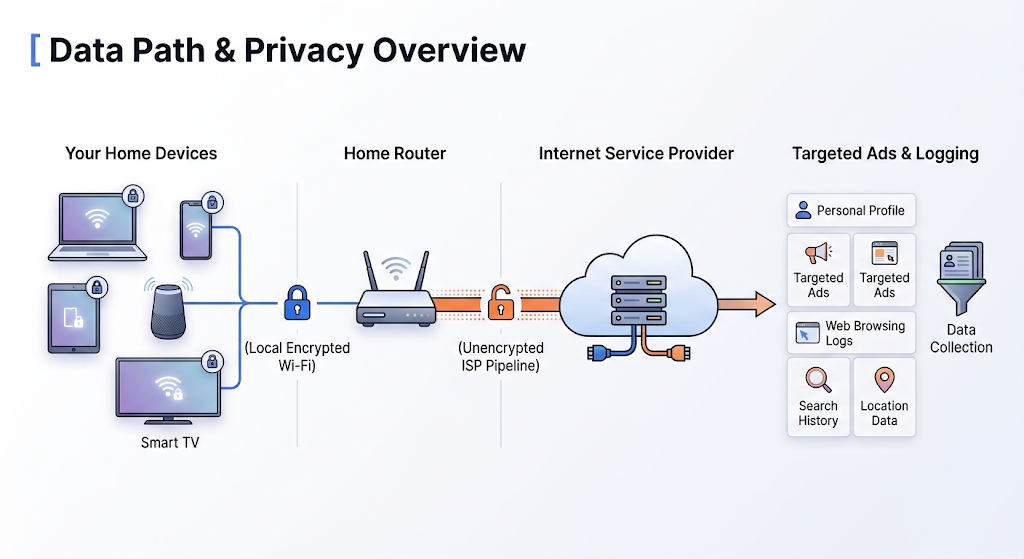
When you add a home wifi vpn, that second pipeline changes completely:
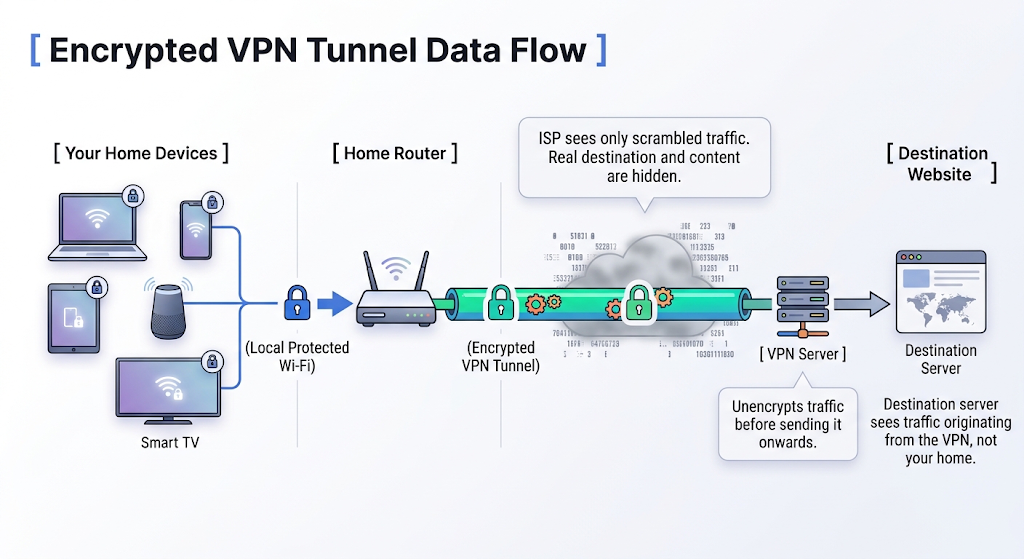
Here are the primary reasons why running a VPN inside your private residence makes sense:
Stopping ISP Surveillance and Data Monetization
In many regions, ISPs can legally monitor, collect, and monetize your browsing history. They track the domain names you visit, the times you connect, and your bandwidth usage patterns. A secure home wifi network blocks your ISP from reading this traffic, replacing your personal browsing history with an unreadable, encrypted tunnel.
Continue reading:
Does ISP Track Me? Strategies to Outsmart Your Provider’s Watchful Eyes
Preventing Targeted Bandwidth Throttling
Have you ever noticed your stream dropping to low quality during peak evening hours, right when you start watching a high-definition movie or gaming online? ISPs routinely inspect traffic types and slow down heavy data streams like torrents, 4K video, or competitive gaming packets. Encrypting your traffic prevents your provider from identifying what you are doing, stopping selective throttling in its tracks.
On a related note:
Unlocking Geo-Restricted Media for the Whole House
Regional media libraries restrict content based on your IP address location. Operating a home internet vpn allows any device in your house, including streaming sticks that lack native browser tools, to access global media libraries smoothly.
On a related note:
Protecting Vulnerable Smart Home and IoT Devices
Your home likely hosts more than just laptops and phones. Smart TVs, security cameras, smart thermostats, and baby monitors sit on your Wi-Fi network 24/7. Many of these devices ship with weak default security features, making them prime targets for local network intrusion. Placing these devices under a VPN shield keeps your internal network protected from external exploits.
Router-Level VPN vs. Device-Level VPN: Which Setup Do You Need?
Before picking a provider, you should choose how you want to deploy your home vpn service. You have two main routes, each offering clear trade-offs.
| Feature | Device-Level VPN Apps | Router-Level VPN Setup |
|---|---|---|
| Setup Effort | Quick installation (1-tap setup) | Moderate (manual configuration) |
| Device Coverage | Secures individual app devices | Protects every connected device |
| Smart TV / IoT Support | Limited by app store availability | Universal coverage (no app needed) |
| Connection Switching | Instant server changes | Requires router dashboard access |
| Best For | Mobile users, individual laptops | Whole-home privacy, smart homes |
Option A: App-Based Setup (Device-Level)
This is the standard approach. You download an app on your computer, phone, or tablet, log in, and press connect.
- When to use it: Ideal if you only care about securing specific personal devices, like your work laptop or primary mobile phone, or when you want the freedom to turn your VPN on and off with a single click.
Option B: Router-Level Setup (Network-Wide Shield)
Instead of running individual apps, you install the vpn for home router directly onto your Wi-Fi router.
- When to use it: Best if you want a set-and-forget solution. Once configured, every device that connects to your Wi-Fi, from your guest’s phone to your smart fridge, routes through an encrypted tunnel automatically without consuming extra simultaneous connection slots.
A Quick Clarification: A Home VPN Client routes your outgoing household traffic through an external encrypted server to protect your privacy. A Self-Hosted Home VPN Server is something you host yourself to log back into your home computer while traveling. This guide focuses on the client side, which keeps your home Wi-Fi traffic private.
How to Set Up a VPN on Your Home Network
Setting up your vpn setup for home router or individual devices is simple once you know which method fits your workflow.
Device-Level Apps
- Pick a provider like HidzoVPN and create an account.
- Download the app directly onto your target device (Windows, macOS, Android, iOS, or streaming devices).
- Open the app, sign in, and select a recommended server close to your real physical location for optimal speeds.
- Toggle the connection switch to on.
Directly on Your Home Wi-Fi Router
- Log into your router’s admin panel by typing its gateway IP address (usually
192.168.1.1or192.168.0.1) into your browser. - Check if your router natively supports VPN client connections (popular firmware includes AsusWRT, OpenWRT, and DD-WRT).
- Download the OpenVPN or WireGuard configuration file from your VPN account dashboard.
- Upload the file into your router’s VPN client tab, enter your authentication details, and enable the connection.
Set up Split Tunneling
If you use smart home devices that need local communication, like wireless printers, local network storage (NAS), or casting devices like Chromecast:
- Open your VPN app’s settings menu and locate Split Tunneling.
- Select local network traffic or specific apps to bypass the VPN tunnel, allowing your phone to cast local media while maintaining an encrypted internet connection for external browsing.
Performance Optimization and Troubleshooting
Running a VPN on a high-speed fiber or cable line can occasionally cause small hiccups. Here is how to keep your speeds fast and your connections stable:
| Symptom | Likely Cause | Quick Fix |
|---|---|---|
| Speed Drop | High Protocol Overhead | Switch to WireGuard |
| Can’t Find Printer | Network Isolation | Enable Local LAN Access |
| Persistent CAPTCHAs | Shared Server IP | Change VPN Server City |
- Pick Modern Protocols: Always select fast protocols like WireGuard or modern smart protocol variations. Older protocols like OpenVPN can struggle to process gigabit speeds on standard home hardware.
- Select Nearby Servers: Unless you need to unlock content from a specific region, connect to the server city closest to your physical location to keep ping low.
- Fix Local Device Communications: If your computer cannot locate your wireless printer while the VPN is running, turn on “Allow Local Network Access” inside your VPN app settings.
Final Words
Protecting your household network does not require an advanced degree in cybersecurity. By pairing a capable router or device setup with a high-performance provider like HidzoVPN or other reliable privacy tools, you can easily take control of your personal data, prevent ISP snooping, and browse safely from every room in your house.
FAQs
Modern protocols add very little overhead, meaning high-speed home connections usually notice zero buffering issues during 4K streaming or casual online play.
No, a VPN works alongside your Wi-Fi password and router firewall by encrypting your outgoing internet traffic rather than managing local device access passwords.
Your ISP can see that you are sending encrypted data to a single IP address, but they cannot see the actual websites you visit or the data you send.
The most reliable method is configuring your VPN connection at the router level, which automatically encrypts traffic for every connected device on your network.
Yes, using a VPN on your personal home Wi-Fi router is completely legal in the vast majority of countries around the world.
Most operating systems disable network adapters to conserve power during sleep mode, but top apps like HidzoVPN feature auto-reconnect logic to restore protection immediately upon waking.
Free VPNs generally lack the bandwidth, router configuration support, and strict privacy standards required to handle an entire home network safely.
Split tunneling allows you to route specific app traffic through the encrypted VPN while letting local tasks like printing bypass the tunnel.
Article by
-
 Sam Clarke
Sam is a cybersecurity and online privacy writer dedicated to making complex network protection accessible, practical, and engaging.





Share your thoughts
Add a comment