Does ISP Track Me? Strategies to Outsmart Your Provider’s Watchful Eyes
Worrying about internet surveillance is not a case of paranoia; it’s being realistic. The fact is that ISPs are capable of monitoring your online activities…

Protect your online privacy and security
Fast, private, and easy to use, get Hidzo on your device and browse freely with one tap.
Get HidzoVPNTable of Contents
Worrying about internet surveillance is not a case of paranoia; it’s being realistic. The fact is that ISPs are capable of monitoring your online activities because they are the gatekeepers of your internet connection. But whether they actually do it is another story. To be fair, some network monitoring is necessary to maintain functionality as long as it’s limited to collective user data, not individual users.
What Exactly Is ISP Tracking?
You’re probably familiar with the Screen Time feature on your cell phone. It tracks and measures the time you’ve spent looking at your cell phone and gives you per-app statistics.
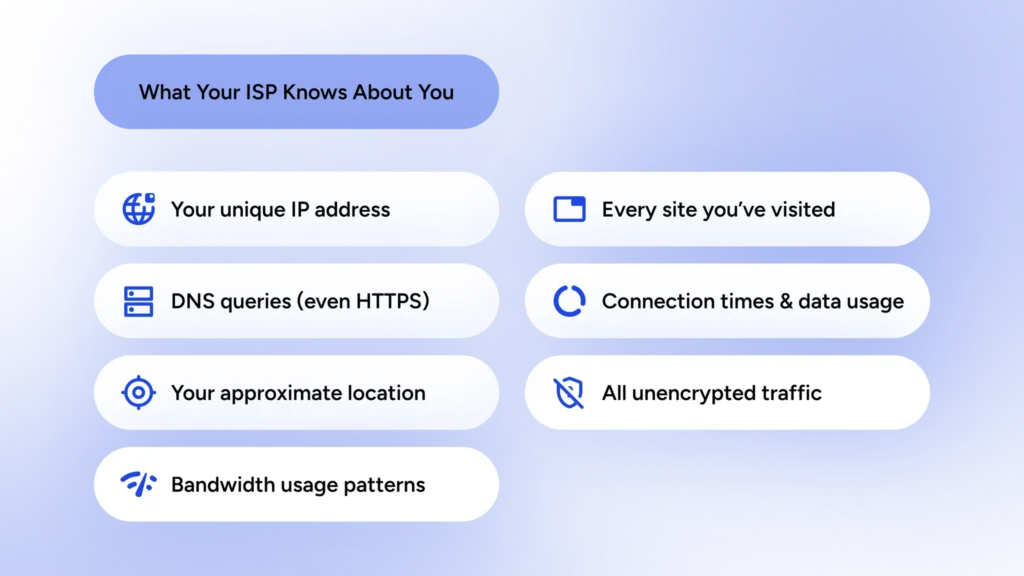
Your ISP basically does the same thing with your online activity. They can easily understand:
- When and how long you’re online
- Which websites you visit and how frequently
- How much bandwidth you use
- How much traffic you have on a given website
In other words, your ISP probably knows more about you than your best friend. This is what we mean by ISP tracking.
3 Warning Signs Your ISP Is Snooping on You
You can expect your ISP to say: “Hi there. I’m spying on you!” However, there are signs that indicate your ISP is watching you.
1. Reduced Speed for Specific Activities
In a process known as bandwidth throttling, your ISP can identify and restrict activities that take up a lot of bandwidth. For instance, if everything looks fine when you’re browsing the web, but as soon as you watch something in 4K on a streaming platform, your internet speed seems to drop, this might be a sign that your ISP is actively monitoring your activities.
2. Highly Personalized Advertisements
The internet is not intuitive. So, if the ads you come across when you’re visiting different websites really relate to your situation, there might be a chance that your ISP is using your browsing history for marketing purposes. For example, you might see ads relating to job agencies because you’ve previously searched for unemployment benefits.
3. Difficulties with VPN or Proxy Services
If your VPN connection is particularly slow or doesn’t connect at all when you’re working with your ISP, but it connects without any problem when you’re on a different network, it can indicate that your ISP is watching and blocking specific traffic.
The Sneaky Ways ISPs Keep an Eye on You
Just like your ID card in the real world, your IP address is used to identify you in the virtual world. Each device connected to the internet has an IP address. Your ISP can monitor what kind of traffic is transferred between your device and the target website. They use Deep Packet Inspection (DPI) methods as a digital scanner that categorizes the content of your data. That is, DPI allows them to see which packets are associated with, for example, your email.
Another trick up your ISP’s sleeve is monitoring your Domain Name System (DNS) queries. When you want to open a webpage, you either insert the address or google it. The thing is that the internet doesn’t know, for example, HidzoVPN; it knows the IP address for this website. So, when you type this address in your browser, your request first goes to a DNS server, and then it directs your request to the IP address defined for this domain. So, by analyzing your DNS query, your ISP can easily track your searches.
They can also use network analyzers and metadata collectors to observe user behavior. This information helps them to extract habits or routines from your activities, which can, in turn, be used for social profiling.
Covering Yourself from Your ISP’s Watchful Eyes
With everything said, you can still protect your online privacy against ISP surveillance, and the good news is that you don’t need to be an IT expert to do that.
Using VPNs and Proxy Services
For private internet access, VPN is the most viable solution. A VPN directs your traffic to a tunnel and encrypts your data. Your ISP can still see that you’re using a VPN, but it can’t see what you’re doing anymore. If you’re particularly concerned with online privacy and your searches involve sensitive data, you should use a no-log VPN, i.e., a VPN that does not keep track of your session.
A proxy service does a similar job, only without the encryption part. In other words, using a proxy doesn’t help much with privacy protection, but it can give you access to content that is restricted by your ISP.
The best VPN for anonymity:
Choosing a fast VPN can be overwhelming if you don’t know which features are necessary and which are extra. For an average privacy-conscious user who is looking for a budget-friendly VPN, HidzoVPN is an excellent choice for only $2.99 per month. It’s no-log oriented, and it features a Kill Switch option that makes privacy protection nonstop.
Implementing Browser Extensions and Settings
You can install some anti-tracker extensions on your browser to obscure your browsing. Also, browsers like DuckDuckGo and Brave are especially developed for privacy protection.
It’s worth noting that using the incognito mode is only good for local privacy protection and doesn’t block ISP monitoring. In other words, the incognito mode is useful when you’re using a public laptop or PC at the workplace or an internet café.
Adopting Privacy-Focused Habits and Tools
You can’t be too careful when it comes to online privacy. You should turn safe browsing into a habit. This isn’t hard; connect your VPN, then open your browser, especially if you’re connected to a public Wi-Fi at a hotel, coffee shop, or airport. Additionally, you should clear cookies and cache regularly, say at the beginning of each week.
The Double-Edged Sword of ISP Tracking
ISP monitoring isn’t entirely negative. It offers both risks and rewards like a double-edged sword. On the one hand, it can violate users’ privacy, but on the other hand, it’s necessary for the functionality of the network.
The Dark Side of ISP Surveillance
Let’s address the elephant in the room first: government compliance. Your ISP must comply with the policies set by the respective regulatory bodies. If they ask for your online records, your ISP is legally bound to hand them over. So, it’s you in the end who is responsible for privacy protection. How can you protect effectively? Rely on VPN privacy.
Other than that, as noted before, your ISP can use your online activities for marketing purposes and target ads. A threat that might emerge here is that if a hacker hacks into your ISP database, they can access the user logs your ISP is keeping, and they won’t hesitate to misuse them.
Potential Benefits for Users
It’s not all about being the “Big Brother.” ISP tracking can be useful for the network’s smooth functionality, given that it only involves aggregated or anonymized user data. By monitoring users’ activities, ISP administrators can identify rush hours and plan to expand the network capacity to prevent bandwidth throttling during this period.
ISP surveillance also helps administrators to keep the network secure. That is, by monitoring traffic, they can identify malicious users trying to introduce malware in the network and block them.
FAQs
Internet Service Providers can observe domain names accessed through DNS queries, even on HTTPS-encrypted sites, though they cannot view specific page content or encrypted data.
Retention periods vary by jurisdiction and provider policy, typically ranging from 6 months to 2 years.
Incognito mode does not provide complete privacy, as it only prevents local browser storage of history and cookies; activity remains visible to Internet Service Providers, websites, and network operators.
Users cannot directly delete browsing records stored by their Internet Service Provider; instead, employing tools such as a reputable VPN is advised to hide your IP address, obscure activity, and prevent detailed logging.
Article by
-
 Sam Clarke
Sam is a cybersecurity and online privacy writer dedicated to making complex network protection accessible, practical, and engaging.





Share your thoughts
Add a comment