Do I Need a VPN? A Practical Guide to When You Should Use One
You’ve probably heard that “Knowledge is power.” This isn’t just an old saying; it’s the basis of the business world in today’s world. But let’s…
Protect your online privacy and security
Fast, private, and easy to use, get Hidzo on your device and browse freely with one tap.
Get HidzoVPN You’ve probably heard that “Knowledge is power.” This isn’t just an old saying; it’s the basis of the business world in today’s world. But let’s make a small adjustment: data is power.
Here, by data, we mean the internet traffic on your devices; it can be the websites you visit, your screen time, your search queries, etc. These pieces of information might look irrelevant and unimportant at first glance. They’re not, especially if one makes a pattern out of it. That’s why you need to encrypt it, hide it, and even get rid of it.
How? with a VPN.
Table of Contents
What Is a VPN and What Does It Do?
A Virtual Private Network (VPN) creates a private, encrypted “tunnel” between your device and a remote server operated by the VPN provider.
This process masks your IP address and encrypts your data, preventing your ISP, hackers, or advertisers on the internet (which is a public space) from monitoring your specific browsing activity or intercepting your personal information.
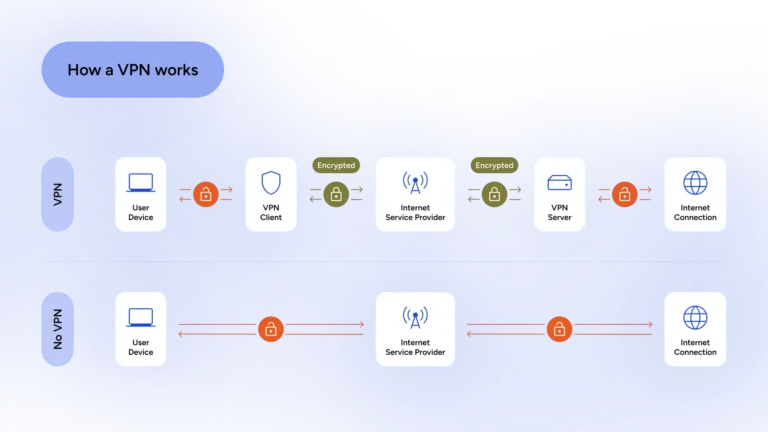
So, a VPN’s first job is to secure your data online, and secondly, it introduces you to the internet as a user in the VPN server location, hiding your actual address. But how does it protect your privacy? Read **How Does a VPN Protect Privacy? (Without Getting Technical).**
Do I Need a VPN? The Short Answer
If you value privacy, use public Wi-Fi, travel, stream content from other countries, or just don’t want your ISP selling your browsing habits, yes, you’ll benefit from one. If you only browse mainstream HTTPS sites from your couch on a secure home network and don’t care who knows what you watch, you can probably skip it (for now).
Everyday Online Risks People Ignore in 2026
Going online without a VPN is like going out on a cold winter night wearing just your underwear; you’re unprotected against the cold, and people point fingers. In the same way, your online data and digital footprints are visible to snoopers because they’re not encrypted.
Undermining the online threats can result in loss of money or, more devastatingly, jeopardize your social profile. Let’s see what you’re risking when your internet connection is not VPN-protected.
Tracking, profiling & targeted ads
You’re thinking of buying a new bed, so you look up different designs, brands, and their prices. The next day, when you’re checking the news and have completely forgotten about the bed, you see some ads promoting special offers from home suppliers.
The beds are 50% off, so you take the deal, and you’re happy. According to an article on Sci-Tech Today, revenues from targeted ads will reach USD 633 billion in 2026 and increase to USD 663 billion in 2027.
That’s the power of targeted advertisement. But what’s the cost? It’s your privacy. Marketing giants like Amazon, Google, and Meta are watching your every click behind the scenes.
Of course, it’s nothing dangerous, and you might even think of it as a favor, but, inherently, it’s a kind of tracking, and you’ve given them your consent by accepting all those intrusive cookies that pop up as soon as you open a website for the first time.
Public Wi-Fi vulnerabilities
Public Wi-Fi or the free Wi-Fi at an airport, hotel, big shopping mall, or a fancy restaurant is there for your convenience. But since they’re not protected, your data can be intercepted by the Man in the Middle or packet sniffers.
You must not use a public Wi-Fi for sensitive activities like logging into your email or bank account, unless you use a reliable VPN. If you connect frequently to public Wi-Fis, this is a must-read: Is Hotel Wi-Fi Safe for the Guests?
ISP data collection
Your ISP can watch what you do online. That includes your search history, the websites you visit, when you visit them, and for how long. They can monetize this data by selling it to advertisers under legal requests. Hopefully, they do so by aggregating or anonymizing users’ data, but it’s not always the case. So, you need a VPN to hide from your ISP’s watchful eyes.
When Do You Actually Need a VPN?
Activating the VPN as soon as you turn on your Wi-Fi is a safe approach because for most of the things you do online, even if it’s casual browsing, you don’t want others (e.g., your ISP) to track your digital footprint. You should enable the Auto Connect and Kill Switch features on your VPN client to make online security effortless.
The problem is that for some local services, like logging into your bank account, you can’t use a VPN due to the security systems and firewalls of your bank’s network. That’s where split tunneling comes in handy. By applying split tunneling settings, you can force the traffic of certain apps out of the VPN tunnel.
Let’s be more specific and go over the most common situations where they move from “nice-to-have” to “practically essential”:
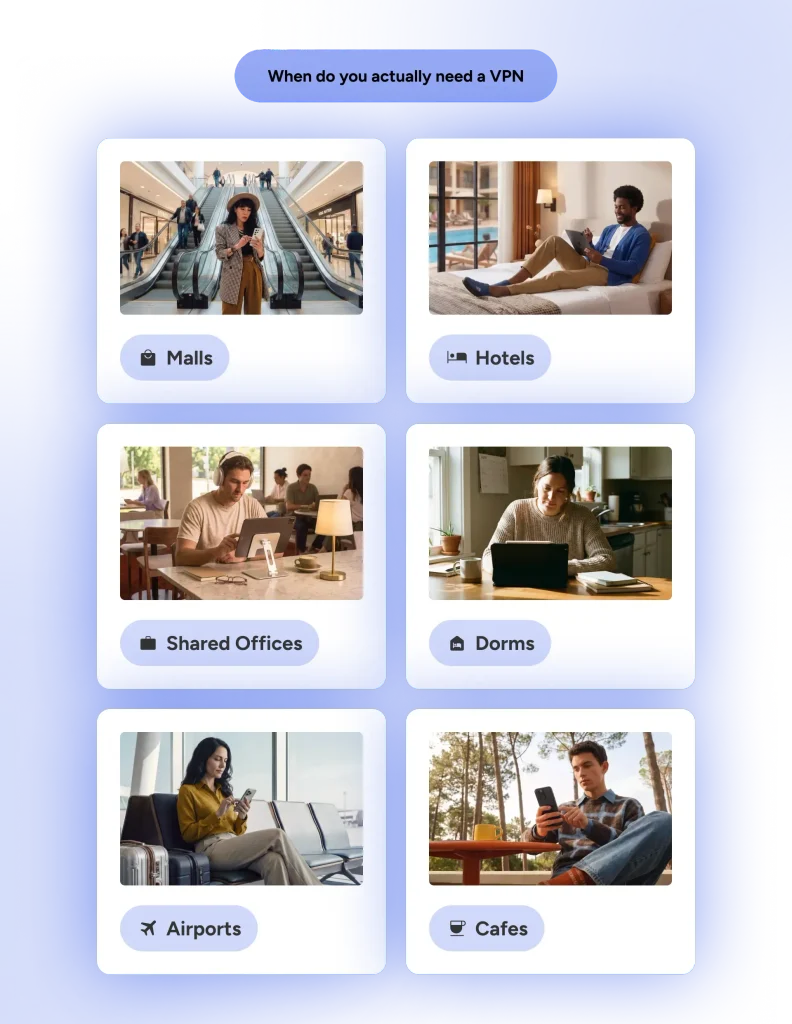
1. Public Wi-Fi hotspots (airports, cafés, hotels, trains)
This is the classic, no-debate use case. Public networks are convenient but often about as secure as leaving your front door wide open with a “Free Snacks” sign.
- Other users on the same network (or the network owner) can potentially intercept unencrypted traffic.
- Risks include man-in-the-middle attacks, where someone snoops on your login details, emails, or browsing.
- Even “secure” hotel Wi-Fi can be compromised or monitored.
A VPN encrypts everything between your device and the VPN server, so eavesdroppers see only scrambled nonsense. Connect automatically via your VPN app whenever you join an unknown network, and you can browse, bank, or check email with far greater peace of mind.
2. Traveling internationally
Whether you’re on a beach in Thailand or a business trip in Europe, travel introduces new risks and restrictions.
- Many countries heavily censor the internet or block services (social media, news, messaging apps).
- Hotel and airport networks are prime targets for attackers.
- You often want access to your home-country banking, streaming, or work tools, which may be geo-restricted abroad.
A reliable VPN lets you maintain your normal online life while adding encryption on unfamiliar networks. It can also help avoid “impossible travel” fraud alerts on your accounts by connecting through a server back home.
3. Streaming geo-restricted content
One of the most popular (and fun) reasons people use VPNs.
- Netflix, Disney+, BBC iPlayer, Hulu, and sports streaming services show different libraries depending on your location.
- Some platforms now detect and block obvious VPNs, so quality providers with strong unblocking tech matter.
A good VPN spoofs your location, giving you access as if you’re physically in another country. Results vary by service and change over time, but top-tier options still deliver excellent results for most major platforms.
4. Torrenting or P2P file sharing
If you download torrents (legally, of course), your real IP address is visible to every peer in the swarm and can be logged by copyright holders or your ISP.
- ISPs may throttle speeds or send warning letters.
- Legal risks exist in many places for copyrighted material.
A VPN with a strict no-logs policy and kill switch hides your IP and encrypts the traffic, significantly reducing exposure. Many providers even offer specialized P2P-optimized servers.
5. Working remotely or handling sensitive data
Ever since COVID, remote work has established itself as a universal work style, and it’s only efficient as long as it’s secure. Remote workers and freelancers need VPNs to:
- Access company intranets, shared drives, or client data safely from cafés, hotels, or home.
- Stay protected against data leaks on public or home networks.
For digital nomads or anyone handling confidential information, this is often non-negotiable. It creates a secure tunnel back to trusted resources.
6. Privacy-conscious everyday use
Considering the pervasiveness of modern internet tracking as discussed above, you don’t need to be paranoid to want to use a VPN.
Even on a secure home connection, a VPN stops your ISP from playing the role of digital peeping Tom and makes targeted tracking harder.
7. Living in or visiting high-surveillance or censored regions
In countries with heavy government monitoring or internet restrictions, a VPN can be a lifeline for accessing unbiased information and communicating privately.
- Bypasses blocks on news, social media, or messaging.
- Adds protection against surveillance (with the important caveat that no tool is foolproof against nation-state actors).
Use reputable providers with strong obfuscation features here, and always understand local laws.
Other Scenarios Worth Considering
- Gaming: Can reduce ping/lag by connecting to better servers, protect against DDoS attacks, or access region-specific games/content.
- Avoiding ISP Throttling: Some ISPs slow down specific traffic (e.g., streaming or downloads). A VPN hides what you’re doing.
- Journalists, Activists, Researchers: Heightened privacy needs where even basic tracking could have serious consequences.
- Shopping smarter: Occasionally helps avoid dynamic pricing based on location.
What a VPN Can and Cannot Do
A VPN is a powerful privacy and security tool, but it’s not a magic wand. It excels at protecting your connection and hiding your location, yet it has clear limitations. Understanding exactly what it can and cannot do helps you use it effectively without unrealistic expectations.
| What a VPN Can Do | What a VPN Cannot Do |
|---|---|
| Encrypt your internet traffic end-to-end (making it unreadable to ISPs, hackers on public Wi-Fi, etc.) | Make you 100% anonymous (websites can still identify you via cookies, accounts, or browser fingerprinting) |
| Hide your real IP address and replace it with the VPN server’s | Protect you from malware, viruses, or phishing attacks (you still need solid antivirus and safe browsing habits) |
| Secure your connection on public or untrusted Wi-Fi networks | Stop all forms of tracking (especially after you log into websites or apps) |
| Bypass many geo-restrictions for streaming, news, and websites | Guarantee access to every blocked service (some platforms actively fight VPNs) |
| Prevent your ISP from seeing and logging your specific activities | Prevent data leaks if you manually disable the VPN or ignore warnings |
| Reduce ISP bandwidth throttling on certain traffic types | Save you from your own bad decisions (weak passwords, oversharing on social media, clicking suspicious links) |
| Add strong protection while torrenting by hiding your IP from peers | Protect data once it has left the encrypted tunnel (e.g., on a compromised website) |
| Help access home content while traveling abroad | Work perfectly against nation-state level surveillance in every situation |
How to Choose the Right VPN for Your Needs
Choosing the right VPN starts with this question: What do you need it for?
If your main concern is privacy, then you don’t need to pay for VPN features like obfuscated servers or split-tunneling. A simple VPN like HidzoVPN does the job in the background without draining your battery or using up your CPU capacity.
On the other hand, if you need to transfer sensitive data, you should use the ones that use AES-256 encryption to ensure your files cannot be stolen. The table below summarizes the factors you should consider when choosing a VPN.
The important thing here is to be very cautious if you want to install a free VPN. Maintaining VPN servers and managing the traffic isn’t a cheap practice, and your free VPN provider may sell your logs to marketers for profit.
On a related note:
How Do Free VPNs Make Money? The Hidden Price You Pay!
So if you can’t pay for a paid VPN, you should turn to reliable no-logs VPN providers like Proton VPN or HidzoVPN that also offer a freemium plan.
| Factor | Why It Matters | What to Look For |
|---|---|---|
| No-logs policy | Ensures they don’t store your activity | Independently audited policies |
| Encryption & Protocols | Core security level | AES-256, WireGuard, OpenVPN |
| Speed & Servers | Minimal slowdown, good coverage | Large global network, fast servers |
| Streaming & Unblocking | Netflix, Hulu, etc. | Proven track record |
| Device Support | How many gadgets you can protect | Unlimited or high simultaneous connections |
| Kill Switch | Prevents leaks if connection drops | Always-on feature |
| Jurisdiction | Legal privacy protections | Privacy-friendly countries (e.g., outside 14 Eyes) |
| Price & Value | Long-term affordability | Money-back guarantee, good deals |
| Extras | Added convenience | Ad/malware blockers, split tunneling |
Why a VPN Is No Longer “Just for Tech People”
VPNs used to be difficult to configure, and you had to have computer and network knowledge to use them; the settings were manual. Today, on the contrary, using a VPN is as easy as one tap or click.
Also, VPNs had a special use case in the past, which was secure remote access to a private network over the public internet. But times have changed. Protecting privacy and securing connections, which were once an enterprise necessity, are now essential for every individual because data about individuals’ online habits can be monetized, and hacker attacks are now higher than ever.
Cybercrime statistics reveal “fraud cost businesses around the world $1 trillion in 2025 alone.” Also, 18% of the 6.47 million cybercrimes reported to the Federal Trade Commission (FTC) in 2024 were related to identity theft. These numbers tell us one thing: online security can no longer be ignored.
Final Verdict: Do You Really Need a VPN
In 2026, with privacy eroding faster than ice cream on a sunny day, a reputable VPN is one of the smartest, low-effort upgrades you can make to your digital life.
You probably need one if you use public networks, travel, stream, torrent, or simply want to reclaim some control over who sees your online activity.
You can comfortably live without one if your internet use is very basic, always on a trusted home network, and privacy isn’t a high priority for you.
The beauty is that modern VPNs are easy to use, often invisible once set up, and provide genuine peace of mind. Start with a well-reviewed provider, use it where it counts most, and treat it as one important layer in your overall privacy and security toolkit, not a magic invisibility cloak.
FAQs
Yes, a VPN is strongly recommended in 2026. Cybercrime costs are projected to exceed $10.5 trillion annually, with threats such as account compromise surging 389% and ransomware attacks increasing significantly.
Yes, a VPN offers substantial benefits for routine online activities. It encrypts traffic to prevent ISP logging and third-party tracking, reduces targeted advertising and price discrimination, secures connections on public Wi-Fi, and enables access to geo-restricted content.
Without a VPN, your internet traffic remains unencrypted, and your real IP address is visible.
Does a VPN slow down the internet?
A VPN may introduce a minor slowdown, typically 10–30%, due to encryption overhead and routing through remote servers.
A VPN may introduce a minor slowdown, typically 10–30%, due to encryption overhead and routing through remote servers.
Not necessary, but recommended. It hides your activity from your ISP and reduces tracking. Skip it only if privacy isn’t a concern.
Yes, especially on mobile data and public Wi-Fi. Phones often switch networks automatically. A VPN keeps your data protected on the go.
Yes. Public networks are risky. A VPN encrypts your traffic and protects against snooping.
Yes. It secures connections on unfamiliar networks, bypasses censorship, and unlocks home content.
Strongly recommended. It adds encryption on public or shared networks and hides your IP, though HTTPS already provides a good baseline protection.
It’s only useful if you want all devices protected automatically (smart TVs, consoles, etc.). Device-level VPNs are often simpler.
When you need maximum speed for gaming or local services, when accessing bank/government sites that block VPNs, or when using a low-quality free VPN that could harm privacy.
Article by
-
 Sam Clarke
Sam is a cybersecurity and online privacy writer dedicated to making complex network protection accessible, practical, and engaging.





Share your thoughts
Add a comment