The Best VPN for Daily Browsing (Not Just Power Users)
In a digital world where every click invites a tracker or a nosy ISP, a VPN has become as essential as your morning coffee. But…

Protect your online privacy and security
Fast, private, and easy to use, get Hidzo on your device and browse freely with one tap.
Get HidzoVPN In a digital world where every click invites a tracker or a nosy ISP, a VPN has become as essential as your morning coffee. But let’s be honest: most options are built for cybersecurity experts who live in server rooms and speak fluent “protocol.”
If you just want to browse the news or stream a show without broadcasting your life to the world, those high-tech apps feel like using a sledgehammer to crack a walnut. HidzoVPN is a refreshingly simple alternative that delivers solid protection without the technical drama.
Table of Contents
What Features Matter Most for Daily Browsing With a VPN?
For casual internet users, a VPN that offers a balance of speed, security, and privacy protection is the sane solution. Other than that, the following points should be taken into consideration. Through VPN reviews, user ratings, and comments, and ultimately trial and error, you can figure out which VPN best handles your online routine.
1. Impact on Speed
A tinge of speed reduction (about 10%) is natural when you connect to a VPN, but it’s negligible if your base internet speed is high. Speed reduction is directly affected by the VPN protocol. For instance, OpenVPN, which employs AES-256 encryption and offers the strongest security, adds more overhead compared to other protocols. So, aim for a VPN that supports 2 or 3 protocols.
2. Security and Encryption
VPNs are inherently secure because they encrypt your internet traffic and prevent your ISP, hackers, or other snoopers from seeing what you’re doing. Encryption is also determined by the VPN protocol. Secure VPN protocols include WireGuard, OpenVPN, and IKEv2/IPSec.
On a related note:
The 2026 Guide to Best VPN Protocols for Every Scenario
3. Kill Switch for Leak Protection
Connection drops are like silent sneezes that happen every now and then. They’re short, but even that can compromise your privacy. Kill Switch is a feature that prevents data leaks when your VPN connection halts for any reason. Keep it enabled.
4. Ease of Use
Fortunately, most Android and iOS VPN apps have a simple interface, and you can secure your connection with a tap. Yet, some providers like PIA, Windscribe, and, to some extent, Proton VPN, are not so easy to work with. For daily use cases, aim for user-friendly ones like HdizoVPN or Surfshark.
5. User Tracking
Reputable VPN providers like NordVPN and ExpressVPN keep no logs of their users’ VPN traffic. It’s privacy 101 that you should only use no-log VPNs. In the case of famous ones, you can check for third-party audits, but given the auditing costs, some no-log VPNs can’t offer that kind of proof. In that case, carefully read the provider’s terms of service or privacy policy.
6. Obfuscation (Stealth) Mode
If you’re living in a region with harsh censorship, you need an extra cover to access free internet. Obfuscation disguises VPN traffic as regular HTTPS, helping maintain connectivity without drawing attention. This proves useful for seamless browsing in varied settings, though it is not always required for home use.
7. Pricing
Choose a VPN within your budget range and steer clear of free VPN apps that have flooded the App Store or Play Store. Maintaining VPN services has costs, and if a provider is doing it for free, there’s a good chance it’s monetizing its users’ traffic.
On a related note:
How Do Free VPNs Make Money? The Hidden Price You Pay!
Less Critical Features for Pure Daily Browsing
Advanced options such as multi-hop routing, built-in ad tracker blockers, or Tor integration add value for specific needs but often introduce extra latency or complexity. They are generally secondary unless tracking protection or heightened anonymity is a priority.
HidzoVPN: The Best VPN for Daily Browsing
HidzoVPN revolves around the VPN essentials: privacy, security, and unrestricted internet access. The app on your device is like a smart, high-tech automaton in your home; it gets the job done without you noticing.
Reliable Privacy Without Constant Configuration
Basic requirements include strong encryption, a strict no-log policy, and automatic reconnection to maintain protection. The goal is set-it-and-forget-it security that operates quietly in the background, not a daily ritual of tweaking settings.
Fast and Stable Connections for Browsing and Streaming
Connections launch quickly and deliver consistent speeds sufficient for loading webpages promptly, streaming videos without endless buffering, and handling email or social feeds smoothly. For gamers, HidzoVPN’s smart protocols minimize latency to, literally, keep them in their game.
Easy One-Tap Access Across Devices
Upon every connection, HidzoVPN automatically selects the fastest server and protocol. This happens with one tap. Of course, if you know a thing or two about VPNs, you can tweak the options for your preferred settings. A visit to HidzoVPN’s YouTube page will paint a picture of the convenience you get working with HidzoVPN.
Affordable Pricing with No Hidden Surprises
HidzoVPN is designed for everyone, so it fits every budget, even if you’re living hand-to-mouth. A freemium entry point with no sign-up allows testing without commitment. If you liked what you saw, you can purchase HidzoVPN Premium for only $2.99 a month for easy but solid, unrestricted, and uninterrupted private internet access.

Why HidzoVPN Fits Daily Life
HidzoVPN aims to impress the users with a fast and secure connection, not with a long settings menu that requires a CCNA certificate to know what it does.
In a word, this is what you get with HidzoVPN:
- Simple and direct interface designed for quick daily use.
- Strict no-log policy that makes your online presence ghost-like.
- A secure connection that doesn’t cost speed.
- Competitive pricing and good value for money.
- Access to freemium with no sign-up (limited features)
- Advanced privacy protection features (premium users)
Why Most VPNs Feel Overbuilt
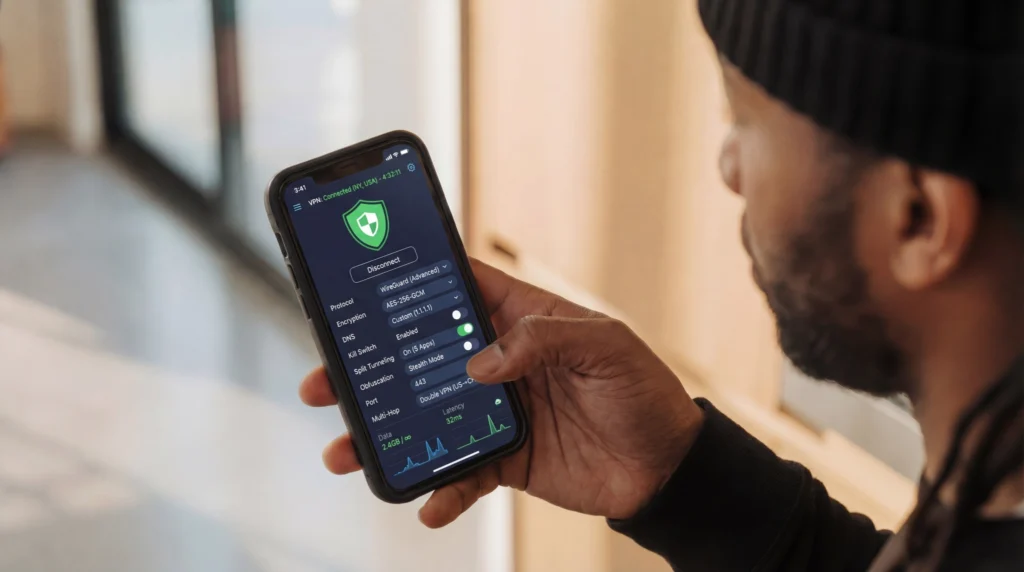
While it might feel good to sit in a pilot’s seat, the buttons, levers, and whatnots will make you feel helpless. The same goes for a feature-rich VPN app. The reason is that an average user can’t make heads or tails of the settings page. Too many options give you the idea that if the connection is slow, then there must be something wrong with the default settings. That’s when you start messing with the toggles and menu items, but in vain.
Excessive Features That Go Unused
Prominent VPN providers proudly advertise multi-hop connections, dedicated IPs, built-in ad blockers, and even onion routing integrations. These appeal to a narrow audience of privacy maximalists and torrent enthusiasts. For everyday browsing, however, most remain untouched, much like that gym membership card gathering dust in a wallet.
Complicated Interfaces and Setup Processes
Setup wizards often resemble cockpit dashboards, complete with protocol dropdowns, custom DNS fields, and other toggles buried in sub-menus. Non-technical users may spend more time deciphering options than actually browsing securely, occasionally resulting in configurations so tangled that the VPN provides less protection than leaving it off entirely.
Performance Trade-offs from Over-Engineering
All those background processes and constant negotiations between VPN protocols can introduce latency that turns smooth streaming into a slideshow. Battery life on mobile devices suffers, and suddenly that quick coffee-shop browse becomes a test of patience.
One wonders if some VPNs were designed more to impress reviewers than to serve ordinary users.
Higher Costs Driven by Unnecessary Capabilities
Premium tiers bundle enterprise-level tools, pushing monthly fees upward. Users end up subsidizing features they will never activate, essentially paying extra for digital shelfware. Even worse, reputable VPN providers like NordVPN or ExpressVPN rip you off even for basic plans, especially if you’re not interested in their long-term plans.
Simplicity vs Features for Daily VPN Users
Accessing certain online content or services may require some settings changes. An easy example is when you want to connect to a server in the USA to subscribe to an American streaming platform.
It gets a bit tricky for VPN users who live in regions with tight internet restrictions. More sophisticated and complicated settings are required at times like this to get rid of restrictive measures like deep packet inspection or protocol whitelisting. This means you need to get technical and optimize the settings unless your VPN app scans your network for the best way to secure your connection.
When there’s no way around changing the settings manually, a reliable VPN provides small, in-app tips that get users out of the dark. Also, a strong support team can save the day with a few quick tips.
Overall, simplicity is what average users value, but the features should also be there to make them feel in control, just in case they need to change something.
Final Words…
In summary, while the VPN industry continues to innovate for niche power users, everyday browsing benefits most from services that emphasize reliability, speed, and ease of use over exhaustive feature lists. HidzoVPN strikes an effective balance: robust core protection delivered through an intuitive experience at a wallet-friendly price.
It proves that sometimes the best tool is the one that actually works quietly, efficiently, and without trying to impress anyone with unnecessary complexity. For those seeking privacy without the headache, it offers a refreshingly practical solution.
FAQs
It adds privacy and security by masking your IP and encrypting traffic, especially on public Wi‑Fi.
Check speed with and without the VPN, test for DNS leaks, ensure a kill switch works, verify no-logs claims with independent audits if available, and confirm reliable access to sites you use.
The internet is a public and loosely-protected space, and any privacy-conscious internet user needs a VPN regardless of what they do online.
HidzoVPN is very user-friendly and direct; you just need to tap connect and let the app take care of your connection in the background.
Article by
-
 Sam Clarke
Sam is a cybersecurity and online privacy writer dedicated to making complex network protection accessible, practical, and engaging.





Share your thoughts
Add a comment