Are Free VPNs Safe? Risks, Privacy & How to Choose
Asking, “Are free VPNs safe?” is a little like asking a police officer if that shiny piece of metal on their hip is safe. The…
Protect your online privacy and security
Fast, private, and easy to use, get Hidzo on your device and browse freely with one tap.
Get HidzoVPNTable of Contents
Asking, “Are free VPNs safe?” is a little like asking a police officer if that shiny piece of metal on their hip is safe. The answer probably starts with, “It depends.” Who’s handling it? How is it being used? And can you trust it to protect you when you need it?
The same goes for a free VPN. A free price tag doesn’t automatically make a VPN dangerous, but it doesn’t make it trustworthy either. The answer depends largely on who’s behind the VPN, how the service protects your connection, what information it collects, and what it does with that information.
Before you hand a free VPN the keys to your internet connection, let’s look at the security and privacy risks, the warning signs to watch for, and how to tell whether a free VPN is safe to use.
What Makes Some Free VPNs Safer Than Others?
Free isn’t necessarily the red flag. The company behind the “free” VPN might be.
In a 2024 investigation of 100 popular free Android VPN apps, researchers found that 88% experienced some type of data leak, while 71% shared personal data with third parties. These findings don’t mean every free VPN is unsafe, but they do show why choosing one shouldn’t begin and end with the word “free.”
A safer free VPN should still do the basic job you expect from a VPN: encrypt your connection, protect your IP address, and handle your data responsibly. Where free VPNs can differ considerably is in how the provider has built it, the information it collects, how it makes money, and what security and privacy protections it offers.
The provider behind the service matters too:
- Is it clear who owns and operates the VPN?
- Does the company have a privacy policy that explains what it collects and whether that information is shared with third parties?
- Does it use established VPN protocols and encryption?
- Has the service undergone an independent security or privacy audit?
These are much better indicators of VPN safety than whether the download button says “free.” Together, these factors can give you a clearer picture of the company behind the VPN and whether you can trust it with your internet traffic.
You should also consider where the VPN came from. An app downloaded from a provider’s official website or a reputable app store is easier to verify than a VPN found through an unfamiliar download site, pop-up ad, or questionable link. Even then, appearing in an official app store isn’t a guarantee of safety, so it’s still important to check the developer, permissions, privacy practices, and reputation of the service.
How Do Free VPNs Pay the Bills?
Running VPN servers, developing apps, maintaining security, and providing support all cost money. Some companies fund a free VPN through paid subscriptions or upgrades, while others may rely on advertising or other sources of revenue.

Understanding what you’re giving up in exchange for “free” can tell you a lot about whether a VPN deserves your trust. We’ll take a closer look at how free VPNs make money and why some providers offer both free and paid versions later in this guide.
Continue reading:
How Do Free VPNs Make Money? + 6 Safe Free VPN Providers
But I Found It on Google Play and the App Store. Isn’t It Safe?
Finding a free VPN on Google Play or Apple’s App Store may offer more reassurance than downloading one from an unfamiliar website, but an app’s presence in a well-known app store isn’t a guarantee that it’s safe.
Google and Apple have policies and review processes for apps offered through their stores, but suspicious, poorly designed, or privacy-invasive apps can still make their way onto these platforms. Some may request unnecessary permissions, contain trackers, leak data, or fail to provide the level of security you expect from a VPN.
In fact, the 100 free Android VPN apps examined in the 2024 investigation mentioned earlier were selected from Google Play. That included apps researchers found leaking data, sharing personal information with third parties, and requesting potentially privacy-risking permissions.
So, consider the app store one checkpoint, not the finish line. Check who’s behind the VPN, read its privacy policy, review the permissions it requests, and make sure you’re downloading the legitimate app from the actual provider.
What Are the Risks of Using a Free VPN?
A VPN is supposed to add a layer of protection to your internet connection, not introduce a new set of problems. Unfortunately, an untrustworthy or poorly built free VPN can do just that.
We’ve already seen what can happen when a VPN’s promises and practices don’t match. In 2020, researchers reported that UFO VPN exposed millions of user logs, despite advertising a zero-logs policy. The exposed database reportedly contained information such as IP addresses, connection timestamps, geotags, and even account passwords stored in plain text.
Concerns about free VPNs haven’t disappeared. In 2024, data cited by Tom’s Guide predicted that by 2025, 80% of free VPNs could contain tracking features and third-party data sales could reach 60%. These figures were estimates based on historical data and trends, rather than measured results, but they highlight why it’s important to look beyond the word “free.”
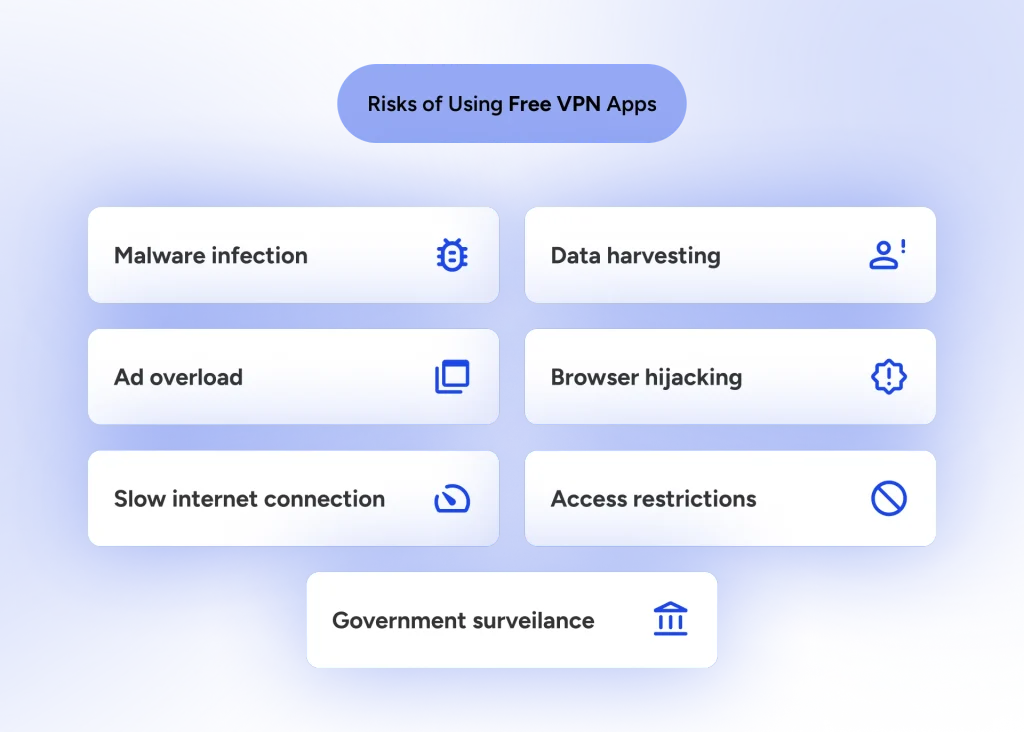
The dangers of free VPNs can range from annoying ads and slow connections to more serious security and privacy concerns, including malware, tracking, weak encryption, and data leaks. That doesn’t mean every free VPN comes with these risks, but knowing what can go wrong can help you recognize one that isn’t worth the download.
Malware, Viruses, and Malicious VPN Apps
Installing a VPN means putting software on your device and giving it significant responsibility for handling your internet connection. If that software is malicious, the tool you downloaded for protection could become the security risk itself.
Some malicious or fake VPN apps may contain malware, spyware, or other unwanted software designed to collect information, display unwanted ads, or interfere with your device. This is one reason questions such as “Can free VPNs hack your phone?” don’t have a simple yes-or-no answer. Being free doesn’t give a VPN the ability to hack your phone, but installing malicious software disguised as a VPN can put your device and information at risk.
Poor Security and Poorly Built Software
A free VPN doesn’t have to be intentionally malicious to create security problems. Sometimes, the software simply isn’t very good.
Poorly developed or inadequately maintained VPN apps may use outdated technology, have security vulnerabilities, or fail to protect traffic as expected. Weak encryption or poorly implemented VPN protocols can undermine the protection you thought you were getting in the first place.
Limited resources can sometimes affect code and software review. A smaller or less-funded VPN company may have fewer people dedicated exclusively to development, testing, security, and maintenance. As software-development roles have evolved, developers have increasingly taken on responsibilities that once belonged to separate teams, including some aspects of testing and security.
There’s nothing inherently wrong with developers testing their own work, but just like in any field, a second set of eyes can help catch problems the person who created something might overlook. With VPN software, overlooked flaws can potentially affect both security and privacy.
Good development doesn’t stop when the app is released. VPN software needs ongoing maintenance as vulnerabilities are discovered and operating systems change. An abandoned or rarely updated free VPN may not receive the fixes necessary to keep its software secure.
Tracking and Data Collection
Your VPN provider occupies an important position between your device and the internet, which makes its approach to data collection particularly important.
Some VPNs collect connection logs or other information needed to operate their services. Others may use trackers or collect considerably more information about users. The important questions are what information is collected, why it’s collected, how long it’s kept, and whether it’s connected to you.
Be cautious about how much personal information a free VPN asks you to provide. A VPN may need basic account information, such as an email address, depending on how the service works, but it shouldn’t be asking for unnecessary personal details that have little to do with providing the VPN service. If you’re being asked for your full address, contacts, or other sensitive information without a clear reason, be cautious about providing it.
The same goes for app permissions. A VPN requesting access to your contacts, photos, microphone, precise location, or other parts of your device should have a legitimate reason for doing so. If a permission doesn’t make sense for the features being offered, review the provider’s policies, research the company, and consider deleting the app entirely.
A privacy policy should provide more information about what a provider collects and how that information is used. If a free VPN is vague about its logging practices or doesn’t clearly explain what happens to your information, that’s worth paying attention to.
We’ll take a closer look at what a VPN can potentially see, including browsing activity, later in this guide.
Selling or Sharing Your Data
Collecting, sharing, and stealing data aren’t the same thing, which is why it’s important to understand exactly what a VPN provider is doing with your information.
Some providers may share certain user information with advertising, analytics, or other third-party partners. Depending on the provider and its policies, information may also be used for targeted advertising or other commercial purposes.
A legitimate provider collecting information that is disclosed in its privacy policy isn’t the same as a malicious VPN stealing data. A malicious VPN app could potentially be designed to capture or misuse information without your knowledge, which is another reason to investigate the provider and its software before installing it.
This doesn’t mean free VPNs automatically sell or steal your data. Check the provider’s privacy policy for details about third-party data sharing, advertising partners, and how collected information is used. If you can’t figure out what happens to your data, that’s a problem in itself.
Intrusive Ads and Adware
Advertising is one way a free service can generate revenue, and seeing an ad doesn’t automatically mean a VPN is unsafe. The concern is how those ads are delivered, what information may be collected to target them, and the type of advertising the service repeatedly exposes its users to.
Some free VPN apps may display intrusive ads, incorporate advertising trackers, or request information that helps support targeted advertising. At the more concerning end of the spectrum, malicious or poorly vetted software may include adware that bombards your device with unwanted advertising.
Pay attention to the ads themselves, too. If a VPN repeatedly serves deceptive ads, questionable products, or businesses with a significant pattern of consumer complaints, it may be worth taking a closer look at the VPN provider and its advertising practices.
Consider whether you’re seeing an occasional questionable ad or a recurring theme. Repeated promotions for misleading offers, suspicious downloads, or companies with poor reputations may tell you something about how carefully the VPN provider or its advertising partners vet what gets placed in front of users.
One bad ad isn’t proof that the VPN company operates the same way, especially when third-party advertising networks are involved. But a pattern of questionable advertising can raise questions about the partners a provider works with and the standards it applies to its business relationships.
How a company treats its customers doesn’t necessarily prove how it treats their data, but its broader business practices can still help you decide whether that company deserves your trust.
Personal Data, IP, and DNS Leaks
A VPN that says you’re protected isn’t very useful if information is slipping out the side door.
VPN leaks can expose information the VPN is supposed to help protect. An IP leak may reveal your regular public IP address, while a DNS leak can cause DNS requests to travel outside the VPN tunnel. Browser technologies such as WebRTC can also create potential IP exposure under certain circumstances.
Leaks don’t necessarily mean a VPN is deliberately stealing your information. They can also result from poor software design, configuration problems, or inadequate leak protection. Either way, regularly failing to prevent leaks raises questions about whether the VPN is doing its job.
Slow Speeds, Data Limits, and Fewer Servers
Not every downside of a free VPN is a security threat. Sometimes, the “free-ninety-nine” price tag is reflected in what you get: fewer servers, slower speeds, or tighter data limits.
Free VPN plans may limit monthly data, bandwidth, available server locations, or connection speeds. A smaller selection of servers can also mean more users competing for the same resources, potentially contributing to congestion and slower performance.
These restrictions can be perfectly reasonable when a reputable provider clearly explains them. In fact, limits can be part of a legitimate freemium model rather than a sign that something suspicious is happening. The important distinction is whether the provider is upfront about what its free service includes and how that service is funded.
Are Free VPNs Safe Across Different Devices?
While the core principles of choosing a trustworthy VPN remain the same on any platform, the specific risks can vary depending on the device you use. Whether you are installing software on a computer or adding a tool to your phone or browser, paying close attention to who made the VPN, what permissions it requests, and how it handles your data is essential.
Android and iPhone
Downloading an app from Google Play or Apple’s App Store does not automatically guarantee good privacy practices. Mobile researchers frequently find tracking tools, data leaks, and overly invasive permissions embedded in free mobile VPNs. Before installing one on your phone, inspect the developer’s background, check the requested permissions, review the privacy policy, and confirm that the app receives regular updates.
PC and Desktop
On a computer, the main risk often comes down to where you source the installer. Avoid unfamiliar download portals, third-party software sites, or unverified links that could host fake or tampered software. Stick exclusively to the provider’s official website. You should also research the service on established technology and security sites like CNET, Comparitech, or TechRadar, which regularly test and review VPNs to help you evaluate a provider before installing anything.
Browser Extensions
A free browser extension typically does not provide the same level of protection as a full VPN app. Many extensions function merely as proxies, encrypting traffic strictly within that specific web browser while leaving the rest of your computer’s internet connection exposed. Always confirm exactly what the extension covers and scrutinize the browser permissions it demands before adding it to your system.
Should You Use a Free VPN for Sensitive Activities?
Where you use a free VPN matters just as much as which one you choose. Browsing the web and checking the weather don’t carry the same stakes as logging into your bank account or entering a credit card number.
Are Free VPNs Safe on Public Wi-Fi?
A trustworthy free VPN can provide an added layer of protection on public networks by encrypting the connection between your device and the VPN server. That’s useful when you’re connected to a public network at an airport or coffee shop, using hotel Wi-Fi, or anywhere else that you log on with strangers.
But public Wi-Fi isn’t the place to experiment with a VPN you know nothing about. If you wouldn’t trust the provider with your connection at home, don’t suddenly trust it because you’re at Starbucks.
Are Free VPNs Safe for Banking and Online Shopping?
For banking and shopping, the bigger question isn’t simply whether the VPN is free. It’s whether you trust the provider handling your connection.
HTTPS already encrypts the information exchanged between your browser and secure banking or shopping websites. A trustworthy VPN can add another layer of protection to your connection, particularly on an unfamiliar network, but a questionable free VPN could introduce unnecessary risk.
For financial transactions, if your bank or financial institution allows VPN connections, stick with a VPN provider whose security, privacy, and logging practices you have researched and trust.
Are Free VPNs Safe for Streaming?
Streaming isn’t as sensitive as accessing your bank account, but free VPNs can come with practical limitations. Data caps, slower speeds, crowded servers, and fewer server locations can make streaming more frustrating.
A reputable free VPN may work perfectly well for occasional streaming, but check its data and bandwidth limits first. A safe VPN isn’t much fun if your movie starts buffering at the plot twist.
Free VPN vs. Paid VPN: What’s the Difference?
Free and paid VPNs can provide many of the same basic protections, but the experience can differ when it comes to speed, server choices, data limits, features, and support. Paying for a VPN doesn’t automatically make it safer, just as getting one for free doesn’t automatically make it unsafe. Here’s how they generally compare.
| Feature | Free VPN | Paid VPN |
|---|---|---|
| Cost | No subscription required, although some providers may require a credit card on file | Monthly or long-term subscription |
| Data limits | May have monthly limits | Often unlimited |
| Server selection | Usually smaller | Typically larger |
| Speed | May be restricted or affected by crowded servers | Often fewer restrictions |
| Ads | Possible | No ads |
| Security features | Varies by provider | Varies by provider, but may include more advanced features |
| Privacy practices | Varies by provider | May include privacy features such as ad and tracker blocking |
| Customer support | May be limited | Usually more support options |
Why Do Some VPN Providers Offer Free and Paid Versions?
Offering a free VPN doesn’t necessarily mean a company has to make money from your data. Some providers use a freemium model, where revenue from paid subscriptions helps support a more limited free version.
The free plan might offer fewer server locations, lower data limits, or fewer features while still providing the core security and privacy protections you’d expect from the provider. The free service also gives users a chance to try the VPN before deciding whether the premium features are worth paying for.
Pay attention to the upgrade offer, too. Currently, many budget-friendly VPN plans cost around $2 to $4 per month with a longer-term subscription, although prices vary by provider, plan, and billing structure. If a provider charges considerably more while offering the same or fewer protections than comparable services, take a closer look at what you’re actually getting for the extra cost.
A higher price isn’t necessarily a cause for concern. Extra security tools, additional services, or other useful features may justify the added cost. But you should be able to clearly understand what you’re paying more for and what happens to the price when your subscription renews.
Ultimately, a free VPN with a clear business model can be easier to understand than one that leaves you wondering how the company keeps the lights on.
Wrapping up: How to Know If a Free VPN Is Safe
Just in case you can’t recite this comprehensive guide on cue, here are a few quick tips worth keeping handy while you’re sifting through all those “Aren’t we the greatest VPN?” promos.
- Know who’s behind it: Look for a clearly identified company with an established reputation.
- Check its privacy and logging policies: Find out what information is collected, how long it’s kept, and whether it’s shared with third parties.
- Look at security: Check for established VPN protocols, strong encryption, leak protection, and features such as a kill switch.
- Review permissions and updates: Question unnecessary app permissions and make sure the VPN is actively maintained.
- Look for independent verification: Security or privacy audits can provide additional support for a provider’s claims.
- Understand how “free” is funded: Know whether the service is supported by paid subscriptions, advertising, or another source.
- Check its reputation: Look at independent research, reputable technology publications, and patterns in consumer complaints.
FAQs
Not necessarily. A large number of downloads can tell you that an app is popular, but popularity isn’t the same as security or privacy. Look beyond the download count and check the provider, permissions, privacy policy, security practices, and independent research.
Some providers use a freemium model, where paid subscriptions help support a limited free service. Others may use advertising or offer additional paid products. The important question isn’t simply why the VPN is free, but whether the provider clearly explains how its business model works.
If you no longer use a VPN app, there’s usually little reason to leave it sitting on your device, particularly if it has permissions or background features you don’t need. Before deleting it, check whether you also need to cancel an account, free trial, or subscription associated with the service.
A VPN doesn’t become safer simply because you only connect to it once in a while. Whenever it’s active, you’re trusting the provider to handle your connection according to its stated security and privacy practices. Whether you use it every day or only while traveling, it’s worth knowing who’s on the other end of that Connect button.
A separate email address can limit how much of your everyday identity is connected to a VPN account, but it can’t make an untrustworthy VPN safe. The provider’s logging, security, data collection, and privacy practices still matter far more than which email address you use to sign up.
Article by
-
 Sam Clarke
Sam is a cybersecurity and online privacy writer dedicated to making complex network protection accessible, practical, and engaging.




Share your thoughts
Add a comment