Best Business VPNs: Top VPNs for Teams, Startups, and Growing Companies
Somewhere in your company, a laptop is joining airport Wi-Fi right now, and a freelancer is logging into a client portal with a shared password….

Protect your online privacy and security
Fast, private, and easy to use, get Hidzo on your device and browse freely with one tap.
Get HidzoVPN Somewhere in your company, a laptop is joining airport Wi-Fi right now, and a freelancer is logging into a client portal with a shared password. And it’s not exactly a cybersecurity dream. A VPN for business can prevent it from turning into a nightmare by encrypting traffic and giving you control over who connects to what, which is why a secure business VPN has become standard kit for teams of every size.
The best business VPNs combine stable connections, dependable support, and simple team management, and the right pick depends on your team size and technical comfort. Below, we compare seven options, HidzoVPN included, so you can choose without burning your budget.
Table of Contents
What Is a Business VPN?
A business VPN service is a VPN built for teams rather than individuals. It still encrypts traffic and masks IP addresses, but it adds a central admin console, user seats you can add or remove, single sign-on, shared gateways, and often dedicated IP addresses.

The difference shows up the moment you grow. A consumer VPN means one person, one account, one app. A business setup lets an IT manager onboard a new hire in minutes and cut off a departing contractor just as fast, which beats chasing shared passwords through a group chat.
For example, a ten-person design agency sharing one consumer login has no idea who is connected or when. On a managed team plan, the owner sees every seat and revokes access with a click.
Why Do Businesses Need a VPN?
Remote and hybrid work scatters company data across home networks, cafes, and hotel lobbies, none of which you control. A VPN for remote workers wraps that traffic in encryption, so a stranger on the same Wi-Fi sees scrambled data instead of client files.
A VPN for companies also helps with access control. Many banking portals, admin dashboards, and cloud tools let you allowlist specific IP addresses, and a shared gateway means only your team gets through. Contractors and freelancers can work without ever touching your wider network.
What Features Should a Business VPN Have?
Not every feature earns its keep. These are the ones that matter most for teams:
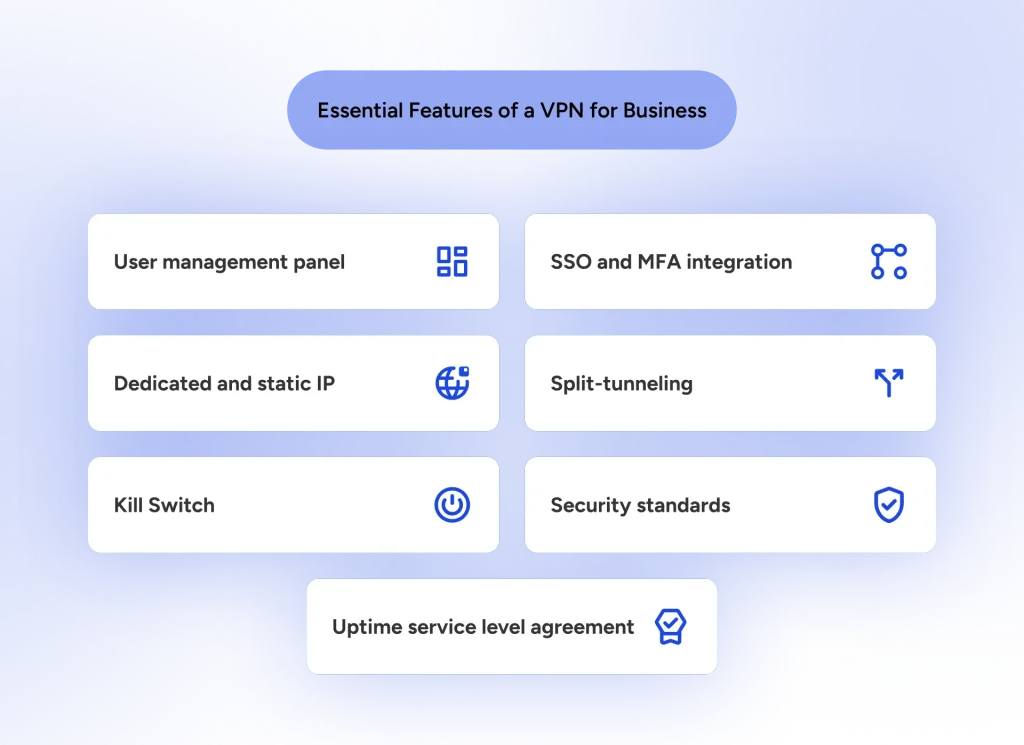
- Central Admin Management: A single control panel to add or remove seats, grant group-level permissions, and view active connections in real time.
- SSO and MFA Integration: Compatibility with identity providers like Okta, Google Workspace, or Microsoft Entra ID to eliminate password sprawl and mandate Multi-Factor Authentication.
- Dedicated and Static IPs: Dedicated gateways grant your team fixed IP addresses to allowlist on sensitive cloud servers, dashboards, and client portals.
- Split Tunneling: Directs work traffic through the encrypted VPN tunnel while letting bandwidth-heavy personal traffic (like video calls or music streaming) bypass it to maintain fast connection speeds.
- VPN Kill Switch: Automatically cuts all internet access if the VPN connection unexpectedly drops, preventing unencrypted data leaks.
- Compliance and Security Standards (SOC 2, ISO 27001, HIPAA): Regulated industries need providers that maintain verified compliance audits (e.g., SOC 2 Type II or ISO 27001) or offer signed Business Associate Agreements (BAAs) for HIPAA compliance.
- Uptime Service Level Agreements (SLAs): For business-critical operations, look for enterprise plans that guarantee 99.9% uptime and offer prioritized, tier-3 customer support.
How We Evaluate Business VPNs
Features tell you what a tool can do. Our criteria tell you how well it performs on an ordinary Monday morning. We reviewed vendor documentation and independent reviews against five points:
- Connection Performance: We evaluate speed retention across local and international endpoints using modern VPN protocols (WireGuard, NordLynx, Lightway). Providers maintaining >80% of baseline ISP throughput with under 15ms added ping pass our benchmark.
- Support: Fast resolution times matter when remote employees are locked out at 9 a.m. We test 24/7 live chat, ticket turnaround speed, and account management access on enterprise tiers.
- Seat Flexibility: We inspect pricing tiers, contract terms, minimum seat barriers (e.g., 1-seat vs. 5-seat thresholds), and how easily IT admins can scale seats up or down.
- Compliance and Logging Audits: We verify independent, third-party security audits (SOC 2 Type II, ISO 27001) and verify whether strict no-logs policies are legally validated.
- Audience Fit: Software suited for a 5-person creative agency is rarely right for a regulated financial firm. We rate solutions based on team size, technical complexity, and administrative effort.
The 8 Best Business VPNs
Based on the above communication standards, we shortlisted the following providers. Whether you’re a small business owner or the network admin of a sizeable company, you can find an option that works for you.
1. NordLayer: Best Overall for Growing Teams
NordLayer is the business-focused platform from the creators of NordVPN. It delivers an intuitive central dashboard, seamless Single Sign-On (SSO) integration (Google Workspace, Azure AD, Okta), and fast connection speeds powered by the proprietary NordLynx protocol.
- Pricing & Seat Minimums: Starts at $8/user/month (Lite plan, billed annually) with no seat minimums. Teams tier ($11/user/mo) and Business tier ($14/user/mo) add ZTNA and device posture checks.
- Compliance & Audits: ISO 27001 certified, SOC 2 Type II audited, and HIPAA-ready.
- Dedicated IP: Available as an add-on (~$50/month).
2. ExpressVPN for Teams: Best for Speed and Easy Rollout
ExpressVPN for Teams excels in ultra-fast speeds and effortless setup using its lightweight, proprietary Lightway protocol. It is ideal for teams without dedicated IT staff who need immediate security across remote devices.
- Pricing & Seat Minimums: Starts at $3.05/user/month on a 2-year commitment with a 5-seat minimum ($366 upfront). Volume discounts apply for 20+ seats.
- Compliance & Audits: Audited zero-logs policy and independent infrastructure audits by PwC and Cure53.
- Dedicated IP: Available as an add-on ($390/year per location).
3. Proton VPN for Business: Best for Privacy-First Companies
Proton VPN for Business caters to privacy-focused organizations where strict jurisdiction and auditability are non-negotiable. Based in Switzerland, it uses 100% open-source apps and operates audited, no-logs infrastructure.
- Pricing & Seat Minimums: Starts at $6.99/user/month (VPN Essentials). Professional tier costs $9.99/user/month plus a $39.99/month dedicated server lease.
- Compliance & Audits: Swiss data protection compliance (FADP/GDPR) and fully audited open-source client apps.
- Dedicated IP: Included with dedicated server leases on Professional plans.
4. HidzoVPN: Best for Fast, Simple Protection
HidzoVPN provides a streamlined, user-friendly protection layer for startups, small teams, and freelancers who want high-speed security without enterprise overhead. Its single-tap Fastest Server algorithm analyzes real-time ping and network congestion to auto-route connections, while split tunneling ensures video calls and localized browsing stay outside the VPN tunnel.
- Pricing & Seat Minimums: Affordable per-user subscription plans with no minimum seat requirements.
- Compliance & Audits: Strict operational zero-logs architecture and end-to-end encryption.
- Transparent Positioning: Best suited for agile small teams needing low-friction privacy. Not designed for large enterprises requiring complex on-premises legacy firewall integration or custom ZTNA posture policies.
5. Twingate: Best Zero Trust Option for Tight Budgets
Twingate replaces traditional network-level VPN access with granular, identity-based Zero Trust Network Access (ZTNA). Instead of exposing your whole network, it grants team members secure access only to specific cloud apps and staging resources.
- Pricing & Seat Minimums: Free plan covers up to 5 users and 1 remote network. Teams plan starts at $5/user/month (billed annually).
- Compliance & Audits: SOC 2 Type II certified and ISO 27001 compliant.
- Dedicated IP: N/A (Uses connector software and private identity routing).
6. Tailscale: Best for Developer Teams and Mesh Networking
Tailscale takes a peer-to-peer mesh networking approach built on top of the WireGuard protocol. Rather than routing traffic through a central VPN server, Tailscale creates a secure mesh network (Tailnet) directly between developer laptops, staging servers, and cloud resources.
- Pricing & Seat Minimums: Free tier covers up to 3 users and 100 devices. Paid plans start at $6/user/month (Starter/Premium) with custom enterprise options.
- Compliance & Audits: SOC 2 Type II compliant with SSO enforcement (GitHub, Okta, Google).
- Dedicated IP: Static node IPs within your mesh network; exit nodes can be assigned as dedicated gateways.
7. Check Point Harmony SASE: Best for Larger Enterprise Teams
Formerly Perimeter 81, Check Point Harmony SASE combines cloud VPN access, ZTNA, and advanced threat protection into a unified enterprise console. It allows large organizations to control user gateways, device compliance, and access policies in one place.
- Pricing & Seat Minimums: Essentials plan starts at $10/user/month plus $50/month per gateway, with seat minimums typically starting at 10 to 20 users depending on tier.
- Compliance & Audits: SOC 2 Type II, ISO 27001, and HIPAA compliant.
- Dedicated IP: Dedicated cloud gateways included in paid gateway subscriptions.
8. GoodAccess: Best for Small Teams Needing Dedicated Gateways
GoodAccess provides a cloud VPN platform featuring dedicated gateways and static IP allowlisting designed for non-technical small business managers. It bridges the gap between basic VPN security and zero-trust controls.
- Pricing & Seat Minimums: Essential plan starts at $7/user/month with a 5-user minimum plus $49/month per gateway. Premium ZTNA is $11/user/month.
- Compliance & Audits: SOC 2 Type II compliant.
- Dedicated IP: Dedicated cloud gateway static IP included on all plans.
Business VPN Comparison Table
| Provider | Best For | Starting Price | Dedicated IP | Compliance & Security Audits |
|---|---|---|---|---|
| NordLayer | Growing businesses | ~$8/user/month | Add-on ($50/month) | ISO 27001, SOC 2 Type II, HIPAA-ready |
| ExpressVPN for Teams | Speed & simple rollout | ~$3.05/user/month (5-seat min.) | Add-on ($390/year per location) | Audited zero-logs policy (PwC, Cure53) |
| Proton VPN for Business | Privacy-first companies | $6.99/user/month | Included with dedicated server lease ($39.99/mo) | Swiss FADP / GDPR compliant, Open-source audited |
| HidzoVPN | Freelancers & small teams | $4.99/5 users/month | Coming soon | Operational zero-logs architecture |
| Twingate | Budget zero trust access | Free (up to 5 users); $5/user/month | N/A (App-level identity routing) | SOC 2 Type II, ISO 27001 |
| Tailscale | Developer & tech teams | Free (up to 3 users); $6/user/month | Static node IPs / Exit node routing | SOC 2 Type II |
| Check Point Harmony SASE | Larger enterprise teams | $10/user/month + $50/mo per gateway | Included with cloud gateways | SOC 2 Type II, ISO 27001, HIPAA |
| GoodAccess | Small teams needing gateways | $7/user/month (5-seat min.) + $49/mo gateway | Included with dedicated gateway | SOC 2 Type II |
Business VPN vs. Zero Trust (ZTNA) vs. Mesh Networks
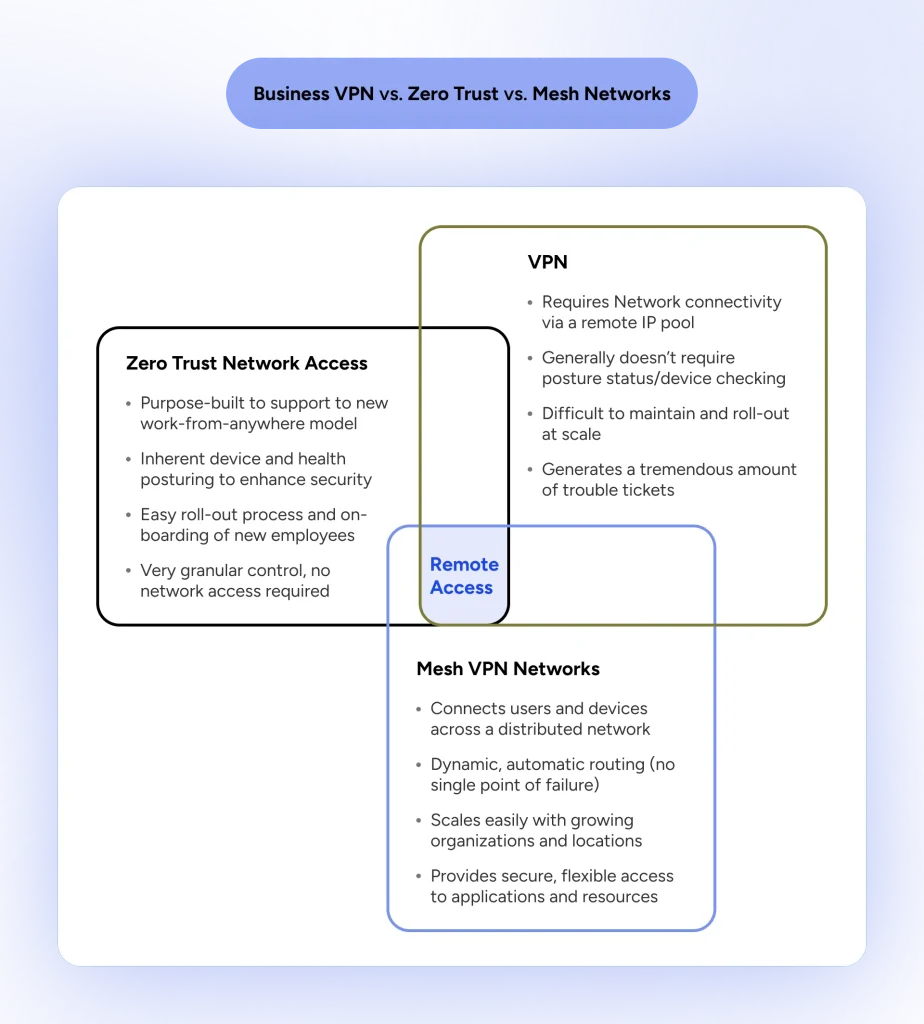
Choosing between a corporate VPN, a Zero Trust architecture, and a Mesh network comes down to how your company grants network access and where your resources reside.
1. Traditional Business VPN
- How It Works: Creates an encrypted tunnel between the user’s endpoint and a central VPN gateway. Once authenticated, the user’s device is assigned an IP address directly on the corporate network.
- Trust Model: Implicit Trust (Perimeter-Based). Authenticates the user once at login. Once inside the tunnel, the user has broad network-level visibility across connected subnets unless gated by secondary internal firewalls.
- Best For: Small businesses looking for simple Wi-Fi encryption, static IP allowlisting for remote workers, or teams maintaining centralized legacy on-premises servers.
2. Zero Trust Network Access (ZTNA)
- How It Works: Replaces network-level entry with granular, application-level access. Users connect to cloud brokers or identity proxies that route traffic exclusively to specific authorized applications—keeping the rest of the corporate network completely invisible.
- Trust Model: Zero Trust (“Never Trust, Always Verify”). Access is granted per-application after continuously validating user identity, device posture (e.g., active antivirus, OS compliance), and context.
- Best For: Hybrid and multi-cloud teams, organizations with heavy contractor/freelancer reliance, and compliance-driven industries seeking to minimize lateral movement risks.
3. Mesh VPN Networks
- How It Works: Utilizes peer-to-peer routing (typically powered by WireGuard) to establish direct, encrypted mesh tunnels between individual devices, cloud instances, and local workstations without forcing traffic through a central gateway choke-point.
- Trust Model: Node-to-Node Identity. Device nodes authenticate directly with an identity provider (SSO) and establish peer connections based on explicit node permissions.
- Best For: Engineering teams, DevOps professionals, and tech startups requiring low-latency connections across distributed cloud servers, staging environments, and developer laptops.
Conclusion & Buyer’s Checklist
Selecting the right business VPN comes down to balancing administrative oversight with technical flexibility. For small-to-growing teams seeking simple, effective protection, HidzoVPN and NordLayer offer low-friction onboarding. Privacy-focused organizations will appreciate Proton VPN for Business, developer-heavy teams will thrive on Tailscale’s mesh architecture, and larger enterprises requiring strict posture controls will benefit from Check Point Harmony SASE or Twingate.
Before purchasing seats or committing to an annual contract, run through this pilot rollout checklist:
- Audit Team Seats & Minimums: Count active employees and contractors, then check each vendor’s minimum seat barriers (e.g., 5-seat minimums for ExpressVPN or GoodAccess).
- Define IP & Access Needs: Decide whether you need a dedicated static IP for server allowlisting or app-level Zero Trust rules (ZTNA) for individual cloud apps.
- Verify Identity Provider (IdP) Support: Ensure the VPN seamlessly integrates with your team’s existing SSO setup (Okta, Google Workspace, Azure AD).
- Conduct a Pilot Test: Deploy 2–3 test seats across different operating systems (macOS, Windows, mobile) and test speed retention during peak work hours.
- Test Support Responsiveness: Submit a test ticket or initiate a live chat during standard operating hours to verify support SLA turnarounds.
- Execute Staged Rollout: Onboard team leads first, configure split tunneling and kill switches, and review active connections after 30 days.
FAQs
Most plans charge per user per month, and some providers offer free tiers for very small teams. Prices and seat minimums change, so check each vendor’s current pricing page.
For a very small team, yes. You will miss out on central management, seat control, and shared gateways, which become important as you add people.
A VPN connects users to the wider network through an encrypted tunnel. ZTNA grants access only to specific apps after verifying identity and device health.
Only if you need a fixed address to allowlist, such as for client portals, cloud dashboards, or banking tools. Otherwise, shared servers work fine.
Usually not. Many free consumer VPNs limit bandwidth or monetize user data, which does not fit company use. A free plan from a business provider is a different story.
Some overhead is normal, but the right protocol and a nearby, uncrowded server keep it small. Always test during busy hours before rolling out.
It varies by provider and plan. Check each plan’s device limit if your staff use a laptop, phone, and tablet.
Article by
-
 Sam Clarke
Sam is a cybersecurity and online privacy writer dedicated to making complex network protection accessible, practical, and engaging.

Share your thoughts
Add a comment