How to Use HidzoVPN: A Quick Tour of Your Privacy Pal
HidzoVPN stands on two solid pillars: privacy protection powered by Xray technology and ease of use. We created HidzoVPN so that everyone can access the…
Protect your online privacy and security
Fast, private, and easy to use, get Hidzo on your device and browse freely with one tap.
Get HidzoVPNTable of Contents
HidzoVPN stands on two solid pillars: privacy protection powered by Xray technology and ease of use. We created HidzoVPN so that everyone can access the open internet with just a single tap. Because the app is built entirely around simplicity, this is going to be a short and sweet guide.
The short version? You just download the app from your app store, choose a plan (or continue for free), and tap Connect. That’s all it takes for HidzoVPN to secure your connection and break down digital borders.
First Stop: Downloading and Installing HidzoVPN
Getting started is easy, depending on your device:
- Android: You can either install the app directly from the Google Play Store or head to our official VPN download page to grab the HidzoVPN APK.
- iOS: Apple users can download the app straight from the App Store.
- The macOS and Windows versions of HidzoVPN are also in the oven and will be ready soon.
Do I Need to Create an Account?
The short answer? Nope! We believe in ultimate privacy and zero friction.
If you are using our free plan, you can skip the sign-up process entirely. Just open the app and tap connect—no email address or password required. However, if you decide to upgrade to Premium, you’ll create a quick account so you can easily sync and use your subscription across multiple devices.
How to Use HidzoVPN After Installation
Open HidzoVPN on your device once the installation is complete. The first choice the app will prompt you to make is whether you want to go Premium or continue with the free plan.
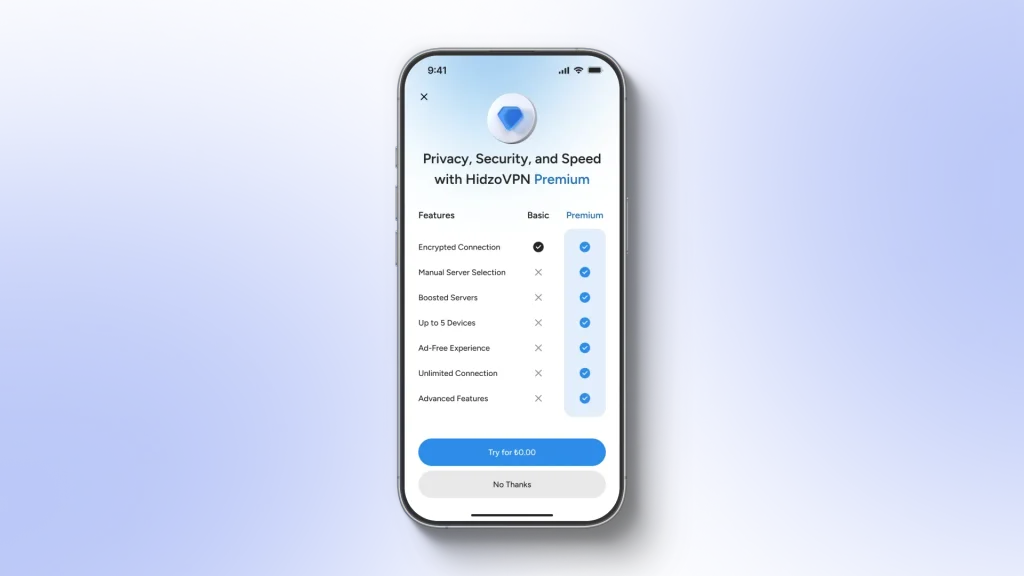
The free plan is a great way to get a feel for the app’s atmosphere. You can use it for as long as you want, provided you don’t mind reconnecting every 30 minutes and missing out on advanced security features like the kill switch.
On the other hand, HidzoVPN Premium unlocks the full experience and gives you complete control over your settings, including:
- Manual server and protocol selection
- Unlimited browsing sessions with absolutely no data caps
- Zero ads interrupting your connection
- Up to 5 simultaneous device connections with a single account
Plus, you’ll get a 7-day free trial to experience the speed and stability of HidzoVPN Premium in action, completely risk-free. We’ll even send you a reminder before the trial ends so that if you want to cancel, you won’t incur any unwanted charges.
Note that to prevent fraudulent activities, the trial period is 3 days for purchases completed on Stripe.
For a side-by-side breakdown, check out our dedicated post: HidzoVPN Free vs. Premium.
Choosing Your Server: Free vs. Premium Limits
If you choose to stick with the free plan, server and protocol selection are fully automated. The app automatically routes you to the server with the lowest current load, meaning you might connect to a different location each time you hit connect.
Premium users have the privilege of customizing these choices. You can manually select any of our listed server locations and sub-locations. Some of these locations support multiple VPN protocols, allowing you to select your preferred option.
If you don’t know which server or protocol to choose, don’t sweat it. Just select Fastest Server. HidzoVPN will instantly connect you to the nearest physical server to minimize latency, and it will automatically select the best protocol based on your local network conditions.
Once you’re ready, just tap Connect to start the magic!
How to Change Your Server & Protocol (Step-by-Step)
Right at the bottom of the home screen, you will see Fastest Server right next to a blue-gray globe icon. By default, this option dynamically pairs you with the best server and protocol for your baseline internet connection.
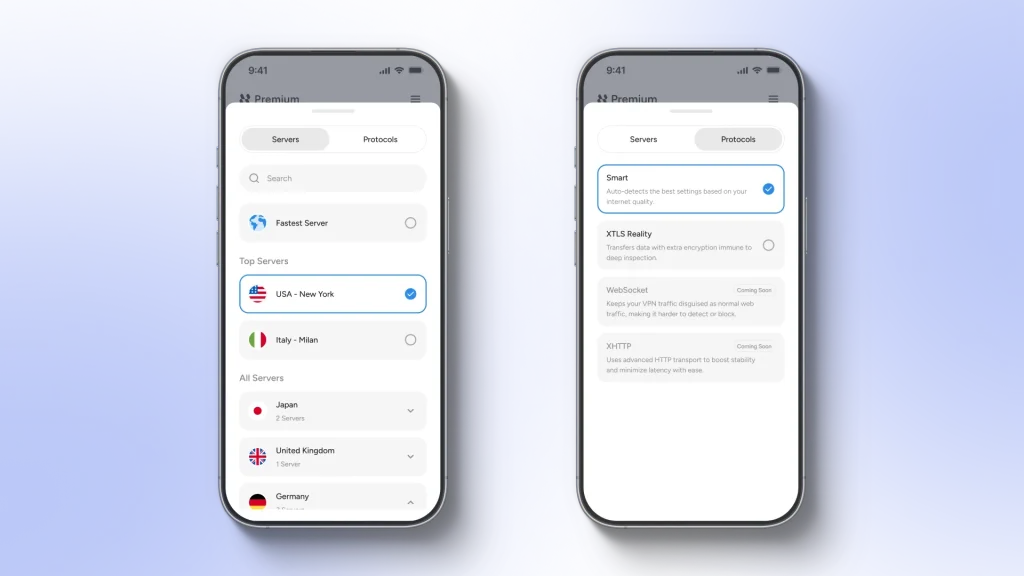
To change this to a specific location, simply tap that area to pull up a new screen. You will see two main tabs here: Servers and Protocols.
- Under Servers, you can browse and pick your preferred location.
- Under Protocols, you can select your preferred connection method.
- Pro tip: Having multiple protocol options works wonders if you are trying to bypass heavy restrictions in a highly censored region.
Every time you change the server location or the VPN protocol, you’ll be redirected to the home screen, and HidzoVPN instantly resets the connection to apply your preferences and then gets out of your hair again.
The Settings Menu That Puts You in the Driver’s Seat
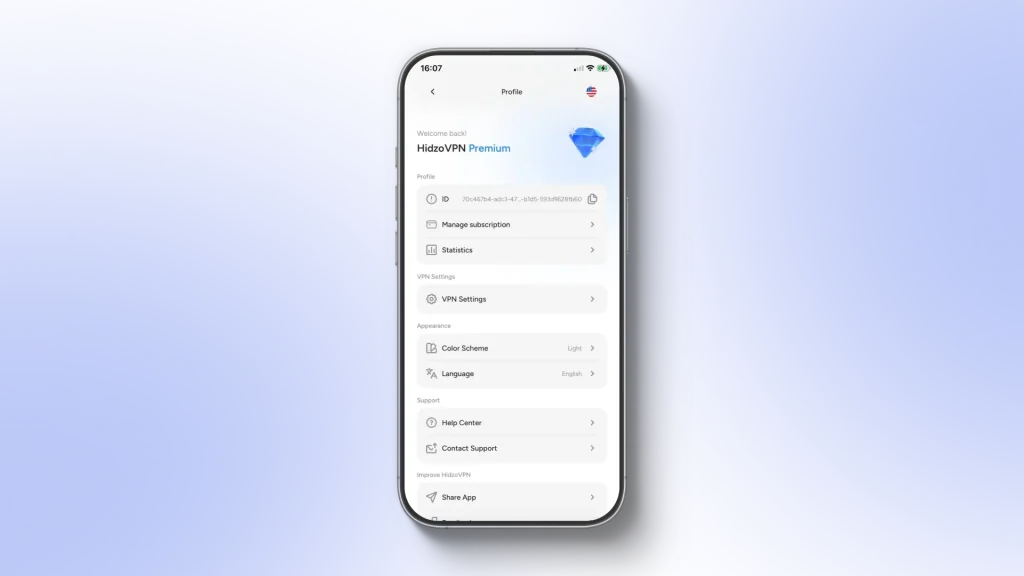
The settings menu allows you to make HidzoVPN completely yours. Just tap the menu icon in the upper-right corner to customize your preferences:
Account
The first stop on the menu is the Account page, where you can find your app ID and manage your account.
HidzoVPN uses the ID to recognize your device on the network and helps us manage your subscription securely and anonymously. If you ever run into a technical glitch, this ID allows our engineering team to look up exactly what went wrong. This is fixed.
You can also see your purchase history under Manage Subscription. Tapping on any plan will show you its exact status and expiration date, along with other details.
In small print located right under the Sign In/Out icon, you’ll find the Delete Account option. If you ever decide HidzoVPN isn’t the right fit for you, you can tap this to request account deletion.
You’ll receive a confirmation email with a secure One-Time Password (OTP). Once entered, your account will be permanently terminated. It’ll be like you were never here, so make absolutely sure before taking the plunge, as this action is completely irreversible.
Statistics
Numbers are lovely when they tell you something meaningful and useful. We took advantage of this fact and developed the Statistics feature to show you exactly how much data and time you’ve secured with HidzoVPN.
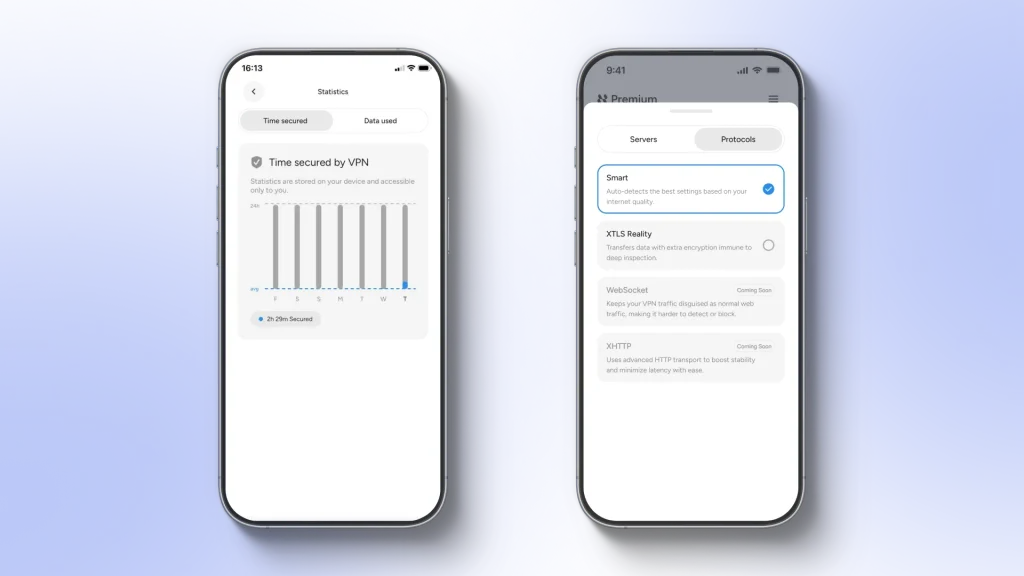
Rest assured, this data is calculated locally and stays strictly on your device. While your operating system tracks network usage, finding that path isn’t straightforward. We built a shortcut right into the settings menu so you can view your protected time and data usage at a glance and spare you the pain of digging for it manually.
VPN Settings
This is where you gain granular control over how HidzoVPN handles your internet traffic. While some apps clutter their settings with dozens of obscure toggles just to justify a higher price tag, we keep things lean, mean, and functional. You get everything you actually need for complete privacy and speed, meaning you’re only paying for essential security.
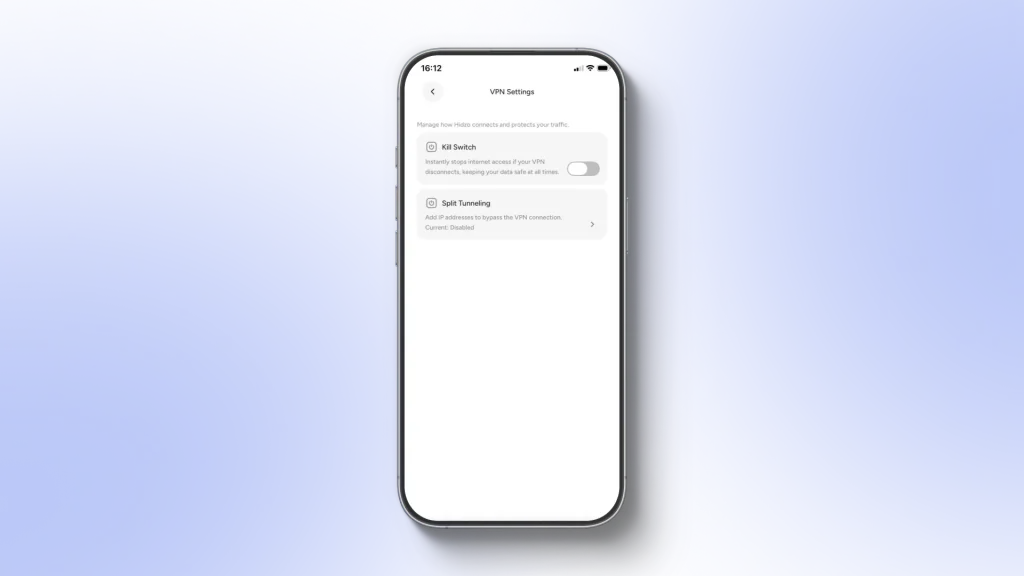
Kill Switch
Let’s face it: internet connections aren’t always perfect. It could be a brief glitch on your internet provider’s side, or your mom accidentally unplugging the router while looking for something (or maybe just to see your reaction).
All it takes is a single second of exposure for your real IP address to leak to the web. In sensitive situations, like accessing a crypto trading platform or certain streaming services, that split second can result in an instant account ban. That’s where the VPN Kill Switch comes to the rescue. It halts all internet traffic the exact millisecond your VPN connection drops, keeping your privacy completely intact.
Split Tunneling
Want to stream show content from another country while ordering local takeaway on your food delivery app? Split Tunneling lets you divide your digital traffic.
You can choose specific apps to route through the secure VPN tunnel while letting other apps connect directly to your regular internet. It’s perfect for apps that get cranky when used with a VPN (like local banking or delivery apps) without sacrificing security for everything else.
Of course, as mentioned earlier, changing VPN settings is a privilege exclusive to Premium users.
P.S. We’re constantly fine-tuning things behind the scenes, so stay tuned for upcoming additions like auto-connect and obfuscation!
Color Scheme
The Color Scheme toggle lets you switch between Dark and Light mode. By default, it’s set to Auto, which smoothly mirrors your device’s system settings.
Language Settings
This toggle lists the languages available for the app UI. HidzoVPN currently supports English and Arabic, with more languages on the way very soon.
Help Center
The Help Center is packed with quick troubleshooting guides for the most common issues users face. It’s also where you can review HidzoVPN’s legal documents, including our Privacy Policy and Terms of Service.
Contact Support
Our support team is at your disposal 24/7. Tapping this option automatically opens your device’s default email app with a direct line to us. Use this whenever you have a subscription question, a technical bug, or just a general inquiry.
Share App
This feature lets you easily share HidzoVPN with the people you care about. It’s always a good idea to encourage friends and family to protect their digital footprints. After all, you don’t want that mortifying photo of you on their phone accidentally leaking to the public web!
Feedback
Don’t worry, we won’t make you type out a whole essay here, so no writing skills required! It’s just a quick, multiple-choice survey that helps us understand our users’ priorities so we can keep making HidzoVPN better.
And Thus Ends Our Tour…
If you’ve worked with other VPNs in the past, we think you’ll agree that HidzoVPN offers a refreshing, straightforward interface that doesn’t overwhelm you with unnecessary clutter. Everything is fully optimized right out of the box. The only thing left for you to do is tap Connect. So, to sum up, how do you use HidzoVPN? Tap Connect.
Stay safe out there!
FAQs
Yes. Our free plan provides the exact same robust encryption as our Premium tier. The only trade-offs are that free sessions are limited to 30 minutes at a time, include a few ads, and select your server location automatically.
Your connection will simply drop to keep our free servers running smoothly for everyone. All you have to do is watch an ad and then tap Connect again to instantly start a brand-new 30-minute session. You can repeat this as many times as you like!
No. Thanks to our “Guest Mode,” you can download HidzoVPN and start browsing securely with one tap without ever handing over your email address or creating a password.
Think of the Kill Switch as your digital safety net. If your Wi-Fi drops or glitches for even a millisecond, the Kill Switch instantly halts all internet traffic so your real IP address never leaks to the web. It is enabled by default for Premium users to guarantee absolute privacy.
A single HidzoVPN Premium subscription allows you to connect up to 5 devices simultaneously. You can easily protect your phone, tablet, and other mobile devices all at once under one account.
Never. We stand by a strict, ironclad no-logs policy. We do not track, log, store, or sell your browsing history, traffic destination, data content, or connection times. What you do online stays entirely between you and your screen.
It is completely risk-free. You get 7 full days to experience everything Premium has to offer, including unlimited session times, manual server picking, and zero ads. We will even send you a friendly reminder before the trial runs out so you can cancel anytime without incurring any unwanted charges.
Article by
-
 Sam Clarke
Sam is a cybersecurity and online privacy writer dedicated to making complex network protection accessible, practical, and engaging.

Share your thoughts
Add a comment