How Online Tracking Works Behind the Scenes + Tips to Stop It
You’d be surprised to know how many trackers are interested in what you do online. From the moment you search for something on your browser…

Protect your online privacy and security
Fast, private, and easy to use, get Hidzo on your device and browse freely with one tap.
Get HidzoVPNTable of Contents
You’d be surprised to know how many trackers are interested in what you do online. From the moment you search for something on your browser to the moment you open a website, you’re being tracked. Supposedly, trackers track you to improve your browsing experience, but even if that is true, you have a right to decline being tracked. These are some of the tools you can use to get rid of trackers:
- Privacy-oriented browsers
- Virtual Private Networks (VPNs)
- Browser extensions
- Private search engines
- DNS and data cleaners
What Is Online Tracking?
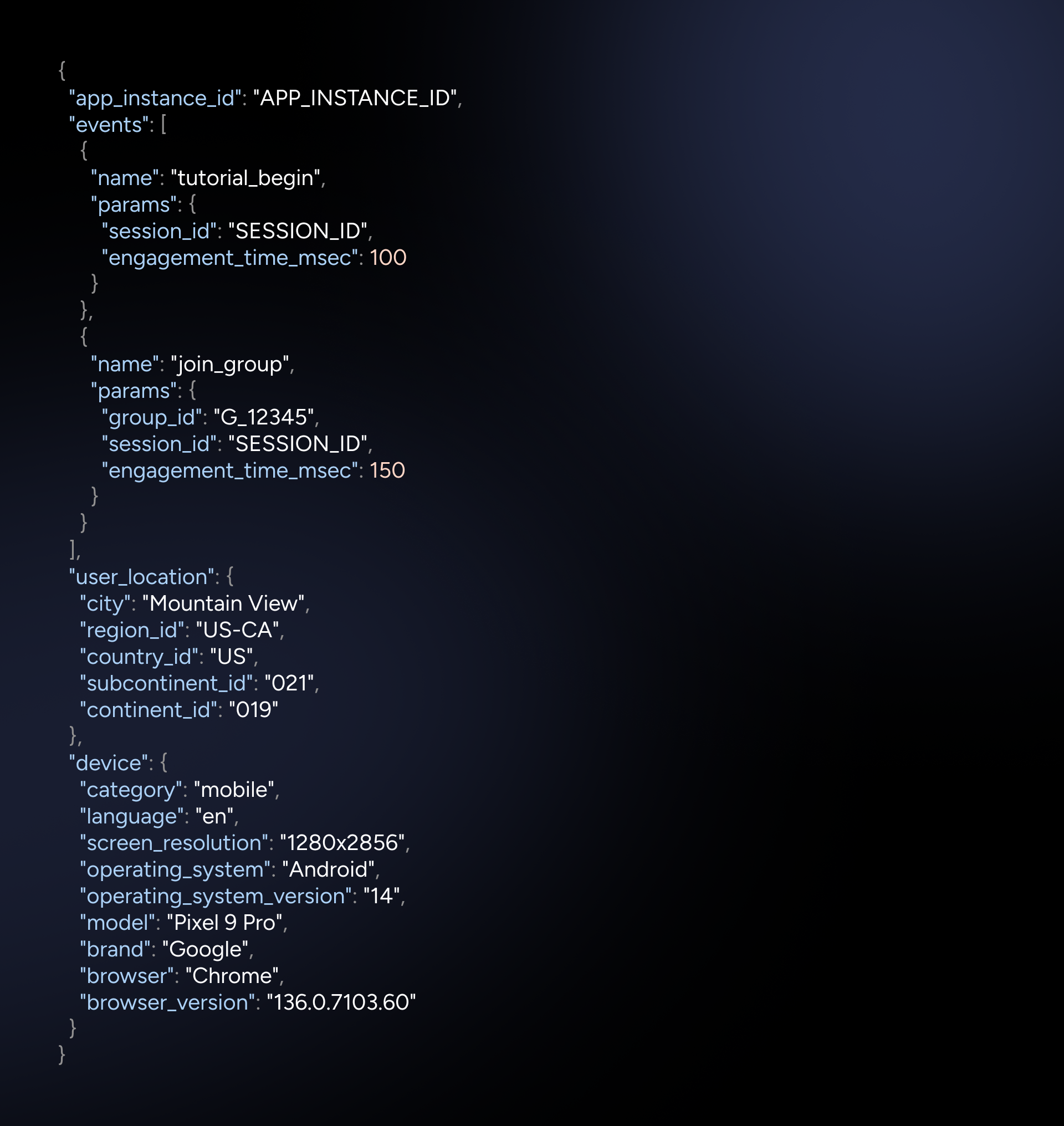
Online tracking is basically a systematic, and of course, undercover collection of users’ online activities, including visited websites, clicked links, and search queries. In other words, trackers can identify your online habits and create a profile for you. For instance, a tracker records that user A from location B with device C spent n minutes on webpage or app D. You can see the detailed info a tracker obtains in each line in the picture below.
First-Party and Third-Party Tracking
First-party tracking is limited to one website. For instance, you look for something on an online shop, and the next time you visit the website again, you can see related items or your incomplete shopping cart. First-party tracking is mainly used for the convenience of the users.
Third-party tracking takes place on a wider scope, meaning that it’s no longer limited to a single website. In this method, trackers like advertising networks follow your tracks across the web for commercial purposes. Third-party trackers can raise privacy concerns.
How to Prevent Online Tracking
Don’t give up yet. You can reclaim your online privacy and block trackers using the following tools.
- Privacy-oriented browsers: DuckDuckGo and Brave. Click for the list of the best private browsers in 2025.
- Anti-tracker extensions: Privacy Badger and uBlock Origin. Click for the list of 23 Best Chrome Extensions To Protect Your Privacy.
- Reputable VPNs: Download HidzoVPN and NordVPN. Click for the list of the 5 best no-log VPNs.
- Private search engines: Startpage and Brave Search.
- DNS and data cleaners: NextDNS and BleachBit.
A Privacy-First VPN for Everyone
A VPN’s main job is to encrypt users’ data and make them invisible to third-party entities. Sounds nice, doesn’t it? What if the VPN provider itself tracks you? This is the reason why you should only use VPN’s with a strict no-log policy.
HidzoVPN is an excellent, fast VPN that puts users’ privacy first. It’s also implemented a Kill Switch feature that continues protecting your privacy even when the connection is unstable. HidzoVPN Premium subscription fee also fits every budget. Just pay $2.99 for pure privacy protection for a month.
5 Common Ways Tracking Happens
Tracking happens in various modalities using different tools. Each of these tools is used to track a specific aspect of a user’s activity, without their direct consent.
1. Cookies But Not the Delicious Kind
Remember those annoying pop-ups asking or sometimes even requiring you to accept them? That’s what we’re talking about. Cookies are small text files that a website stores on your device. These files contain information about login credentials, language settings, and past interactions with that website. Cookies are an instance of first-party trackers, but persistent cookies can track users long enough to share users’ info with advertisers to display relevant ads.
2. Device Fingerprinting
If your solution for tracking via cookies is to reject the cookies and delete the existing ones, you should know that evading trackers isn’t as easy. Device fingerprinting allows trackers to be able to recognize you and continue logging your online activities. even after clearing the cache. Device fingerprinting uses data, such as screen resolution, installed fonts, and browser plugins, to identify users without relying on cookies.
3. Pixel Tags or Beacons
Think of pixel tags (aka beacons) as a transparent and invisible digital layer on your screen. Pixel tags report whatever you tap or click on to the tracker’s server. They track details, such as page views, email opens, and interaction times; it’s like screen recording, only this time the recording is stored on someone else’s hard drive.
4. Your IP Address
Your IP address in the virtual world is tantamount to your ID card in the real world, and it indicates two things: your internet service provider and your approximate location. Trackers use this information to identify regional preferences and deliver location-based content or ads.
Most users are connected to the internet using a dynamic IP that changes whenever they reconnect. For users who request a static IP, trackers can continuously follow their tracks and possibly link online activities to a physical location. Click to learn more about dynamic IP vs static IP.
5. Browsing History to Complete the Puzzle
Your browser history is a map of the routes you follow when you’re online. Visited sites combined with timestamp information can create a vivid image of your online habits. They can use the information to infer your interests and predict your future behavior.
Who Tracks You and Why?
Data brokers like Acxiom, giant advertising companies like Google Ads and Facebook Pixel, as well as social media platforms like X and Meta, are on top of online tracking. Why do they do this? Because information is power. They use the tracking info to deliver targeted and personalized ads to increase engagement and conversion rates.
These companies monetize the collected data by selling user profiles to advertisers. Advertisers use the data to run marketing campaigns, and they pay the trackers using pay-per-click models. These days, with the help of AI, analysis of tracking data can yield precise predictions of users’ behaviors.
How Online Tracking Can Violate Your Privacy
First of all, online tracking is very subtle, and you don’t notice that you’re being tracked. Those long service terms you agree with without reviewing contain paragraphs about your data being used for a better ad experience. These are actually a sugar code for online tracking.
Online tracking can easily turn into a privacy threat. How? If the servers that store tracking data are hacked, users’ sensitive data, such as email addresses and browsing behavior, falls into the wrong hands. The data can be used as pieces of a puzzle that ultimately build a profile. This profile can, in turn, be used to impersonate individuals. In the end, whenever you go online, you’d be as easy to spot as the elephant in the room.
FAQs
Websites track users’ activities via cookies and users’ IP addresses.
Digital footprint refers to all your online activities, including the visited URLs, search queries, social media interactions, and shared content. When put together, the data forms a profile of users’ digital presence and behavior.
A VPN masks your IP address and encrypts your data. This means that even if the VPN doesn’t stop all tracking, the trackers have no way to understand that it’s actually you who’s behaving like this. They have some logs, but they can’t say who they belong to.
Article by
-
 Sam Clarke
Sam is a cybersecurity and online privacy writer dedicated to making complex network protection accessible, practical, and engaging.





Share your thoughts
Add a comment